AudioLDM 2: Learning Holistic Audio Generation with Self-supervised Pretraining
What is AudioLDM 2: Learning Holistic Audio Generation with Self-supervised Pretraining
AudioLDM 2 is a research project that turns text into sound. It can make sound effects, music, and even speech, all from simple prompts.
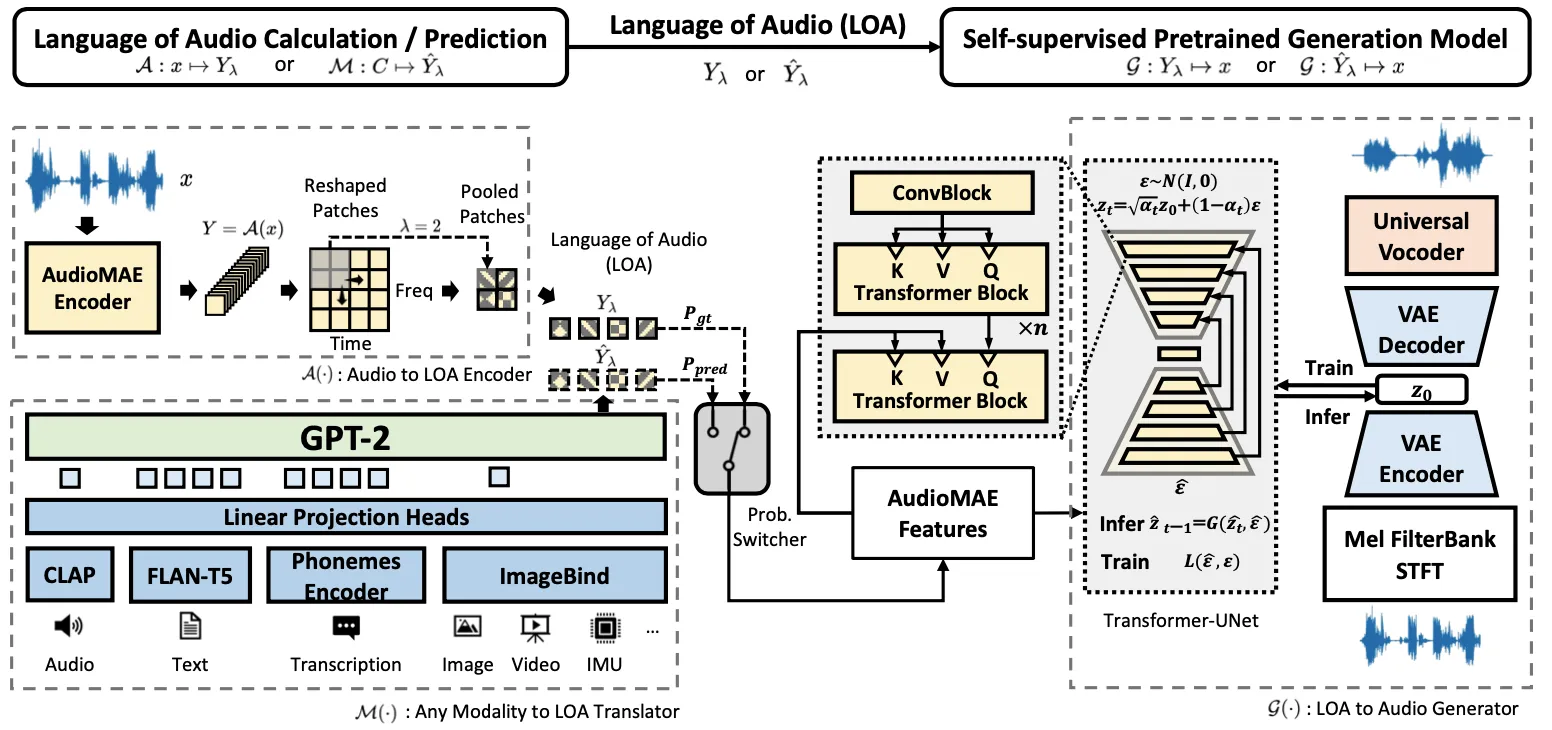
It uses one shared method for many kinds of audio, so you don’t need a different model for each task. The team uses self-supervised learning and a smart “language of audio” to keep results consistent.
If you want a simple intro to this space, check our easy text-to-audio guide.
AudioLDM 2: Learning Holistic Audio Generation with Self-supervised Pretraining Overview
Here’s a quick summary so you know what this project can do and how to try it.
| Item | Details |
|---|---|
| Type | Open-source AI model for audio generation |
| Purpose | Create sounds, music, and speech from text; also supports super resolution inpainting |
| Core idea | A shared “language of audio” that works across many audio types |
| Main features | Text-to-audio, text-to-music, text-to-speech, web app (Gradio), CLI |
| Models/checkpoints | audioldm2-full (default), audioldm_48k, audioldm_16k_crossattn_t5, audioldm2-full-large-1150k, audioldm2-music-665k, audioldm2-speech-gigaspeech, audioldm2-speech-ljspeech |
| Sample rates | 16 kHz and 48 kHz options |
| Devices | cpu, cuda, mps (mps needs about 20 GB RAM) |
| Latest changes | 48 kHz model added; improved 16 kHz model (2023-08-27) |
| Interface | Web app (Gradio) and command line |
| Project URL | https://audioldm.github.io/audioldm2/ |
AudioLDM 2: Learning Holistic Audio Generation with Self-supervised Pretraining Key Features
- One model for many audio types: sound effects, music, and speech.
- Self-supervised pretraining to learn strong audio features without labels.
- “Language of audio” that acts like a shared bridge across tasks.
- Text-to-speech support with LJSpeech and GigaSpeech checkpoints.
- 48 kHz model for high-fidelity output; 16 kHz model for speed and coverage.
- Web app for easy testing; CLI for power users.
- Runs on CPU, CUDA GPU, or Apple MPS (needs around 20 GB RAM on MPS).
- Super resolution inpainting mode is available.
- In-context learning for speech: supply a short sample to set style, then generate the rest.
AudioLDM 2: Learning Holistic Audio Generation with Self-supervised Pretraining Use Cases
- Sound design: Generate sounds for games, apps, or videos from short text.
- Music ideas: Create short music clips from prompts for beats and mood boards.
- Voice lines: Produce short speech clips from a transcription and a speaker style description.
- Prototyping audio: Try many prompts fast and compare outputs.
- Audio fill and repair: Super resolution inpainting for fixing or extending audio.
Working on video tools too? See how fast content comes together in our short read on video generation research.
Performance & Showcases
This project page includes many real examples: text-to-audio, text-to-music, text-to-speech, and even image-to-audio. The team generated lots of audio to show how prompts affect results.
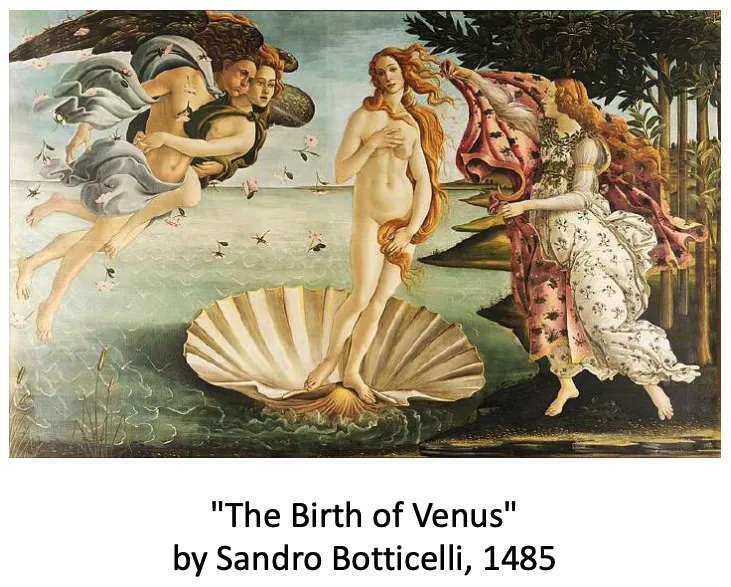
Showcase 1 — A complete, unfiltered pack of text-to-audio outputs 😃 For text-to-audio generation, we generated a total of 350 audio files with prompts (generated by ChatGPT) without cherry-picking. You can download them here.
How AudioLDM 2 Works (Plain-English Tour)
AudioLDM 2 builds a common “language of audio” that many tasks can share. This is learned with self-supervised training, using a model called AudioMAE.
At generation time, the system maps text (or other inputs) into this shared audio space. Then a diffusion model turns that into final sound.
For speech, it can read a short audio sample as context and keep the style for the next part. This is handy for natural-sounding speech with a steady tone.
![[Paper on ArXiv] [Code on GitHub] [HuggingFace Demo] [Discord Community]](/github/audioldm2/paper-on-arxiv-code-on-github-huggingface-demo-discord-community.webp)
Curious about related large models from ByteDance? Take a peek at DPLM-2 for more background.
Installation & Setup (Getting Started)
Below are the exact steps from the official repository. Follow them as-is.
Web APP
- Prepare running environment
conda create -n audioldm python=3.8; conda activate audioldm
pip3 install git+https://github.com/haoheliu/AudioLDM2.git
git clone https://github.com/haoheliu/AudioLDM2; cd AudioLDM2
- Start the web application (powered by Gradio)
python3 app.py
- A link will be printed out. Click the link to open the browser and play.
Commandline Usage
Installation
Prepare running environment
# Optional
conda create -n audioldm python=3.8; conda activate audioldm
# Install AudioLDM
pip3 install git+https://github.com/haoheliu/AudioLDM2.git
If you plan to play around with text-to-speech generation. Please also make sure you have installed espeak. On linux you can do it by
sudo apt-get install espeak
Run the model in commandline
- Generate sound effect or Music based on a text prompt
audioldm2 -t "Musical constellations twinkling in the night sky, forming a cosmic melody."
- Generate sound effect or music based on a list of text
audioldm2 -tl batch.lst
- Generate speech based on (1) the transcription and (2) the description of the speaker
audioldm2 -t "A female reporter is speaking full of emotion" --transcription "Wish you have a good day"

audioldm2 -t "A female reporter is speaking" --transcription "Wish you have a good day"
Text-to-Speech use the audioldm2-speech-gigaspeech checkpoint by default. If you like to run TTS with LJSpeech pretrained checkpoint, simply set --model_name audioldm2-speech-ljspeech.
Random Seed Matters
Sometimes model may not perform well (sounds weird or low quality) when changing into a different hardware. In this case, please adjust the random seed and find the optimal one for your hardware.
audioldm2 --seed 1234 -t "Musical constellations twinkling in the night sky, forming a cosmic melody."
Pretrained Models
You can choose model checkpoint by setting up "model_name":
# CUDA
audioldm2 --model_name "audioldm2-full" --device cuda -t "Musical constellations twinkling in the night sky, forming a cosmic melody."

# MPS
audioldm2 --model_name "audioldm2-full" --device mps -t "Musical constellations twinkling in the night sky, forming a cosmic melody."
We have five checkpoints you can choose:
- audioldm2-full (default): Generate both sound effect and music generation with the AudioLDM2 architecture.
- audioldm_48k: This checkpoint can generate high fidelity sound effect and music.
- audioldm_16k_crossattn_t5: The improved version of AudioLDM 1.0.
- audioldm2-full-large-1150k: Larger version of audioldm2-full.
- audioldm2-music-665k: Music generation.
- audioldm2-speech-gigaspeech (default for TTS): Text-to-Speech, trained on GigaSpeech Dataset.
- audioldm2-speech-ljspeech: Text-to-Speech, trained on LJSpeech Dataset.
We currently support 3 devices:
- cpu
- cuda
- mps ( Notice that the computation requires about 20GB of RAM. )
Other options
 usage: audioldm2 [-h] [-t TEXT] [-tl TEXT_LIST] [-s SAVE_PATH]
 [--model_name {audioldm_48k, audioldm_16k_crossattn_t5, audioldm2-full,audioldm2-music-665k,audioldm2-full-large-1150k,audioldm2-speech-ljspeech,audioldm2-speech-gigaspeech}] [-d DEVICE]
 [-b BATCHSIZE] [--ddim_steps DDIM_STEPS] [-gs GUIDANCE_SCALE] [-n N_CANDIDATE_GEN_PER_TEXT]
 [--seed SEED] [--mode {generation, sr_inpainting}] [-f FILE_PATH]

 optional arguments:
 -h, --help show this help message and exit
 --mode {generation,sr_inpainting}
 generation: text-to-audio generation; s
The Technology Behind It (Simple Notes)
- AudioMAE learns audio features without labels. This helps the model understand many sounds.
- A GPT-2 style module maps text into the shared audio space.
- A latent diffusion model then turns that into final waveforms.
This pipeline makes it easy to reuse parts for new tasks. It also supports style control for speech.
Tips for Best Results
- If output sounds off, try a different seed with the --seed flag.
- Pick the 48 kHz checkpoint for higher detail, or 16 kHz for speed.
- On Apple silicon (MPS), keep enough RAM free (about 20 GB is suggested).
- For TTS, install espeak on Linux as shown above.
FAQ
How long are the audio clips?
Most demos show short clips, often around 10 seconds. The team listed “longer audio (> 10s)” as a future item, so current clips are generally short.
Do I need a GPU?
You can run on CPU, but it will be slow. For faster runs, use a CUDA GPU or Apple MPS.
Can I make both music and sound effects?
Yes. Use the same audioldm2 command and change your prompt. You can also pick a music-focused checkpoint for stronger results on music.
Image source: AudioLDM 2: Learning Holistic Audio Generation with Self-supervised Pretraining