WildDoc: Bridging the Gap in Real-World Document Understanding
What is WildDoc: Bridging the Gap in Real-World Document Understanding
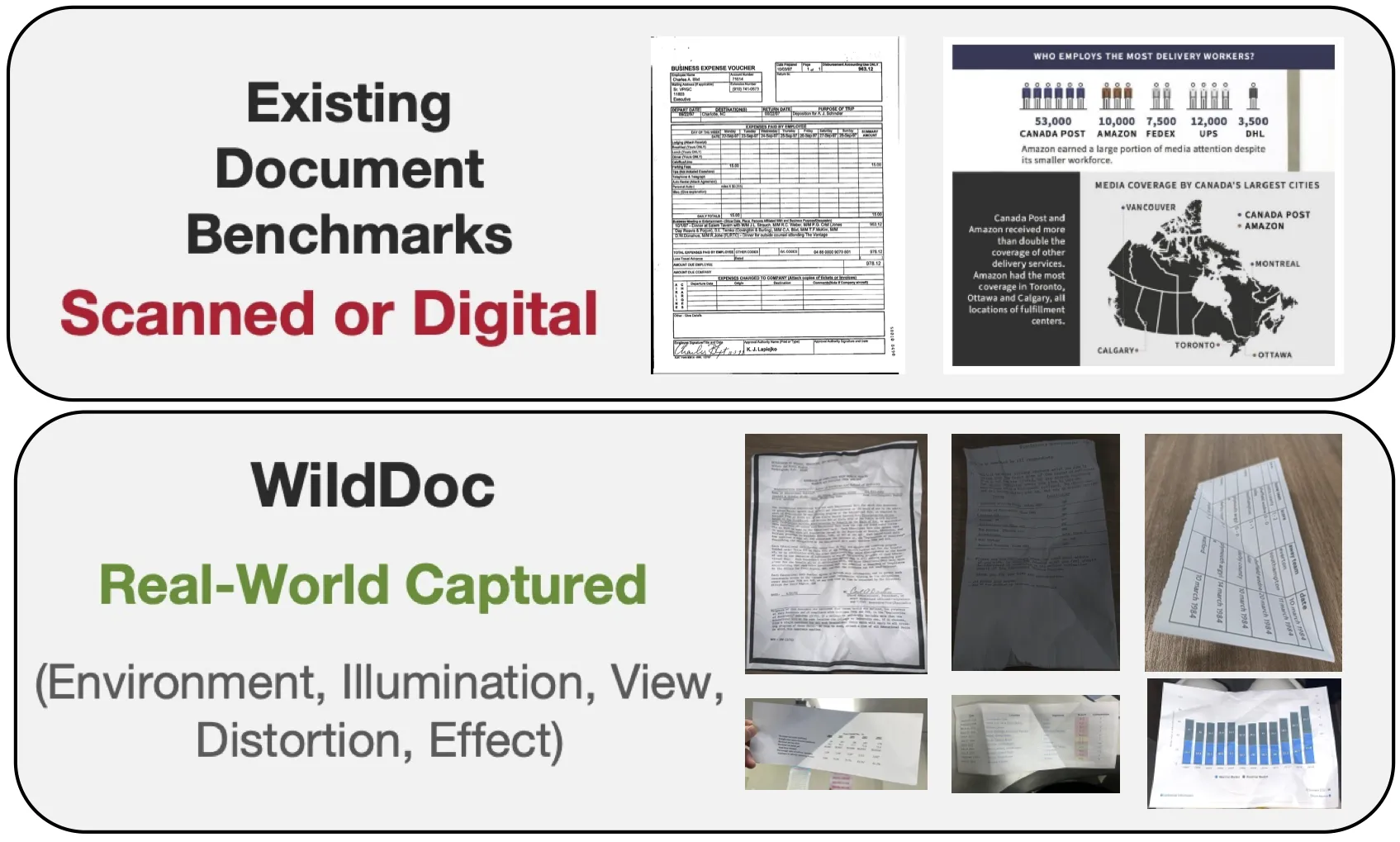
WildDoc is a public test set that checks how well AI models read and understand real photos of documents. These photos are taken in daily settings, like on a desk, under different lights, with phone angles, and even light blur. The goal is simple: can a model still read and answer questions about a document when the photo is not perfect?
This project is built by the team at ByteDance and shared with the research community. It adds a fresh way to test “document understanding” for AI models that process both text and images. To see more work from the company, visit our ByteDance hub.
WildDoc: Bridging the Gap in Real-World Document Understanding Overview
Here is a quick summary of what WildDoc offers and how you can use it.
| Item | Details |
|---|---|
| Type | Benchmark + Dataset for document understanding in the real world |
| Purpose | Test if AI models can read and understand photos of documents taken in daily settings |
| Who It’s For | AI engineers, researchers, product teams working on document AI |
| Main Features | Real photos (not just clean scans), 4 captures per document, new robustness metric, ready-to-use dataset, leaderboard |
| Data Source | Mix of real photos linked to known document QA sources (e.g., forms, charts, tables) |
| Capture Plan | Each document is photographed 4 times under different conditions |
| Evaluation | Strongly recommended to use VLMEvalKit |
| Dataset Access | Available on Hugging Face |
| Key Updates | 2025-05-16: Launch; 2025-05-19: Supported in VLMEvalKit |
| Notable Results | Doubao-1.5-thinking-VL leads overall; Qwen2.5-VL leads among open-source models |
For a quick, human-friendly wrap-up of the project, see our short notes on WildDoc highlights.
WildDoc: Bridging the Gap in Real-World Document Understanding Key Features
- Real-world photos only. The dataset focuses on documents captured by hand in the wild.
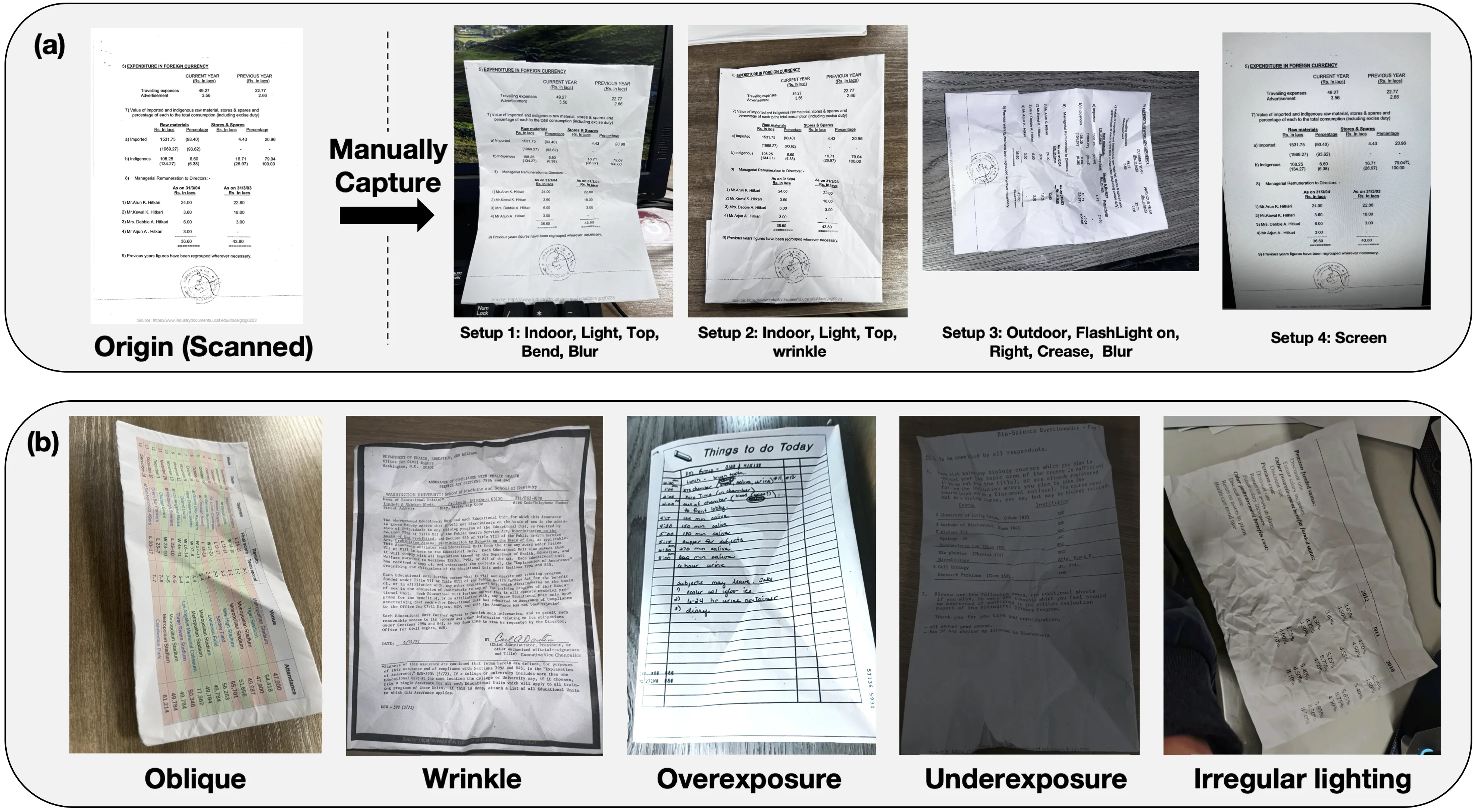
- Four photos per document. Each one has a different setup, like angle or lighting.
- A new robustness score. It checks if a model stays consistent across all four photos.
- Wide model testing. Both open-source and closed-source models are compared.
- Simple to adopt. It plugs into VLMEvalKit and is on Hugging Face.
WildDoc: Bridging the Gap in Real-World Document Understanding Use Cases
- Test your multimodal model on real photos of documents before launch.
- Compare model choices for tasks like forms, charts, and tables.
- Study where models fail: glare, blur, small text, odd layouts, or low light.
- Build internal QA checks for doc-reading tools, scanners, and phone apps.
- Teach teams why real-world photos are hard and how to spot weak spots.
If you want more simple explainers like this, visit our home at Omnihuman 1.Com.
Installation & Setup (Getting Started)
You can start with the Hugging Face data loader. This gives you direct access to the dataset.
Exact code from the authors:
from datasets import load_dataset
dataset = load_dataset("ByteDance/WildDoc")
To evaluate your model, the authors highly recommend using VLMEvalKit.
If you run your own evaluation and get a result file, compute the final metrics with this exact command:
python3 calculate_metric.py --eval_file "Your output file"
Tips:
- The authors provide an example output Excel for Qwen2.5-VL-72B-Instruct in the results folder of the repo.
- To add your score to the leaderboard, email wanganlan@bytedance.com or tangjingqun@bytedance.com with your results and details.
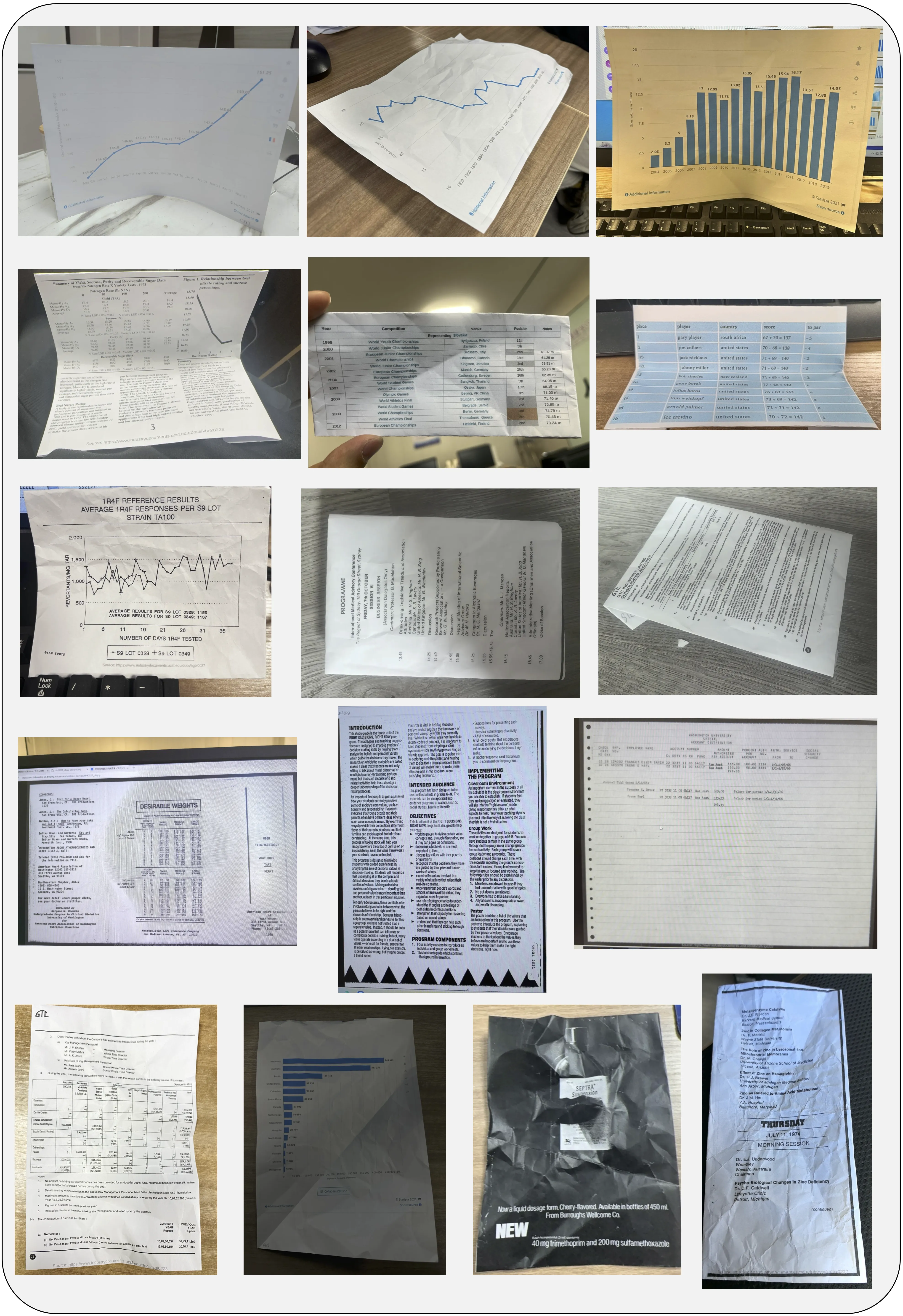
How WildDoc Works
- The team collects real photos of documents using phones and other handy setups.
- Each document is captured four times in different conditions to test stability.
- Models answer questions about each photo. The new score checks both accuracy and consistency across all four captures.
Performance & Showcases
The team ran many popular models on WildDoc, including general models like Qwen2.5-VL and leading closed models. Results show a clear drop in accuracy when moving from clean inputs to real photos. This shows that many models need stronger handling of blur, glare, angles, and small text.
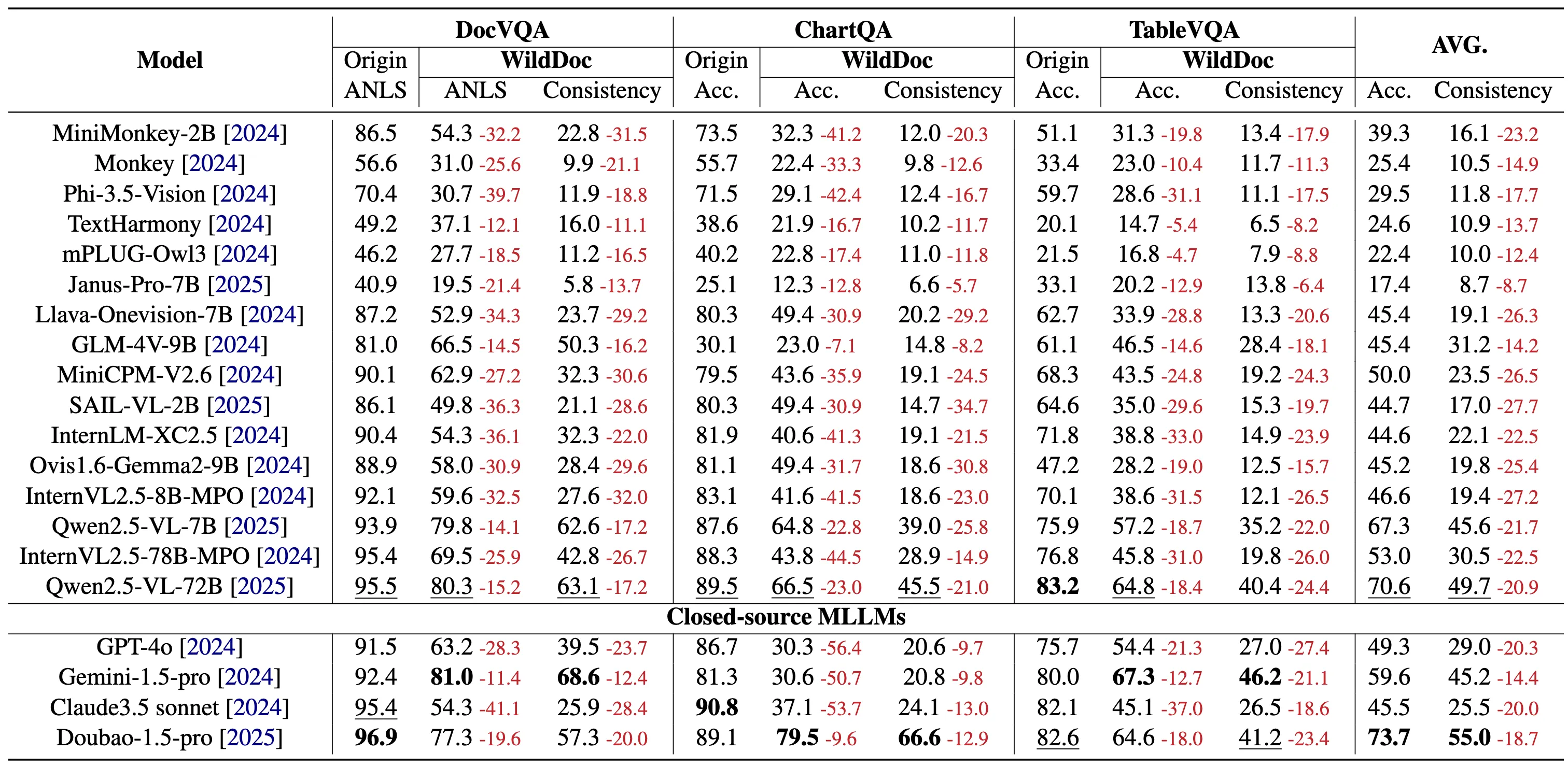
Across different parts of the dataset, all models drop in score, and the drop is not the same for each subset. GPT-4o shows a large drop in one subset, which highlights the test’s toughness. Doubao-1.5-thinking-VL leads overall, and Qwen2.5-VL leads among open models.
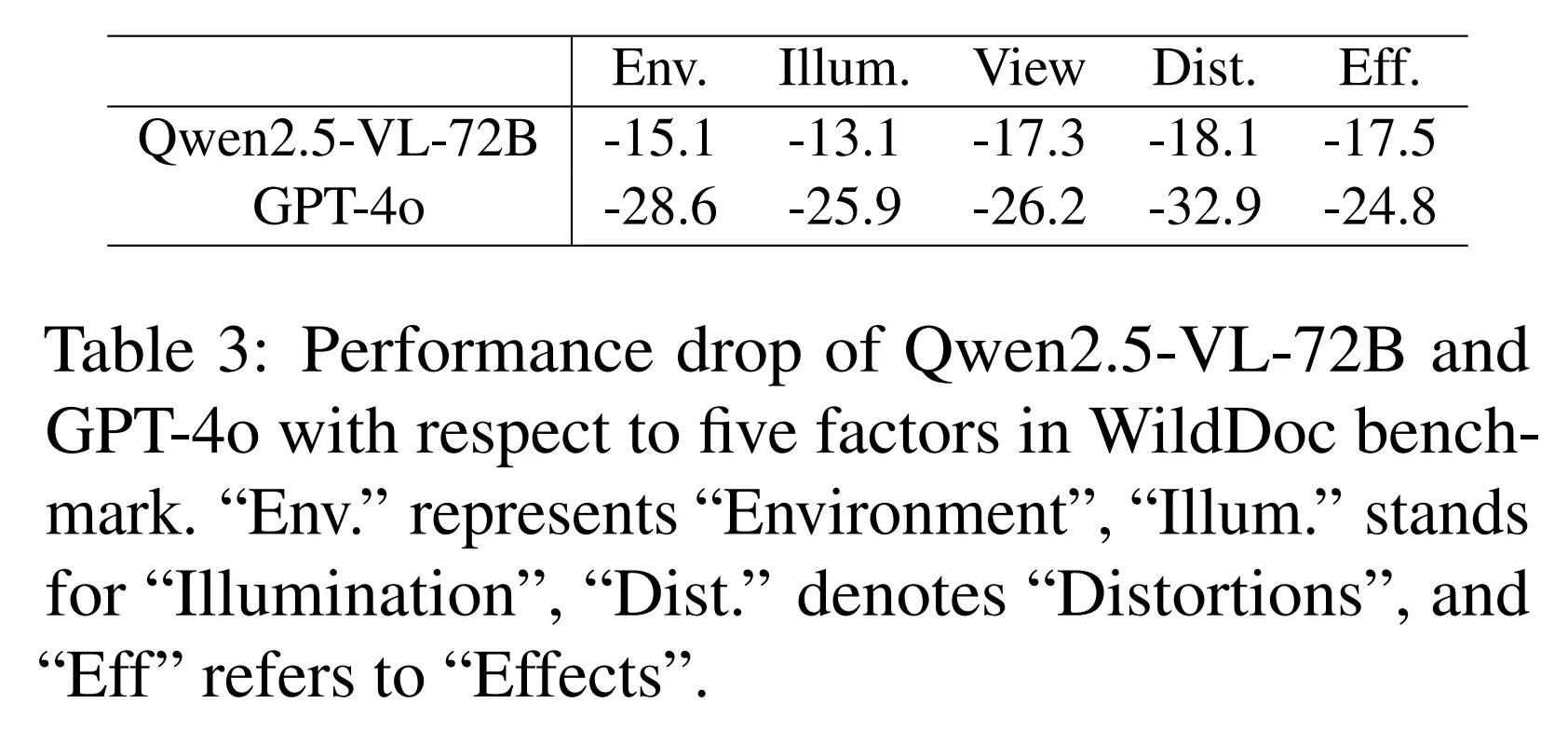
The Technology Behind It
WildDoc is a benchmark, which means it is a fair test to compare models. It brings questions about documents like forms, charts, and tables, and pairs them with real photos. The strength is the focus on daily photo issues that we see in real life, not just clean files.
Practical Tips for Teams
- Start with the Hugging Face loader to explore samples and questions.
- Use VLMEvalKit to keep your test setup the same as the authors.
- Look for weak spots by grouping fails: tiny text, curved pages, glare, or odd layouts.
- Track both raw accuracy and the new consistency idea across the four captures.
FAQ
What makes WildDoc different?
WildDoc uses real photos of documents, captured under common day-to-day conditions. This helps you see how a model holds up when the input is not perfect.
How many photos do you have per document?
There are four photos per document. Each one is taken in a different way to test consistency and strength.
Can I use this for my research or product tests?
Yes. It is public, easy to load, and works well with VLMEvalKit. You can also email the team to list your score on the leaderboard.
How do I add my model to the leaderboard?
Run your tests and compute metrics with the provided script. Then email your results to the team at wanganlan@bytedance.com or tangjingqun@bytedance.com.
Image source: WildDoc: Bridging the Gap in Real-World Document Understanding (https://bytedance.github.io/WildDoc/)