VideoAuteur: Towards Long Narrative Video Generation
What is VideoAuteur: Towards Long Narrative Video Generation
VideoAuteur is a research project that turns a long text story into a full video made of connected clips. It aims to keep the story flowing over time, so the scenes feel related and the actions make sense from start to finish.
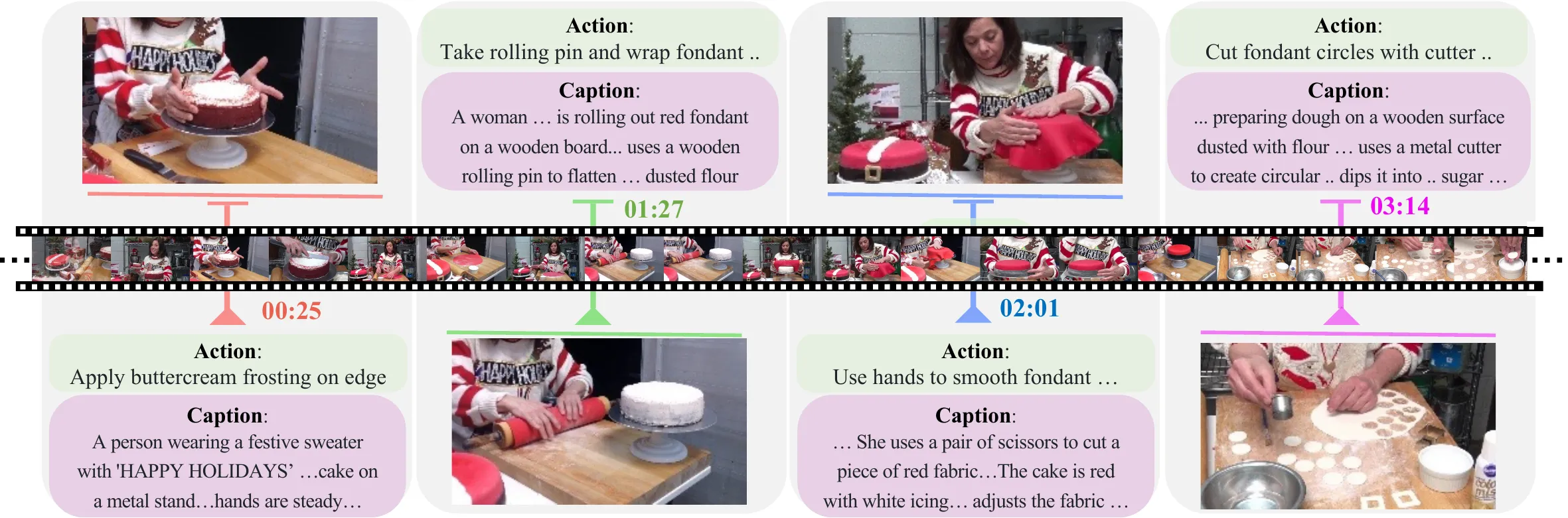
It is built for topics like cooking and product ads, where steps or scenes need to follow a clear order. The team also built a special dataset called CookGen to train and test long videos with strong text labels.
VideoAuteur: Towards Long Narrative Video Generation Overview
Here is a quick view of what this project does and why it matters.
| Item | Detail |
|---|---|
| Type | Research project for long narrative video generation |
| Purpose | Turn a full story (like a recipe or ad script) into a longer, connected video |
| Inputs | Text storylines; optional reference images or short clips |
| Outputs | 30–150 second videos, often split into 4–12 clips |
| Core modules | Long Narrative Video Director; -Conditioned Generation |
| Dataset | CookGen (from Howto100M and YouCook2) with actions and captions created using GPT-4 and a finetuned video captioner |
| Target content | Cooking, product ads, how-to videos, story previews |
| Demos | Tesla Car Product Video; multiple “How to cook Fried Chicken?” runs |
| Project site | https://videoauteur.github.io/ |
| Status | Research preview and demos available |
If you want a simple primer on this space, see our short guide to text to video.
VideoAuteur: Towards Long Narrative Video Generation Key Features
-
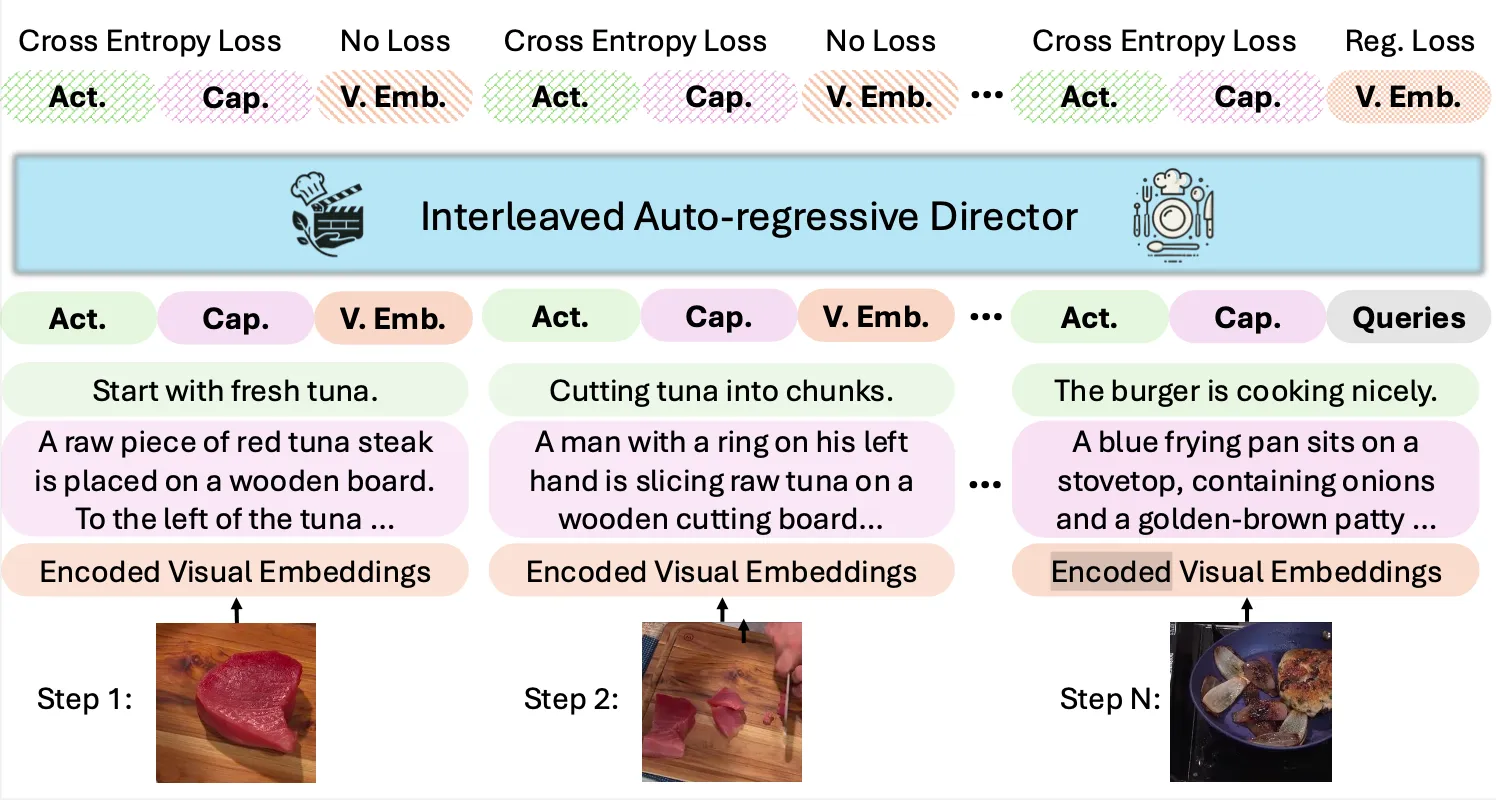
Long Narrative Video Director: Plans a video as a sequence of beats. It builds a timeline with captions and actions that guide what each clip should show.
-
-Conditioned Generation: Can take text plus optional images or frames as hints. This helps keep people, tools, or scenes consistent across clips.
-
Interleaved action and caption planning: The model writes short “actions” (what happens) and longer “captions” (scene detail) that line up with the video. This keeps the story on track from clip to clip.
-
CookGen Dataset: A focused cooking dataset with long videos broken into labeled clips. This supports skills like step-by-step planning, timing, and smooth scene changes.
-
Multi-clip flow: Videos are produced as ordered clips, so the story has a start, middle, and end. This is helpful for tutorials, ads, and lessons.
-
Rich text grounding: Detailed text at both action and caption levels adds context. This helps the model stay faithful to the script.
For a related approach to long sequences, you might enjoy our write-up on long context video research.
VideoAuteur: Towards Long Narrative Video Generation Use Cases
- Cooking and recipes: Turn a full recipe into a video with clear steps, timings, and scene changes.
- Product ads: Write a simple script and produce a product story with shots, motions, and clean pacing.
- How-to content: Break any task into stages and auto-generate a tutorial video.
- Education: Create lesson videos with chapters, keeping structure simple and easy to follow.
- Story previews: Turn a short story or outline into a quick scene reel for planning.
If you want to compare with another system, see our note on ByteDance’s Goku video project.
Performance & Showcases
Showcase 1 — Tesla Car Product Video This “Tesla Car Product Video” demo shows a fully AI-produced ad from storyline to clips. Editing used CapCut for pacing, with only audio and a logo added by hand, and the whole touch-up took about 30 minutes.
Showcase 2 — How to cook Fried Chicken? “How to cook Fried Chicken?” shows a step-by-step cooking flow with actions and captions guiding each clip. It highlights how the model keeps the cooking process in order.
Showcase 3 — How to cook Fried Chicken? “How to cook Fried Chicken?” demonstrates repeated runs of the same idea with small style and timing changes. This shows stability across multiple generations.
Showcase 4 — How to cook Fried Chicken? “How to cook Fried Chicken?” focuses on clear stage transitions like prep, cook, and plate. It keeps the narrative moving with short, connected clips.
Showcase 5 — How to cook Fried Chicken? “How to cook Fried Chicken?” offers another pass with solid clip order and simple scene detail. It shows how well the model sticks to kitchen tasks.
Showcase 6 — How to cook Fried Chicken? “How to cook Fried Chicken?” highlights consistency over multiple clips for a full recipe. It is a good example of long video planning for cooking content.
How It Works
The system reads a text input and plans the story as a chain of clips. Each clip has an action (what happens) and a caption (scene detail).
It can also take images or clip hints to keep key items and looks the same over time. This is useful for a chef’s hands, tools, or a car’s style.
The Technology Behind It
VideoAuteur uses an interleaved, step-by-step generator. It writes captions, actions, and “ states” in order, so all parts agree.
This planning-first approach keeps the long video on track. It reduces drift across scenes and helps with story flow.
CookGen Dataset
CookGen is a curated set of cooking videos built for long stories on video. Each source video is cut into clips and matched with labeled “actions,” plus high-quality captions.
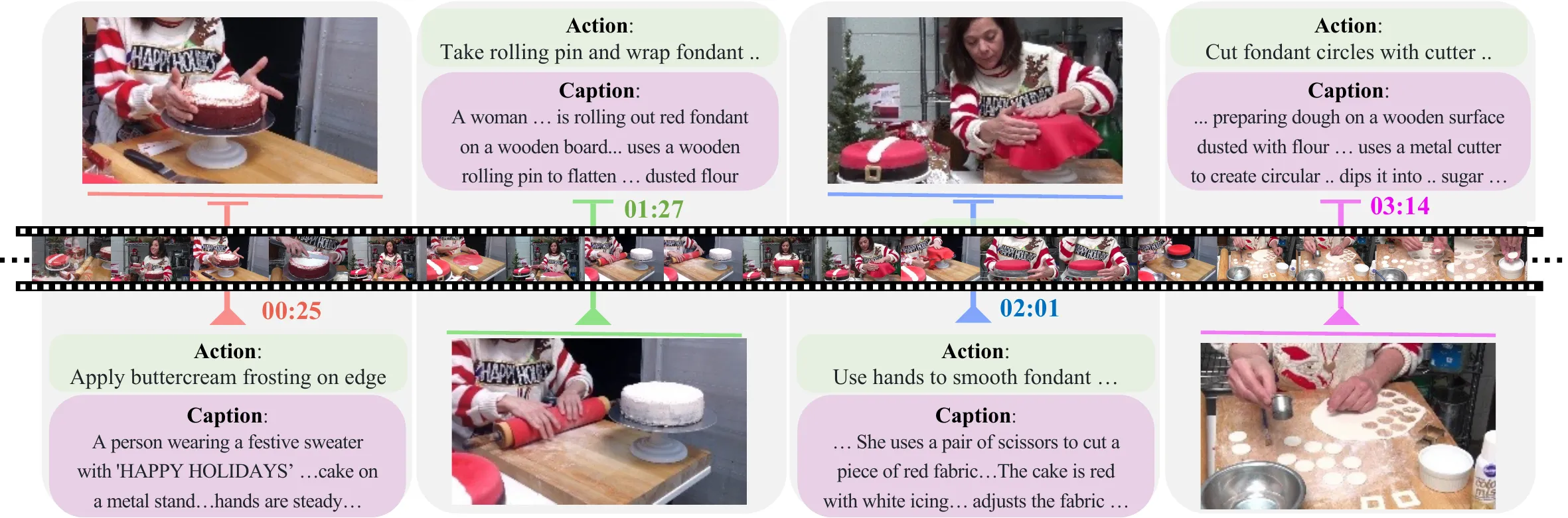
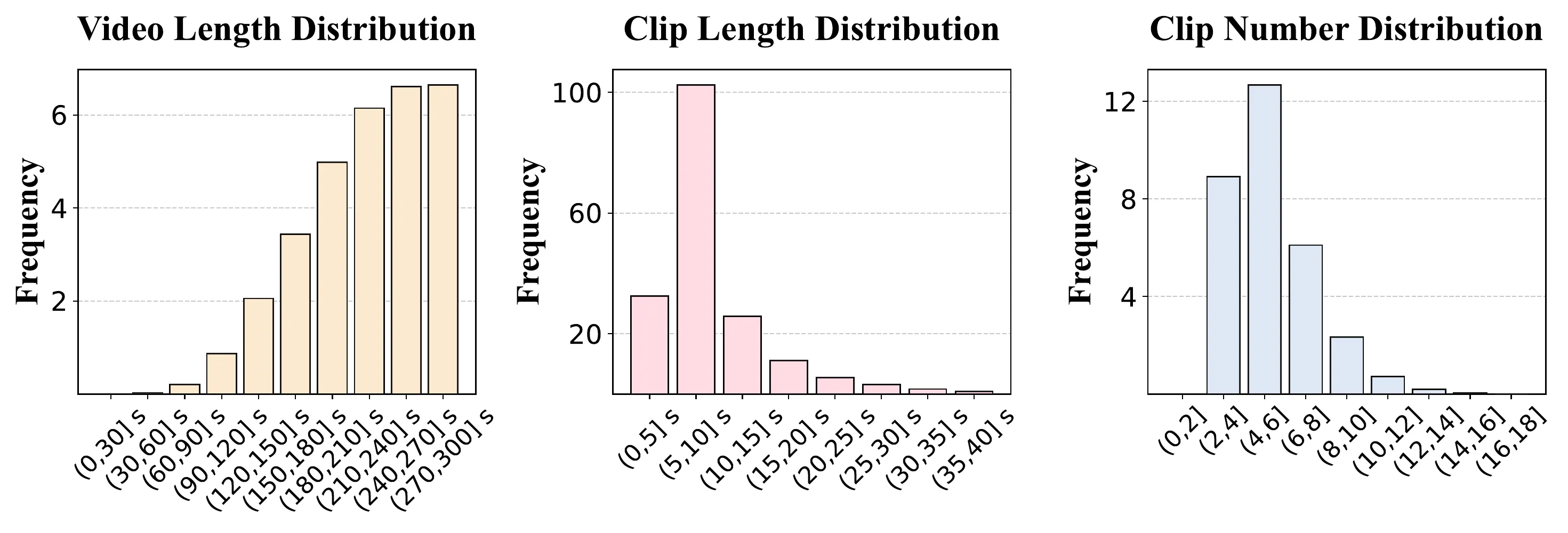
Videos run 30–150 seconds, and each is split into 4–12 clips of 5–30 seconds. This spread makes it easier to learn pacing and order.
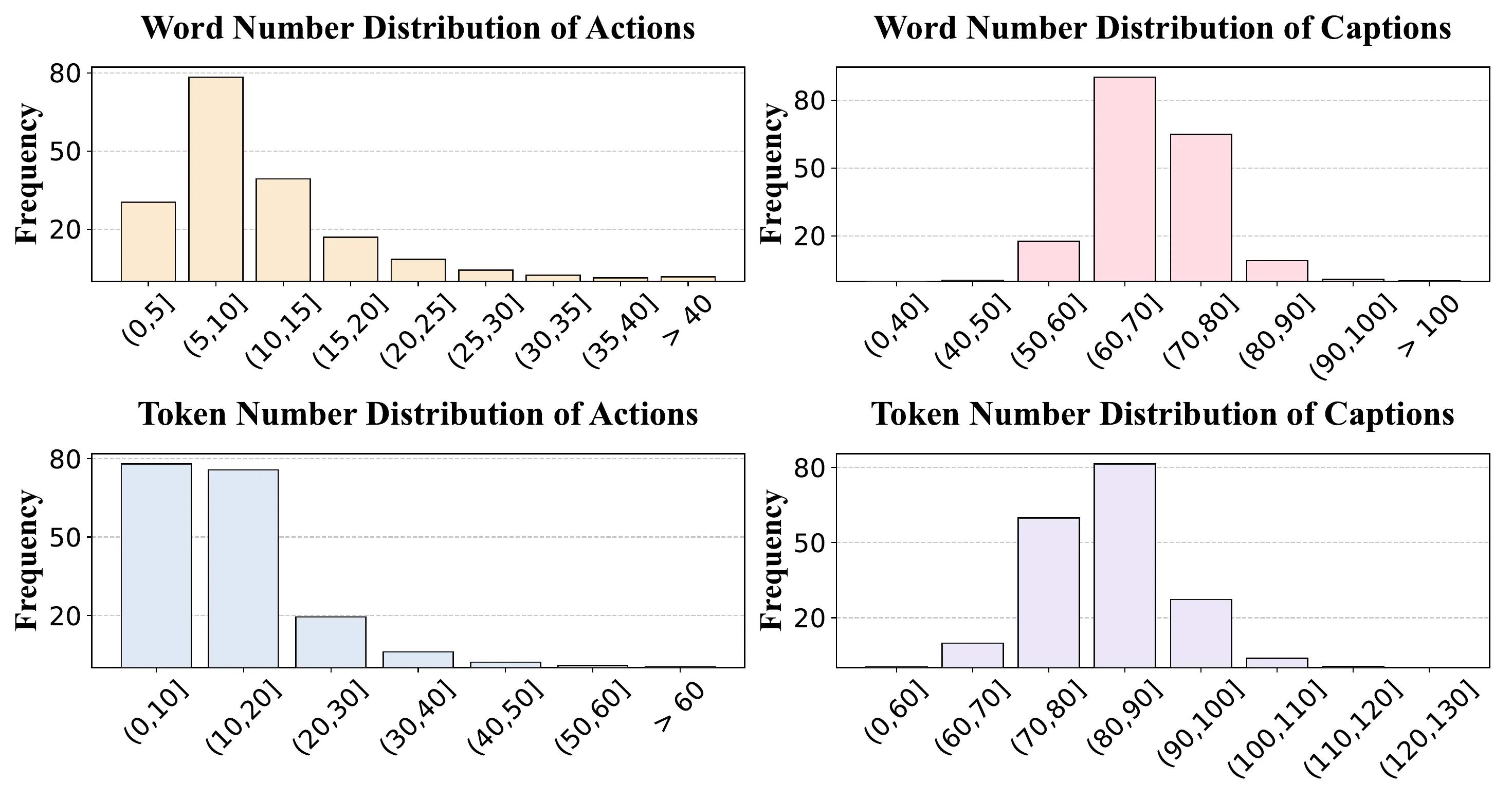
Text labels are rich: actions are 10–25 words; captions are 40–70 words. Token counts range to capture fine detail for both short and longer text.
If you are comparing tools and trends, our quick note on text-to-video methods gives more background.
Installation & Setup
The team has not shared public install steps or a runnable code package yet. To explore the work, watch the demos and read the project notes on the website: https://videoauteur.github.io/.
When code or a Colab becomes available, we will update this section with exact commands and steps.
Getting Started: Try The Demos
- Step 1: Visit the project site and watch the “Tesla Car Product Video” and cooking demos.
- Step 2: Note how the story is split into clips with actions and captions.
- Step 3: Draft your own short script (3–5 beats) and think about what each clip should show.
Tips for Writing Good Prompts
- Keep the story simple and in order. Use short steps like “prep,” “cook,” and “serve.”
- Add key objects and places. Name tools, food items, and the setting.
- Keep timing hints short. Say “close-up” or “wide shot” only if it matters.
FAQs
What makes VideoAuteur different?
It aims at longer, story-like videos, not just short clips. It plans actions and captions for each step to keep the flow.
What is CookGen and why is it special?
CookGen is a dataset of cooking videos with clip-level actions and captions. It helps the model learn step-by-step cooking videos that follow a clear order.
How long are the videos?
Videos are typically 30–150 seconds. They are split into 4–12 clips, each 5–30 seconds.
Can I use my own images as hints?
The system is designed to accept hints for consistency. This helps keep people, tools, or scenes the same across clips.
Is there code I can run today?
Not yet. The project page shares demos; public install steps have not been posted.
Where can I learn more about long video planning?
Check our overview on long context video research for more ideas on handling longer inputs.
Image source: VideoAuteur: Towards Long Narrative Video Generation