Long Context Tuning for Video Generation
What is Long Context Tuning for Video Generation
Long Context Tuning (LCT) is a method that helps a video model plan and generate a whole scene, not just one short clip. It lets the model keep track of who is in the scene, where they are, and how the story flows across many shots.
It builds on a strong single-shot video model and teaches it to remember context across the full scene. With this, you can direct a multi-shot story, keep a single shot going for minutes, and even mix a person’s face with a new background to get a new video.
The team behind this work includes researchers from The Chinese University of Hong Kong and ByteDance. The demos show long stories that move from a forest, to an old house, and then inside that house, with the same people holding their look and actions from shot to shot.
Long Context Tuning for Video Generation Overview
Here is a quick overview of the project, what it does, and what makes it special.
| Key | Details |
|---|---|
| Project Name | Long Context Tuning for Video Generation (LCT) |
| Type | Research project for scene-level video generation |
| Purpose | Create multi-shot videos with steady story flow and look across shots |
| Main Features | Interactive multi-shot directing, single-shot extension to minutes, compositional video, conditioning, scene interpolation |
| Model Base | MMDiT-based single-shot video diffusion model (internal, ~3B parameters reported in paper) |
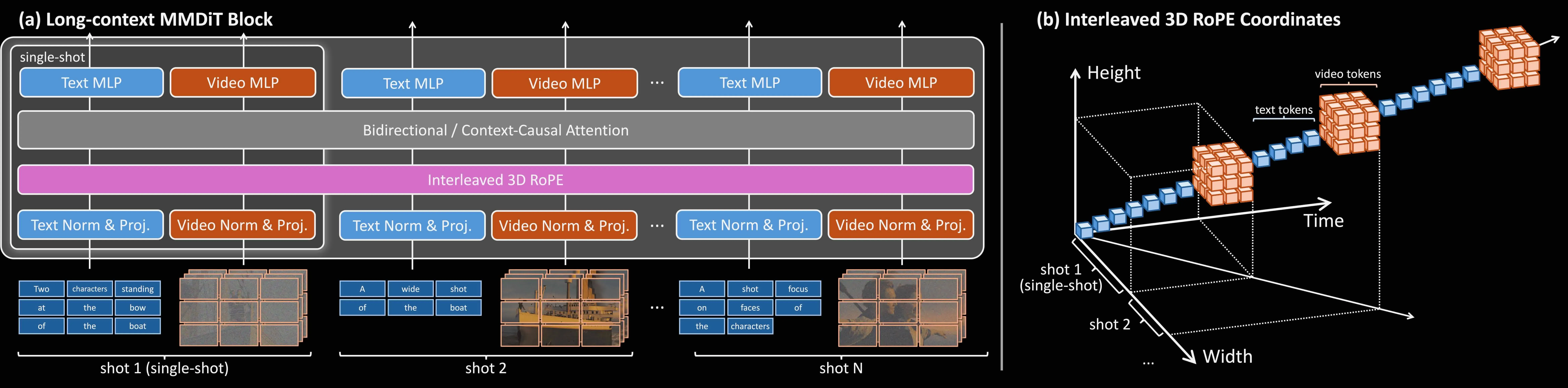
| Core Idea | Expand the context window from one shot to the whole scene; add simple timing and order cues so the model knows how shots connect |
| Key Techniques | Interleaved 3D RoPE for shot order, asynchronous diffusion timesteps for clean conditioning, context-causal setup with KV-cache for faster auto-regressive shots |
| Inputs | Text prompts, identity image(s), environment image(s), prior shots |
| Outputs | Multi-shot stories, long single shots, and composed videos that mix identity and scene |
| Authors | Yuwei Guo, Ceyuan Yang (†), Ziyan Yang, Zhibei Ma, Zhijie Lin, Zhenheng Yang, Dahua Lin, Lu Jiang |
| Project Page | LCT Project Page |
| Code/Weights | Public code is not listed on the page at the time of writing; see project page for updates |
For a friendly primer on long-context ideas in video, see our short explainer: how long context video works.
Long Context Tuning for Video Generation Key Features
-
Scene-level memory: The model sees a full scene as a sequence of shots and keeps people, places, and story flow steady across them.
-
Interactive multi-shot directing: You can guide the next shot based on what was already made, step by step, with quick feedback.
-
Single-shot extension: Take one shot and keep it going to minute-long duration in 10-second blocks while staying on topic.
-
Compositional video: Give one identity image and one environment image to get a new video that blends both parts well.
-
conditioning: Use outside images or videos to lock in a face, a costume, or a place, then generate new shots around them.
-
Scene interpolation: Provide the first shot and the last shot, and generate the middle shots that connect them.
-
Faster multi-shot runs: A context-causal setup with a KV-cache speeds up step-by-step shot creation.
-
Works across themes: From people in a café to nature scenes like a coral reef, it adapts well to different content.
Long Context Tuning for Video Generation Use Cases
-
Indie filmmakers and small studios can plan storyboards and pre-ize long scenes with steady characters and settings.
-
Ad teams can keep brand look across many cuts, while trying new backgrounds and camera moves.
-
Educators and creators can build longer explainers, nature tours, or story chapters, with less manual stitching.
-
Story writers can direct the tale shot-by-shot, making edits as they see the result.
-
Social video teams can keep a face or style steady over many clips in one session.
-
R&D groups can test long-context training ideas in a clear, scene-focused setup.
The Technology Behind It
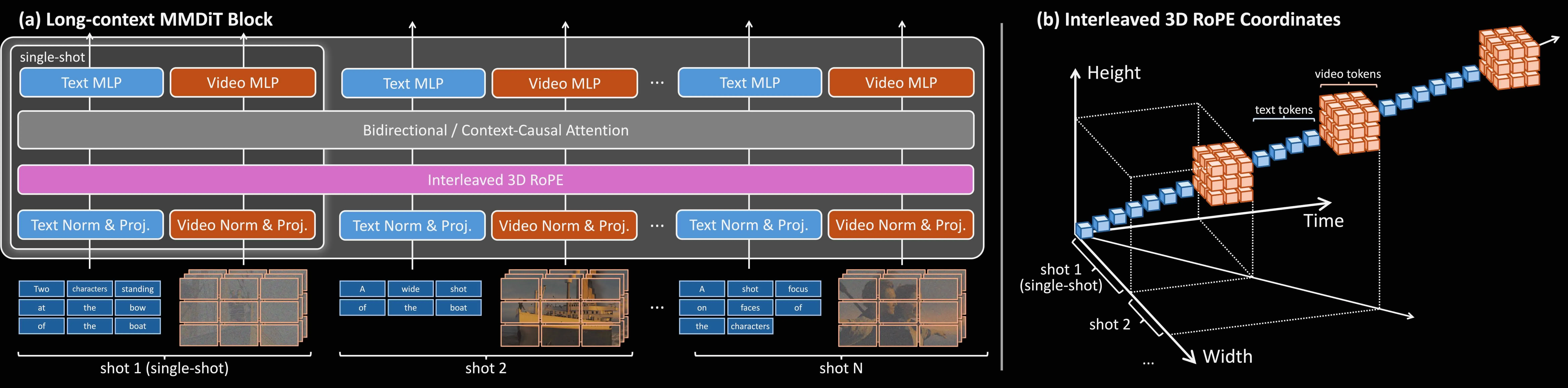
At its core, LCT turns a single-shot model into a scene model. It expands the model’s “context window” from one clip to the whole scene, so all shots can “see” what came before without adding extra model parameters.
To help the model know shot order and timing, it uses interleaved 3D Rotary Position Embedding (RoPE). It also trains with asynchronous diffusion timesteps so that conditions (like identity or environment images) and samples align better.
For speed, it supports a context-causal setup with a KV-cache. This lets the model generate shots one after another more efficiently.
Interactive Story Development
You can grow a scene one shot at a time. Start from shot 1, review it, write a short prompt for shot 2, and keep going until your story is done.
This fits a real production flow where choices happen step by step. You get fast feedback at each step and can change the next shot based on the last one.

Extend a Single Shot
If you have a strong single shot, you can keep it going. The model adds 10-second segments to the same shot and keeps the look steady.
This is helpful for long takes, walks, or smooth camera moves that you want to keep in one piece.

Compositional Generation
You can give the model an identity image (for the person) and an environment image (for the place). It makes a new video that blends both in a steady way.
You can even swap a new identity later and continue the story. This is handy for casting and scene testing.
For a broader view on text-driven tools, see our short guide on text to video basics.
Performance & Showcases
Showcase 1 — 0:00 / 0:00 This is the main reel for the project and shows the method in action across many scenes and shots. Watch how the look of the people and places stays steady over time. Label: 0:00 / 0:00
Showcase 2 — Interactively directing a multi-shot story This clip shows how you can guide a story one shot at a time. It highlights “Interactively directing a multi-shot story” with quick edits between prompts and results.
Showcase 3 — Extending a single-shot video to minute-long duration Here you see one shot kept alive for much longer by adding 10-second parts. It is “Extending a single-shot video to minute-long duration” while holding a steady look and motion.
Showcase 4 — Composed Video This is a “Composed Video” that blends an identity image with an environment image. Notice how the person and the place fit together across the clip.
Showcase 5 — Composed Video Another “Composed Video” example that continues the idea above. The scene holds together with clear details carried from the input images.
Showcase 6 — Composed Video A third “Composed Video” sample that shows stable faces and background layout. It keeps the feel of the given identity and environment while moving the story forward.
Getting Started
- Watch the demos and read the paper on the project page.
- Prepare short, clear prompts for each shot. Keep the same names for people and places across shots to help the model stay steady.
- If you plan to compose identity and environment, collect clean images with clear faces and tidy backgrounds.
Public code or install steps are not listed on the page at the time of writing. Please check the project page for updates on releases.
For another research direction on video creation from ByteDance, see this related work overview: a different video generation approach.
Workflow Tips
-
Start with a simple outline: who, where, what happens first, what happens next.
-
Use small, focused prompts per shot: one camera angle, one action, one mood.
-
Reuse key words (names, outfit, place) so the model keeps them the same.
-
For composition, pick a sharp identity photo and a clear environment photo.
-
When extending a single shot, describe motion in short steps (for example: “keeps walking forward,” “turns head left,” “smiles”).
Limitations & What to Expect
- Very long scenes can still drift if prompts are unclear. Keep prompts short and steady.
- Results may vary by topic or style. Try 2–3 prompt twists to find a good path.
- Content rules still apply. Be mindful of safety and rights for any images you use.
FAQ
Is this a product I can install today?
This is a research project with public demos on the project page. The page does not include install commands at this time.
Can I control both the person and the place?
Yes. The project shows compositional video using an identity image for the person and an environment image for the place.
How long can a single shot be?
The demo shows minute-long duration by adding 10-second parts again and again. You can keep extending while the look stays steady.
What do I need to prepare for a multi-shot story?
Write a short plan with key shots and keep names and places the same across prompts. Then build the story step by step, checking each result before moving on.
Does it only work for people?
No. The demos include people and nature, such as a coral reef scene, showing it can handle different topics.
Image source: Long Context Tuning for Video Generation