Infinite Depth: How Video Depth Anything Redefines Consistency for Long-Form Content
What is Infinite Depth: How Video Depth Anything Redefines Consistency for Long-Form Content
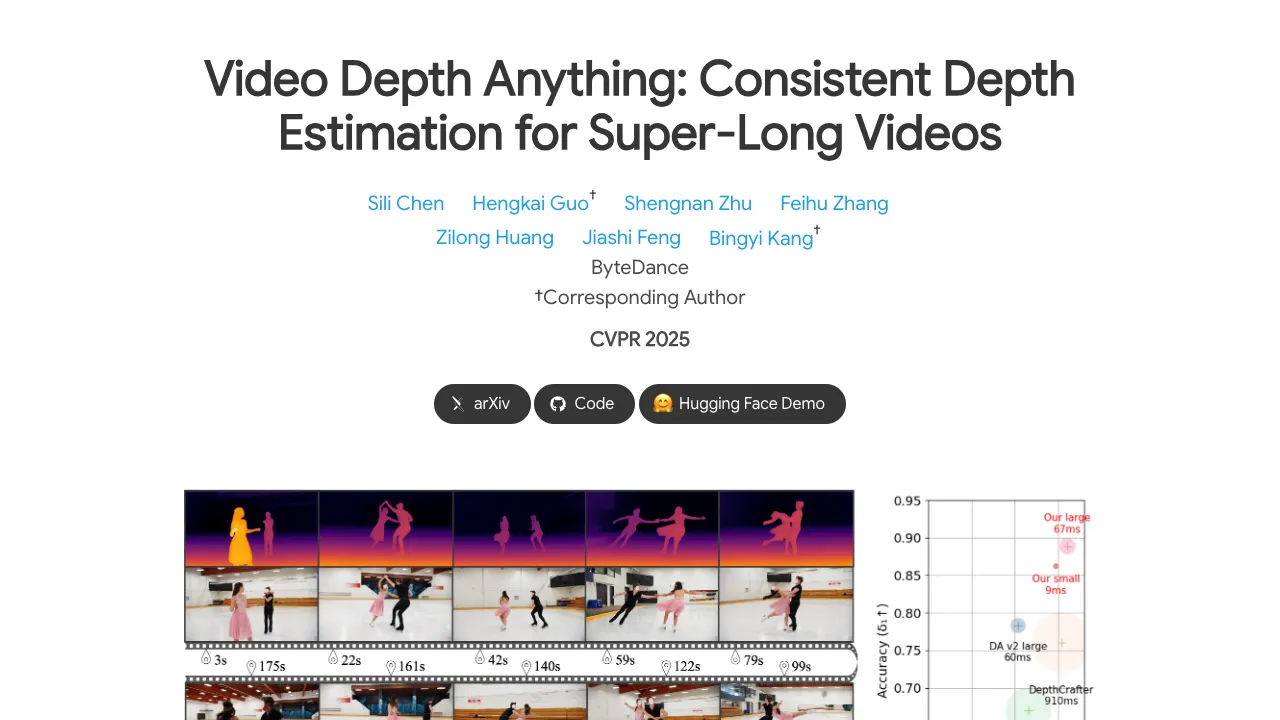
Infinite Depth is a friendly way to think about Video Depth Anything: a tool that turns each frame in a video into a clean, steady depth map, even when the video is very long. It focuses on keeping depth values consistent from start to end, so scenes do not “breathe” or wobble over time.
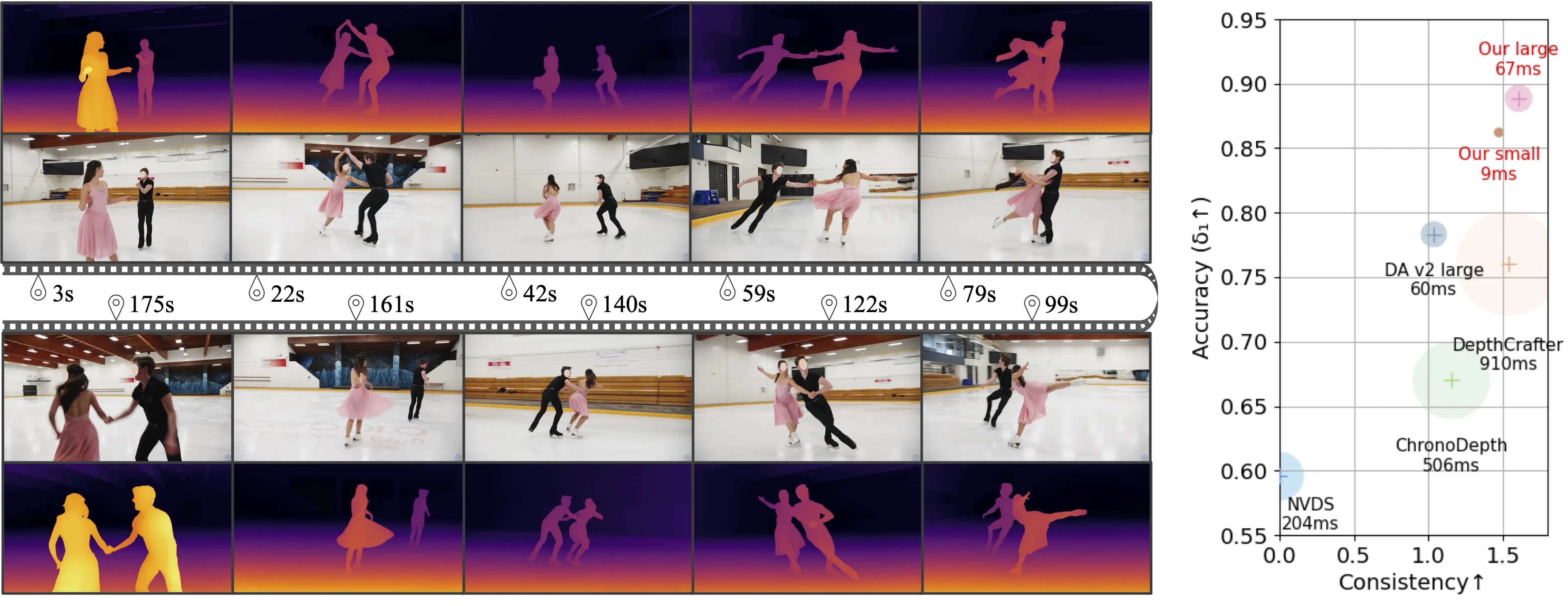
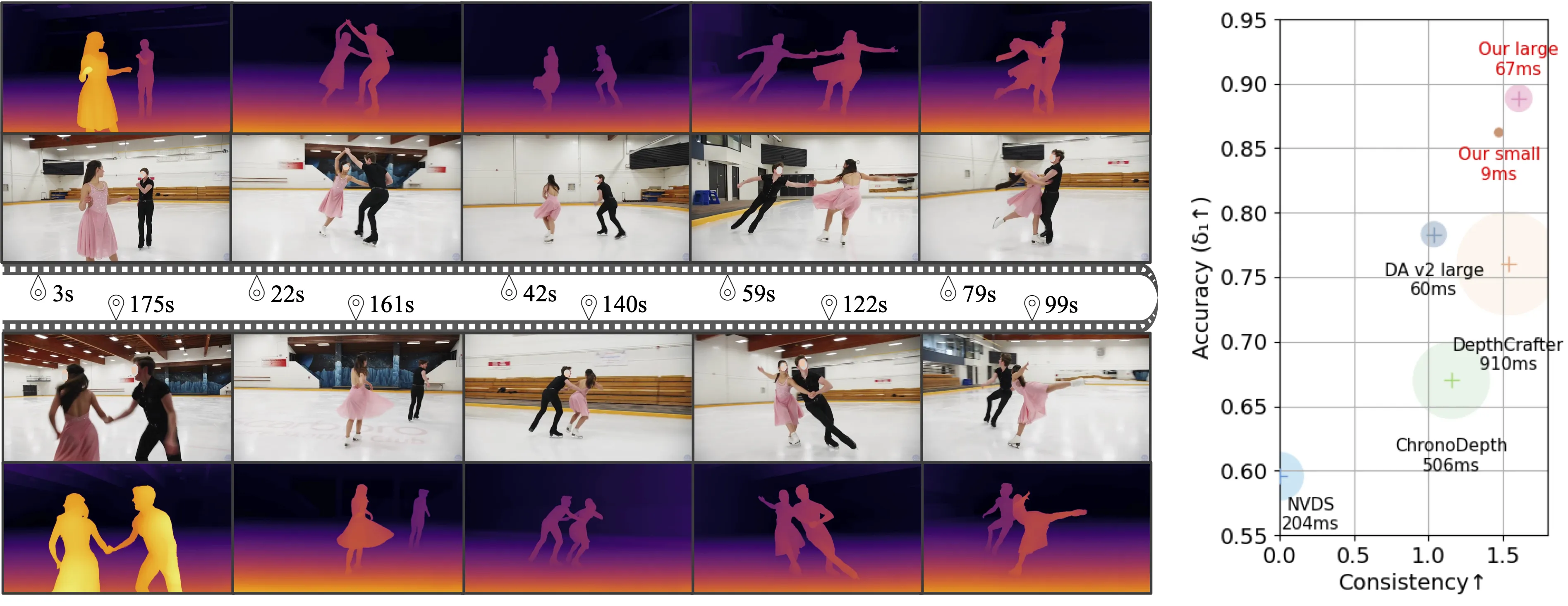
It is built on Depth Anything V2 and comes from the ByteDance research team. Compared to many diffusion-style tools, it is faster, uses fewer model parameters, and holds steady depth quality across frames.
Infinite Depth: How Video Depth Anything Redefines Consistency for Long-Form Content Overview
Here is a quick summary of what this project offers and how you can use it right away.
| Key | Details |
|---|---|
| Type | Video depth estimation toolkit (long-form friendly) |
| Purpose | Produce stable, high-quality depth maps for very long videos |
| Creator | ByteDance research team (Chen, Guo, Zhu, Zhang, Huang, Feng, Kang) |
| Based on | Depth Anything V2 |
| Works on | Relative depth and metric depth (Virtual KITTI + IRS–trained metric models) |
| Models | ViT-small (vits), ViT-base (vitb), ViT-large (vitl) |
| Modes | Standard offline inference, training-free streaming mode (experimental) |
| Input | Standard video file |
| Output | Depth maps as color or grayscale; can also save NPZ or EXR |
| Speed | Fast on GPU with FP16 by default; FP32 optional |
| Resolution control | input_size (default 518), max_res (default 1280) |
| Video control | max_len (no limit by default), target_fps (keep original by default) |
| Where to start | Project page: Video Depth Anything, Code: GitHub |
If you want a friendly intro to the family of tools this belongs to, check our depth model overview.
Infinite Depth: How Video Depth Anything Redefines Consistency for Long-Form Content Key Features
- Consistent depth for very long videos: The tool is designed to keep the same objects at the same depth scale across time.
- Two depth types in one place: Get relative depth or switch to metric depth with a flag.
- Fast in practice: The team reports quick FP16 inference and lower memory use compared to many diffusion-style methods.
- Flexible size controls: Set input_size and max_res so you can balance speed and detail.
- Long video controls: Set max_len to -1 for no cap, and target_fps to -1 to keep the source frame rate.
- Streaming mode (experimental): Send one frame at a time using saved temporal states for lower delay.
- Output formats: Save color depth, grayscale, NPZ, or EXR files.
- Autocast support: FP16 is on by default for speed; FP32 is available if needed.
- Ready models: Small, Base, and Large models are provided for different needs.
- Scripts and loss code: Training loss code and dataset inference scripts are included in the repo.
Infinite Depth: How Video Depth Anything Redefines Consistency for Long-Form Content Use Cases
- Video editing and VFX: Create accurate mattes, relighting, or depth-aware effects that stay stable across long shots.
- 3D-aware filters: Power background blur, portrait effects, and AR overlays that keep their place over time.
- Robotics and mapping: Turn long runs into consistent depth maps for navigation or scene study.
- Post-production checks: Compare metric depth across takes to keep sizes and distances steady.
For broader context on long-form models, see our notes on long-context video methods. If you work with generative clips, pairing depth with text-to-video tools can help with editing and control.
Performance & Showcases
Showcase 1 — Long Video Results These Long Video Results highlight steady depth across extended scenes. Watch how objects keep a stable order and scale from the first frame to the last.
Showcase 2 — Long Video Results Long Video Results here focus on consistency through camera moves and scene changes. Depth maps stay clear and stable across many frames.
Showcase 3 — Long Video Results Another set of Long Video Results shows the model on varied content. Even with motion, depth stays controlled and smooth.
Showcase 4 — Comparison with DepthCrafter on open-world videos Comparison with DepthCrafter on open-world videos shows clear frame-to-frame stability. Pay attention to object edges and background layers.
Showcase 5 — This work presents Video Depth Anything, which is based on Depth Anything V2. It can be applied to arbitrarily long videos and exhibits strong quality This work presents Video Depth Anything, which is based on Depth Anything V2. It can be applied to arbitrarily long videos and exhibits strong quality. The video shows long-form stability and wide-scene coverage.
Showcase 6 — This work presents Video Depth Anything, which is based on Depth Anything V2. It can be applied to arbitrarily long videos and exhibits strong quality This work presents Video Depth Anything, which is based on Depth Anything V2. It can be applied to arbitrarily long videos and exhibits strong quality. The clip underlines consistency at length.
How Infinite Depth: How Video Depth Anything Redefines Consistency for Long-Form Content Works
- Core idea: The model uses a video backbone with temporal attention to keep depth steady across frames.
- For streaming mode: It stores hidden states from earlier frames in a cache and feeds only the new frame at each step. This reduces delay but may lower accuracy without fine-tuning.
- Flexibility: You can choose relative depth for general scenes or metric depth if you need real-world scale.
The Technology Behind It (Plain-English)
- Model sizes: Choose vits, vitb, or vitl encoders. Larger models tend to give stronger results with more compute.
- Depth types:
- Relative depth: Great for stable layers and ranking of near/far.
- Metric depth: Trained on Virtual KITTI and IRS, gives estimates closer to real-world scale.
- Output controls: Save grayscale for simple pipelines, or NPZ/EXR for later processing.
Installation & Setup (Exact Steps)
Follow these steps exactly as shown in the repository.
Preparation
git clone https://github.com/DepthAnything/Video-Depth-Anything
cd Video-Depth-Anything
pip install -r requirements.txt
Download the checkpoints listed here and put them under the checkpoints directory.
bash get_weights.sh
Run inference on a video
We support both relative depth and metric depth:
# For relative depth
python3 run.py --input_video ./assets/example_videos/davis_rollercoaster.mp4 --output_dir ./outputs --encoder vitl

# For metric depth
python3 run.py --input_video ./assets/example_videos/davis_rollercoaster.mp4 --output_dir ./outputs --encoder vitl --metric
Options:
- --input_video: path of input video
- --output_dir: path to save the output results
- --input_size (optional): By default, we use input size 518 for model inference.
- --max_res (optional): By default, we use maximum resolution 1280 for model inference.
- --encoder (optional): vits for Video-Depth-Anything-Small, vitb for Video-Depth-Anything-Base, vitl for Video-Depth-Anything-Large.
- --max_len (optional): maximum length of the input video, -1 means no limit
- --target_fps (optional): target fps of the input video, -1 means the original fps
- --metric (optional): use metric depth models trained on Virtual KITTI and IRS datasets
- --fp32 (optional): Use fp32 precision for inference. By default, we use fp16.
- --grayscale (optional): Save the grayscale depth map, without applying color palette.
- --save_npz (optional): Save the depth map in npz format.
- --save_exr (optional): Save the depth map in exr format.
Run inference on a video using streaming mode (Experimental features)
We implement an experimental streaming mode without training. In details, we save the hidden states of temporal attentions for each frames in the caches, and only send a single frame into our video depth model during inference by reusing these past hidden states in temporal attentions. We hack our pipeline to align the original inference setting in the offline mode. Due to the inevitable gap between training and testing, we observe a performance drop between the streaming model and the offline model (e.g. the d1 of ScanNet drops from 0.926 to 0.836). Finetuning the model in the streaming mode will greatly improve the performance. We leave it for future work.
To run the streaming model:
# For relative depth
python3 run_streaming.py --input_video ./assets/example_videos/davis_rollercoaster.mp4 --output_dir ./outputs_streaming --encoder vitl

# For metric depth
python3 run_streaming.py --input_video ./assets/example_videos/davis_rollercoaster.mp4 --output_dir ./outputs_streaming --encoder vitl --metric
Options:
- --input_video: path of input video
- --output_dir: path to save the output results
- --input_size (optional): By default, we use input size 518 for model inference.
- --max_res (optional): By default, we use maximum resolution 1280 for model inference.
- --encoder (optional): vits for Video-Depth-Anything-Small, vitb for Video-Depth-Anything-Base, vitl for Video-Depth-Anything-Large.
- --max_len (optional): maximum length of the input video, -1 means no limit
- --target_fps (optional): target fps of the input video, -1 means the original fps
- --metric (optional): use metric depth models trained on Virtual KITTI and IRS datasets
- --fp32 (optional): Use fp32 precision for inference. By default, we use fp16.
- --grayscale (optional): Save the grayscale depth map, without applying color palette.
Step-by-Step: Your First Run
- Install dependencies and download weights using the steps above.
- Pick a model size with --encoder (vits, vitb, vitl). Start with vitl for the best quality.
- Run the relative depth command first. Confirm outputs are saved to the --output_dir folder.
- Try the metric flag (--metric) if you need real-world scale.
- Adjust --input_size and --max_res to control speed and detail.
- For very long videos, set --max_len -1 and tune --target_fps if you need to cap the frame rate.
If you want a background on why depth consistency matters for editing pipelines, check our short explainer.
Speed Notes and Practical Tips
- Reported latency on a single A100 with input shape 1 × 32 × 518 × 518:
- Small model: FP32 9.1 ms, FP16 7.5 ms; VRAM FP32 7.3 GB, FP16 6.8 GB.
- Large model: FP32 67 ms, FP16 14 ms; VRAM FP32 26.7 GB, FP16 23.6 GB.
- FP16 is the default and is usually the best trade-off for speed and memory.
- Streaming mode is great for lower delay but may drop accuracy without fine-tuning.
What’s New (Highlights from the Project)
- Streaming mode for metric depth models.
- ViT-base for relative depth; ViT-small/base for metric depth.
- Training-free streaming video depth estimation (experimental).
- Training loss code released.
- Metric depth model based on the Large variant.
- Autocast inference; support for grayscale, NPZ, and EXR outputs.
- Full dataset inference and evaluation scripts.
For projects that blend generation and editing, see our quick guide to text-to-video tools.
Files You Might Care About
- run.py: Standard video inference.
- run_streaming.py: Experimental streaming inference.
- loss/test_loss.py: Usage for training loss.
- checkpoints/: Place model weights here (use get_weights.sh to fetch).
FAQ
What is the difference between relative and metric depth?
Relative depth keeps near/far order and smooth layers. Metric depth aims to match real-world scale and is trained on Virtual KITTI and IRS.
Which encoder should I choose?
Start with vitl for top quality if your GPU can handle it. Use vits or vitb for faster runs or lower memory.
When should I try streaming mode?
Use it when you need lower delay or frame-by-frame processing. Expect some accuracy drop unless you fine-tune for streaming.
How do I save raw data for later processing?
Add --save_npz or --save_exr to save depth in machine-friendly formats. Use --grayscale if you want a simple single-channel image.
Does it work on super long videos?
Yes, set --max_len -1 for no cap. The tool is built to keep depth steady across long timelines.
Image source: Infinite Depth: How Video Depth Anything Redefines Consistency for Long-Form Content