Video-As-Prompt: Unified Semantic Control for Video Generation
What is Video-As-Prompt: Unified Semantic Control for Video Generation
Video-As-Prompt is a research project that lets you guide a new video using another video as a “prompt.” In simple words, you show it a short reference video with the style, motion, or concept you want, and it makes a new video that follows those same ideas while keeping your subject’s look.
It was created by a team from ByteDance and The Chinese University of Hong Kong. The method treats the reference video as the source of meaning (the “semantic”) and keeps that meaning steady in the final result.
Video-As-Prompt: Unified Semantic Control for Video Generation Overview
Here is a quick overview to help you understand the project at a glance.
+------------------------------------------------+------------------------------------------------------------------+ | Item | Detail | +------------------------------------------------+------------------------------------------------------------------+ | Project Type | Research model and demos for video generation | | Purpose | Control a new video using a reference video as the guide | | Key Idea | Treat a reference video as a “video prompt” for in-context use | | Main Features | Identity keeping, zero-shot styles, text prompt edits, plug-in | | Inputs | Reference video, reference image, optional text prompt | | Output | A new video that follows the reference video’s meaning | | What It Can Control | Concept, style, motion, camera behavior | | Who It’s For | Creators, editors, studios, researchers | | Demos | Many video examples on the project page | | Authors & Orgs | ByteDance, CUHK (Yuxuan Bian et al.) | | Code/Models/Dataset | GitHub, Hugging Face model and dataset (see project page) | | Project Page | https://bytedance.github.io/Video-As-Prompt/ | | Status | Public research page with technical report and showcases | +------------------------------------------------+------------------------------------------------------------------+
Want a simple intro to this field? Read our quick primer on text-to-video tools: beginner’s guide to text‑to‑video.
Video-As-Prompt: Unified Semantic Control for Video Generation Key Features
- One method for many controls: concept, style, motion, and camera movement.
- Uses a reference video as a “prompt” you can plug in when you need it.
- Works in a zero-shot way on new styles not seen during training.
- Keeps the person or object identity from your reference image.
- Lets you edit small details with a short text prompt (color, texture, mood).
- Stays steady across different reference videos that share the same idea.
- Handles different tasks: transfer style, guide motion, change look, or update camera path.
Video-As-Prompt: Unified Semantic Control for Video Generation Use Cases
- Different reference videos (with different meanings) + the same reference image: get different outputs that each follow their reference’s idea.
- Different reference videos (with the same meaning) + the same image: keep the same idea steady across outputs.
- Same reference video + different images: transfer one idea to many subjects.
- Same reference video and image + a text tweak: keep identity and meaning, but change small traits like color, texture, or mood.
If you want to compare with another strong open project from the same space, see our overview of Open O3 Video.
How It Works: Video-As-Prompt in Simple Words
- Step 1: You pick a short reference video that shows the idea you want (for example, toy style, voxel style, or a camera move).
- Step 2: You give a reference image for the subject you want in the final video.
- Step 3: The system mixes the meaning from the reference video with your subject image and optional text, then makes a new video that follows that meaning.
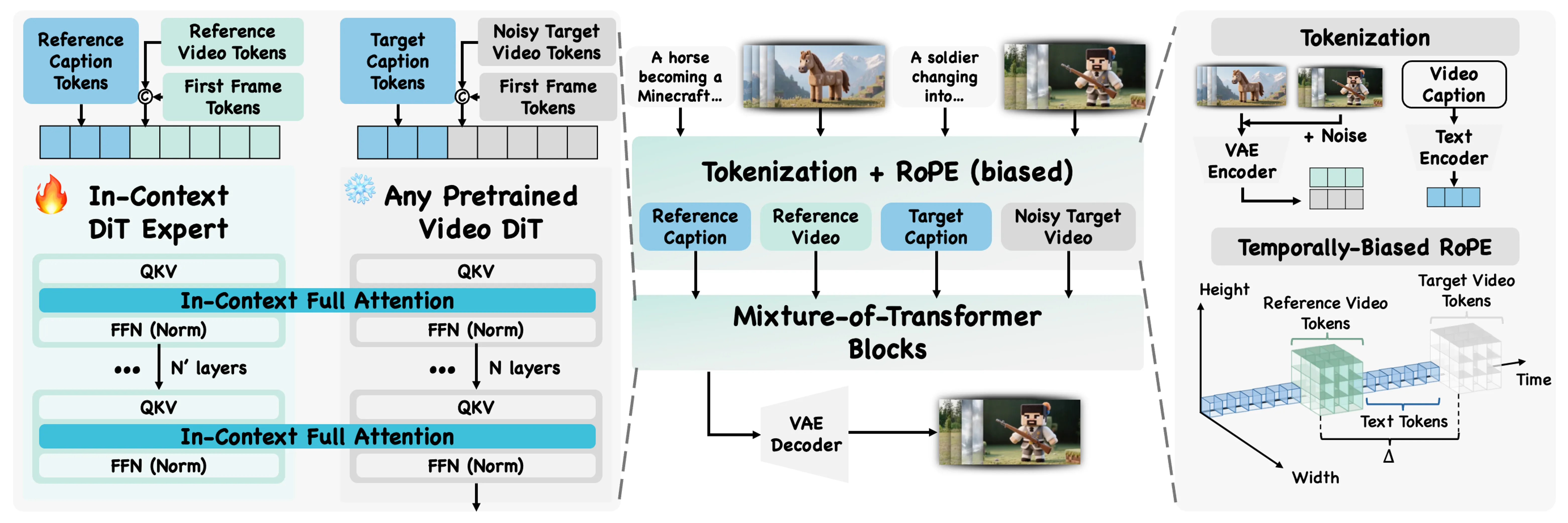
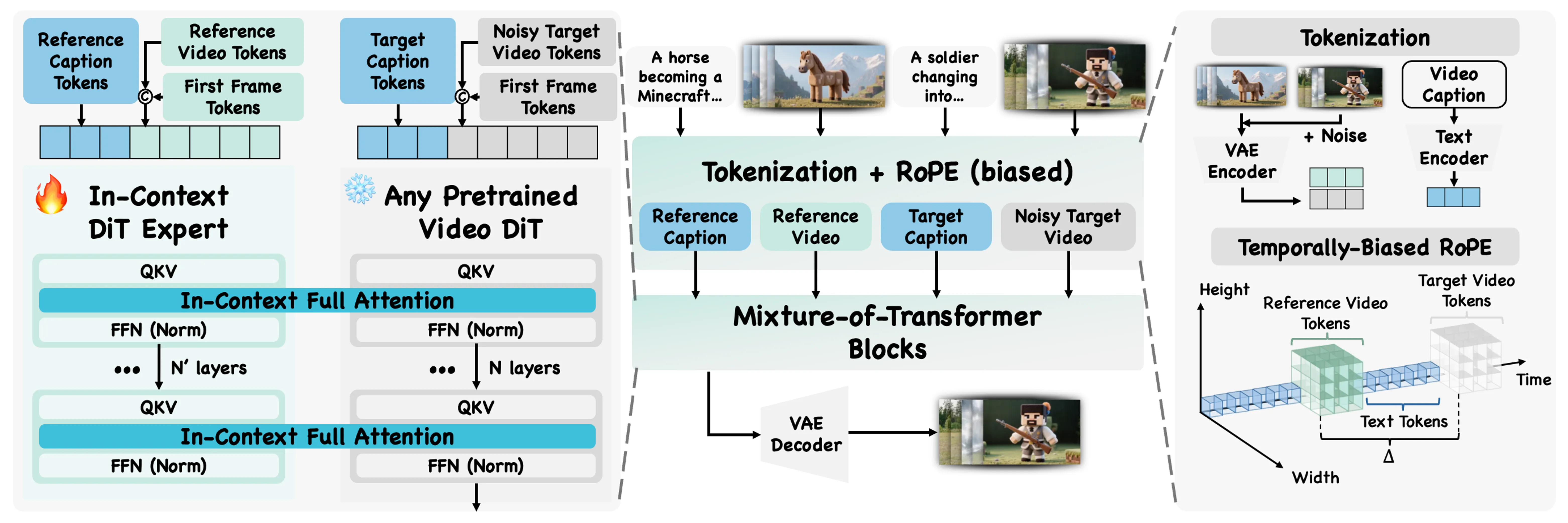
The team calls this “in-context” use, because the model reads the meaning from the example you give it. A mixture-of-transformers design helps it blend base generation with the guidance from your reference.
The Technology Behind It
The core trick is to treat the reference video as a prompt, not just as a style filter. This lets the model learn from the example directly, so it follows high-level ideas like “toy figure,” “voxel world,” or “drop-in partner” moves.
A mixture-of-transformers structure guides how the model fuses the example with your inputs. The result is steady control over concept, motion, and camera behavior while keeping your subject’s look.
Curious about more creative tools from this space? Check our short feature on Goku Video Generation for another angle on video creation.
Installation & Setup (Getting Started)
The project page links to the GitHub repository, a Hugging Face model, and a Hugging Face dataset. Since setup steps and commands can change, please follow the exact instructions on the GitHub page for your system.
Basic checklist to prepare:
- Visit the project page and open the GitHub link for the latest code and steps.
- Check the Hugging Face model and dataset pages linked there.
- Prepare a GPU machine if you plan to run local generation.
- Get a clean Python environment and install the listed dependencies from the repo readme.
- Gather your inputs: a clear reference video, a sharp reference image, and an optional short text prompt.
Note: The official page hosts many demos. For the most accurate, up-to-date setup, use the GitHub readme on the project site.
Performance & Showcases
Showcase 1 — Reference This example highlights how the system follows a Reference to guide the new clip. Watch how the target video stays faithful to the idea shown in the source. Reference is the key tag for this demo.
Showcase 2 — Reference Here, a different Reference drives the content and motion. The result stays close to the shown style while keeping the chosen subject. Reference is the label you will see for this item.
Showcase 3 — Reference This case shows steady control from a Reference even when the subject changes. The guided idea remains clear in the output. The label used is Reference.
Showcase 4 — Reference A new Reference leads to a new look and feel for the final video. The subject identity stays in place while the idea shifts. The label for this demo is Reference.
Showcase 5 — Reference This demo shows how the same Reference idea can be reused for different inputs. The system keeps the key meaning in each new clip. The label remains Reference.
Showcase 6 — Reference Here, a Reference sets the main concept that the model follows. You can see strong consistency with the guiding example. The label displayed is Reference.
Video-As-Prompt: Unified Semantic Control for Video Generation — Tips for Best Results
- Pick a short, clear reference video that shows the idea early and with simple motion.
- Use a high-quality reference image with the face or subject well-lit and centered.
- Keep your text prompt short and to the point, such as “make the fur green” or “add a slow pan.”
FAQs
What does “semantic” mean here?
It means the high-level idea from the reference video, like “toy figure style,” “voxel world,” or a certain camera move. The model follows that idea in the final output. Think of it as the message or meaning of the example.
Do I always need a reference image?
Most use cases include one, because it helps keep your subject’s look. It tells the model who or what should appear in the final video.
Can it work with new styles it has not seen?
Yes, the method supports zero-shot guidance. That means it can follow many new ideas from the reference video even if they were not part of training.
Can I still change small details with text?
Yes. You can add a short text prompt to change fine traits like color or small style notes. The model tries to keep the main idea and the subject identity while making these edits.
Is this open source?
The project page links to the GitHub repo, a model, and a dataset page. Check the repo readme for the latest status and any use terms.
Read More: Open O3 Video
Image source: Video-As-Prompt: Unified Semantic Control for Video Generation