How Open-o3 Video Grounds AI Reasoning with Spatio-Temporal Evidence?
What is How Open-o3 Video Grounds AI Reasoning with Spatio-Temporal Evidence?
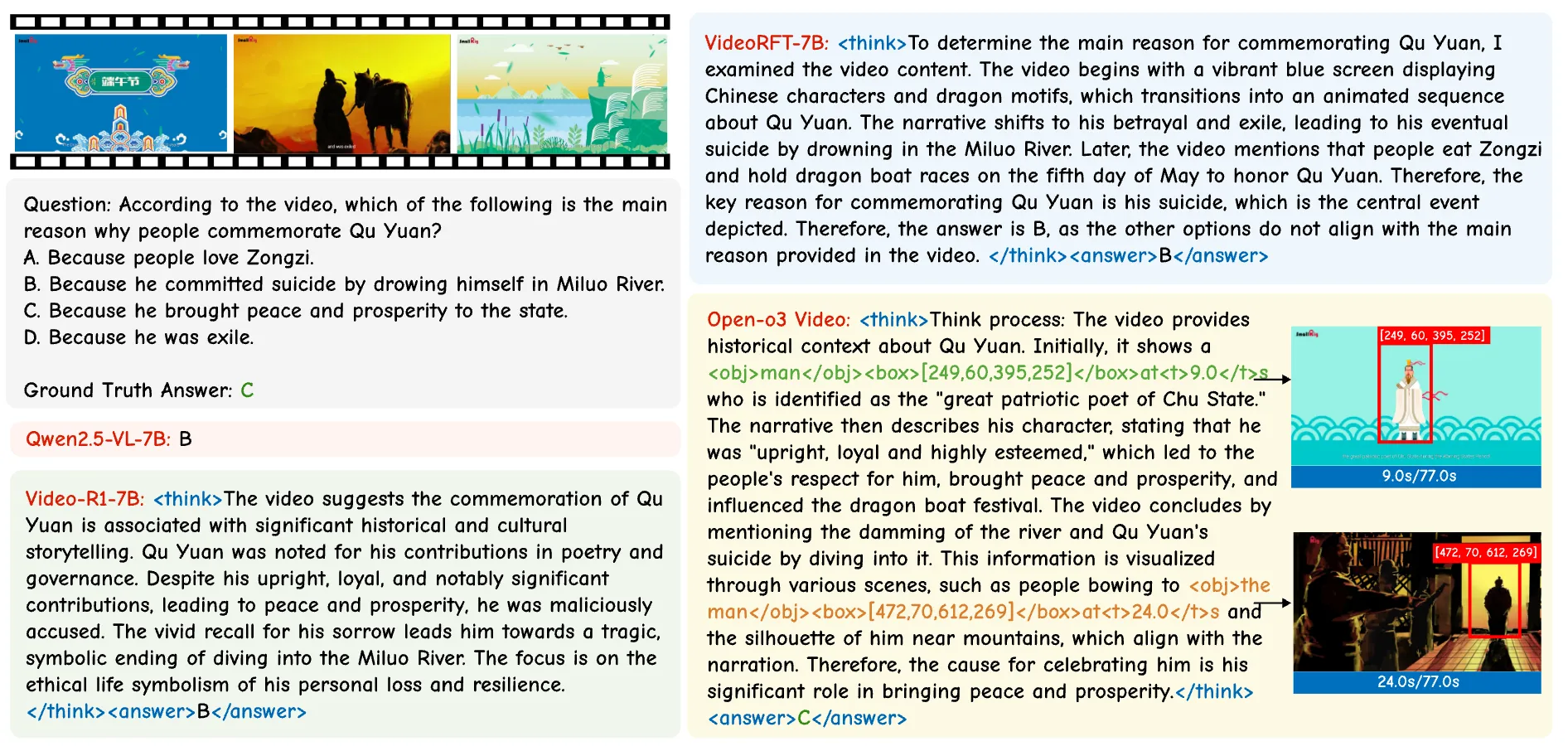
Open-o3 Video is a research project that helps AI explain videos with clear proof. It points out the exact time and on-screen location of the evidence behind each answer, so you know “when” and “where” the key moment happens.
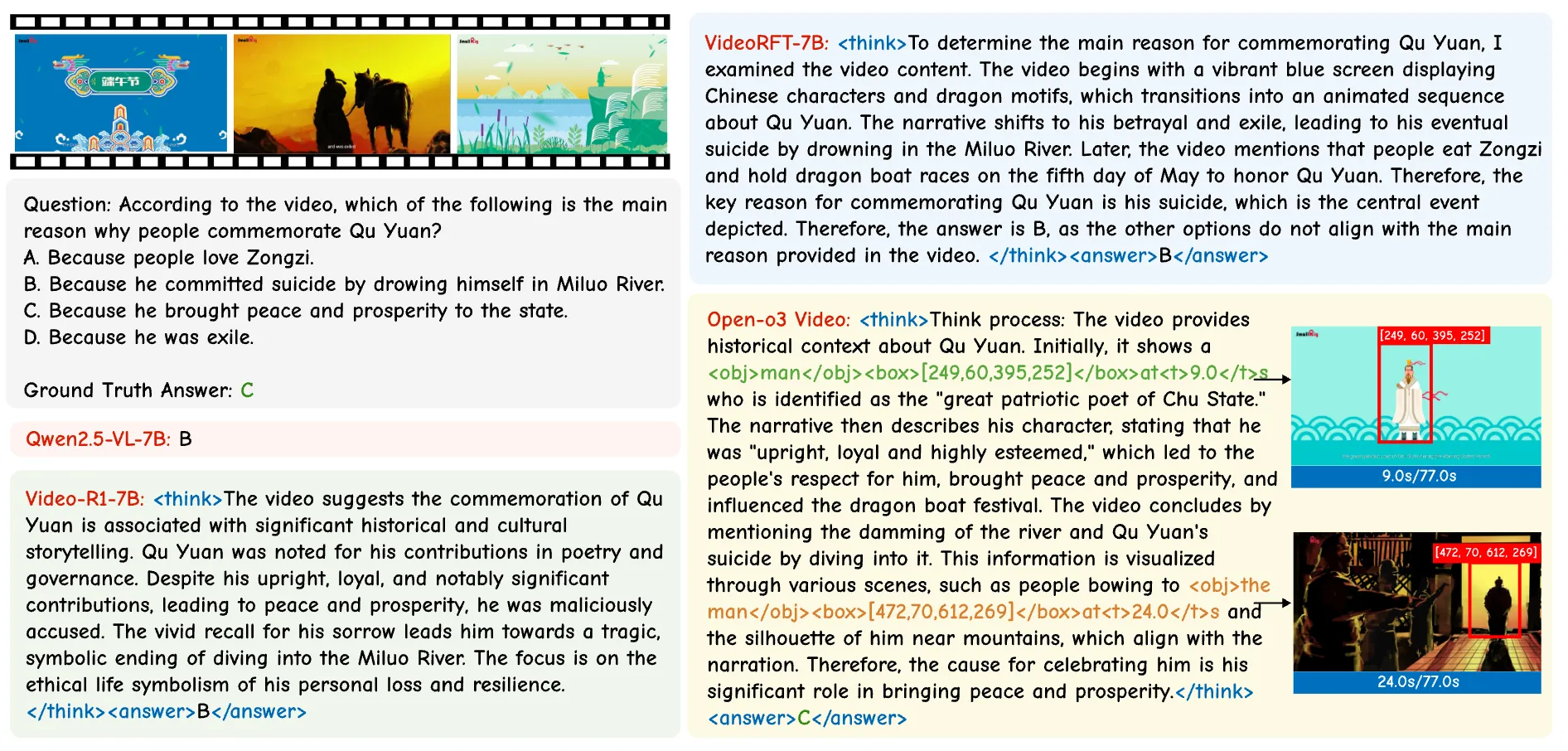
This makes video answers easier to trust. You don’t just get text; you also see marked timestamps and boxes around the objects that matter.
How Open-o3 Video Grounds AI Reasoning with Spatio-Temporal Evidence? Overview
Here’s a quick snapshot of the project, so you can see what it is and what it offers at a glance.
| Item | Details |
|---|---|
| Type | Open-source research project and model for video question answering |
| Purpose | Give clear, checkable proof (time and location) for each video answer |
| What it does | Highlights key timestamps and draws boxes on objects while writing the answer |
| Main features | Time-and-place evidence, two-stage training (SFT + RL), curated datasets (STGR-CoT-30k, STGR-RL-36k), test-time scaling with evidence, strong benchmark results |
| Inputs | Short videos and a text prompt or question |
| Outputs | Answer text + key timestamps + object boxes tied to the answer |
| Training flow | Stage 1: supervised fine-tuning; Stage 2: reinforcement learning with special rewards |
| Base models | Qwen2.5-VL; also trained with Qwen3-VL-8B for stronger scores |
| Benchmarks | V-STAR (big gains), plus VideoMME, WorldSense, VideoMMMU, TVGBench |
| Best for | Teams and researchers who want clear, checkable video reasoning |
Read More: smart AI tools for media tasks
How Open-o3 Video Grounds AI Reasoning with Spatio-Temporal Evidence? Key Features
- Evidence you can verify: each answer shows when it happens in the video and where on the screen it occurs.
- Two-stage training: first learns the basics, then gets better with reinforcement learning.
- Special rewards in training: help the model stay accurate in answers, timing, and object boxes.
- Test-time scaling: the extra evidence helps check and boost answer reliability.
- Strong benchmark scores: large gains on V-STAR, plus solid results on other public tests.
How Open-o3 Video Grounds AI Reasoning with Spatio-Temporal Evidence? Use Cases
- Product help: answer “what happened” questions with proof for support or safety reviews.
- Education: explain science clips, sports plays, or history footage with time and place notes.
- Research: study model behavior with clear evidence traces for each output.
- Content search: find moments in videos faster using the model’s timestamps and object boxes.
Read More: AI tools for media understanding
How It Works
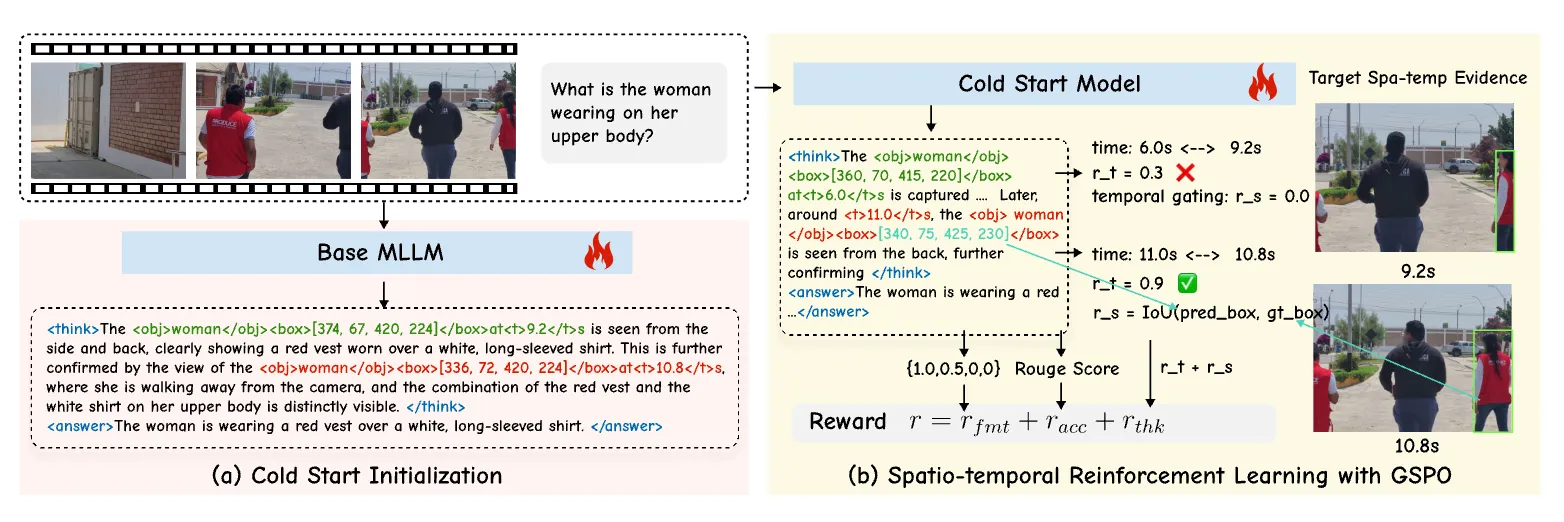
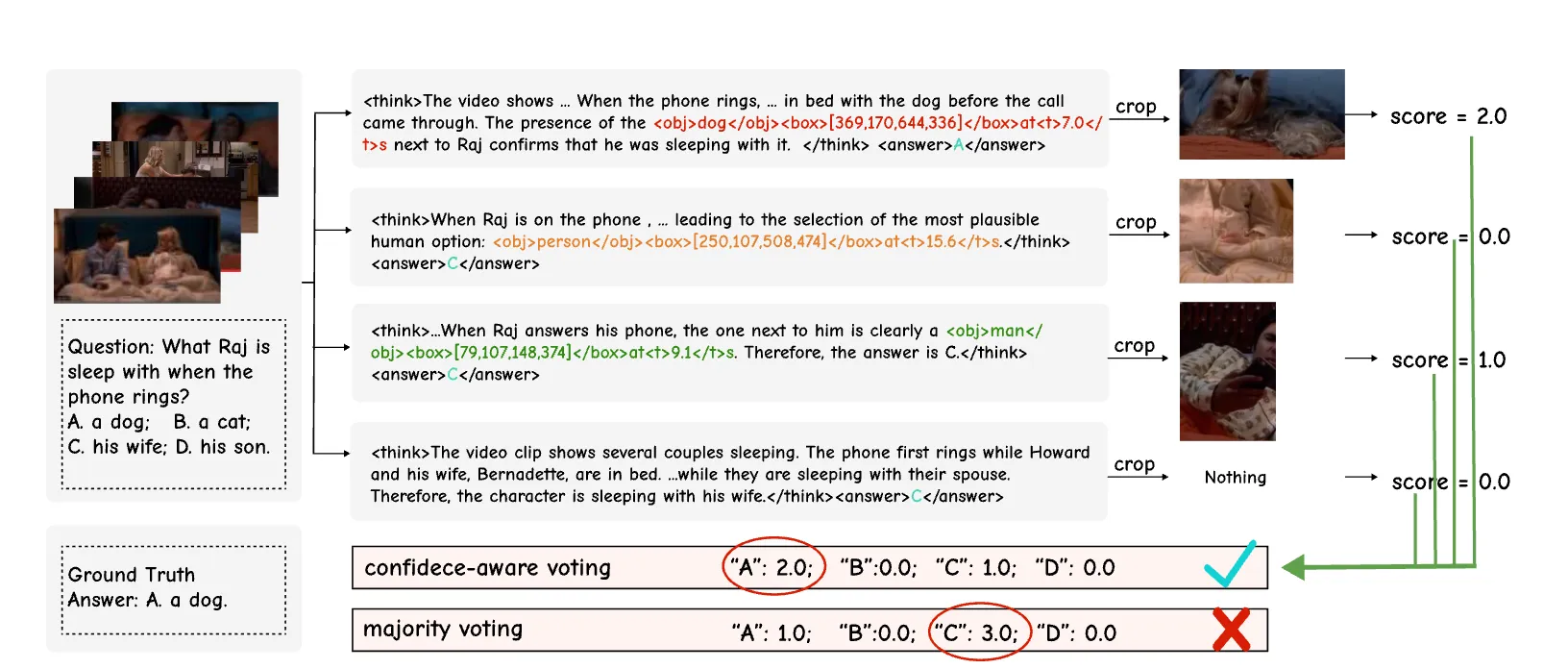
Open-o3 Video watches a clip, then builds an answer that ties to real moments on the screen. It marks key timestamps and draws boxes around important objects, so the proof is right there.
Training happens in two steps. First, it learns from a curated dataset that shows the right answers plus timing and boxes. Next, it improves with reinforcement learning that rewards correct answers and precise time-and-place markings.
The Technology Behind It
Two datasets power this: STGR-CoT-30k (for early learning) and STGR-RL-36k (for later training). Both include time spans and object boxes, which many older datasets do not have together.
The second step uses Group Sequence Policy Optimization to make long reasoning stable. It adds timing-aware rewards that encourage the model to pick the right moments and gate out the wrong ones.
Read More: UI-focused AI workflows
Getting Started: Installation & Setup
Follow these steps exactly as shown to set up the project.
Environment setup:
git clone https://github.com/marinero4972/Open-o3-Video
cd Open-o3-Video

conda create -n open-o3-video python=3.11
conda activate open-o3-video
bash setup.sh
Data Preparation: To provide unified spatio-temporal supervision for grounded video reasoning, we build two datasets: STGR-CoT-30k for supervised fine-tuning and STGR-RL-36k for reinforcement learning.
Json data download link and video source data download instructions: STGR
The overall data structure should be:
DATA_ROOT
├── json_data
│ └── STGR-RL.json
│ └── STGR-SFT.json
└── videos
 └── gqa
 └── stgr
 └── plm
 └── temporal_grounding
 └── timerft
 └── treevgr
 └── tvg_r1
 └── videoespresso
 └── videor1
You should refine the DATA_ROOT in src/r1-v/configs/data_root.py according to your data path.
Training:
# cold start initialization
bash ./src/scripts/run_sft_video.sh

# reinforcement learning with GSPO
bash ./src/scripts/run_grpo_video.sh
Evaluation: Evaluate on benchmarks:
cd eval
bash ./scripts/eval_all.sh
Infernce on examples:
cd eval
python ./inference_example.py
Tip: Make sure your DATA_ROOT paths match your local folders before you run training. If something fails, check your conda env and Python 3.11 version first.
Training & Evaluation Walkthrough
- Step 1: Run the SFT script to teach the model basic time-and-place reasoning on STGR-CoT-30k.
- Step 2: Run the RL script to improve accuracy and timing with the STGR-RL-36k set.
- Step 3: Run the eval scripts to see scores on common benchmarks. Then try the example inference to view answers with timestamps and boxes.
Performance & Showcases
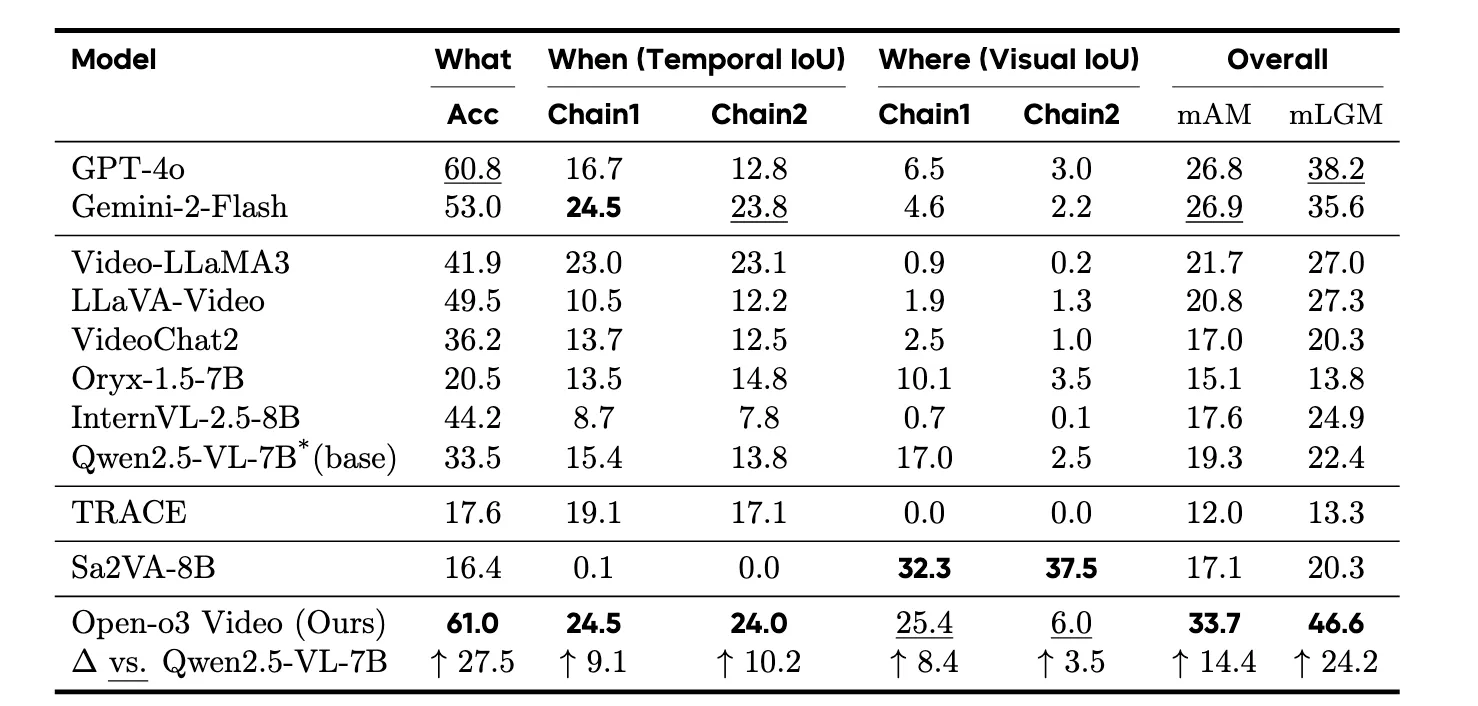
Open-o3 Video reports big gains on the V-STAR benchmark for time-and-place reasoning. It improves mAM by +14.4% and mLGM by +24.2% over a strong baseline. A newer run with Qwen3-VL-8B pushes the scores even higher.
Showcase 1 — Input video This demo shows how the model handles an Input video while pointing to exact moments and object boxes. You can see how the answer links to real frames and locations in the clip.
Showcase 2 — Input video Here the model works on an Input video and marks the key timestamps as it explains the scene. Boxes highlight the parts of the frame that matter for the answer.
Showcase 3 — Input video In this Input video example, the model ties each claim to a time in the clip. It also draws clear boxes to show the object or area it relies on.
Showcase 4 — Input video This Input video case shows how evidence-aware answers can be checked by the viewer. The timestamps and boxes make it easy to confirm the result.
Showcase 5 — Input video Watch this Input video to see how the model balances text answers with grounded proof. The time and location notes help avoid guesswork.
Showcase 6 — Input video In the last Input video demo, you can follow the reasoning step by step. Each marked moment supports the final answer.
Results at a Glance
- V-STAR: Large gains on both accuracy and location-grounded metrics.
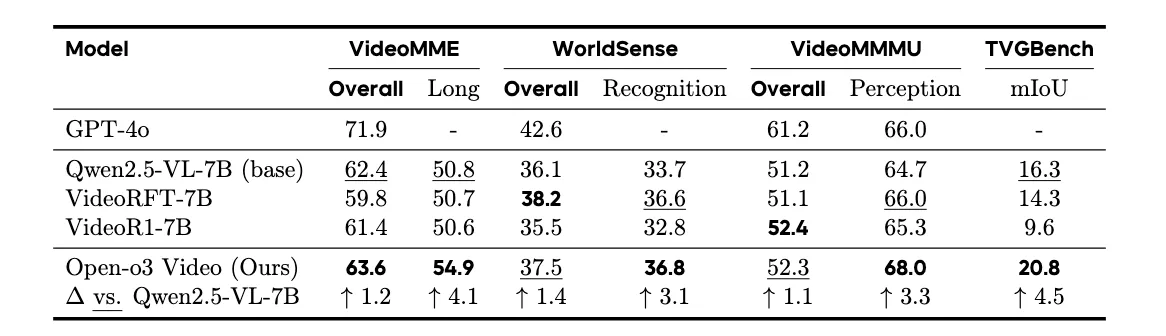
- Broad tests: Strong results on VideoMME, WorldSense, VideoMMMU, and TVGBench.
- Newer base: Training with Qwen3-VL-8B yields even higher scores on V-STAR.
FAQ
What makes Open-o3 Video different from regular video Q&A?
It does not only give text answers. It also shows the exact time and on-screen location that back up each answer, so you can check it.
Do I need a special machine to try it?
You need a machine that can run Python 3.11, conda, and the setup script. A GPU is helpful for training and faster testing.
Can I use my own videos?
Yes. Prepare your data like the sample structure, point DATA_ROOT to your folders, and run the inference example to test your clips.
How do I improve the model further?
Train on your own data using the SFT script first, then the RL script. Keep your annotations clear for time and object boxes.
Image source: How Open-o3 Video Grounds AI Reasoning with Spatio-Temporal Evidence?