Plan-X: Bridging Semantic Planning and High-Fidelity Video Synthesis
What is Plan-X: Bridging Semantic Planning and High-Fidelity Video Synthesis
Plan‑X is a research project that teaches a video model to “think first, then generate.” It breaks a user instruction into small, clear actions (the plan), and then turns that plan into a short, clean video. This helps the model follow multi-step tasks, keep objects in the right place, and produce smoother motion.
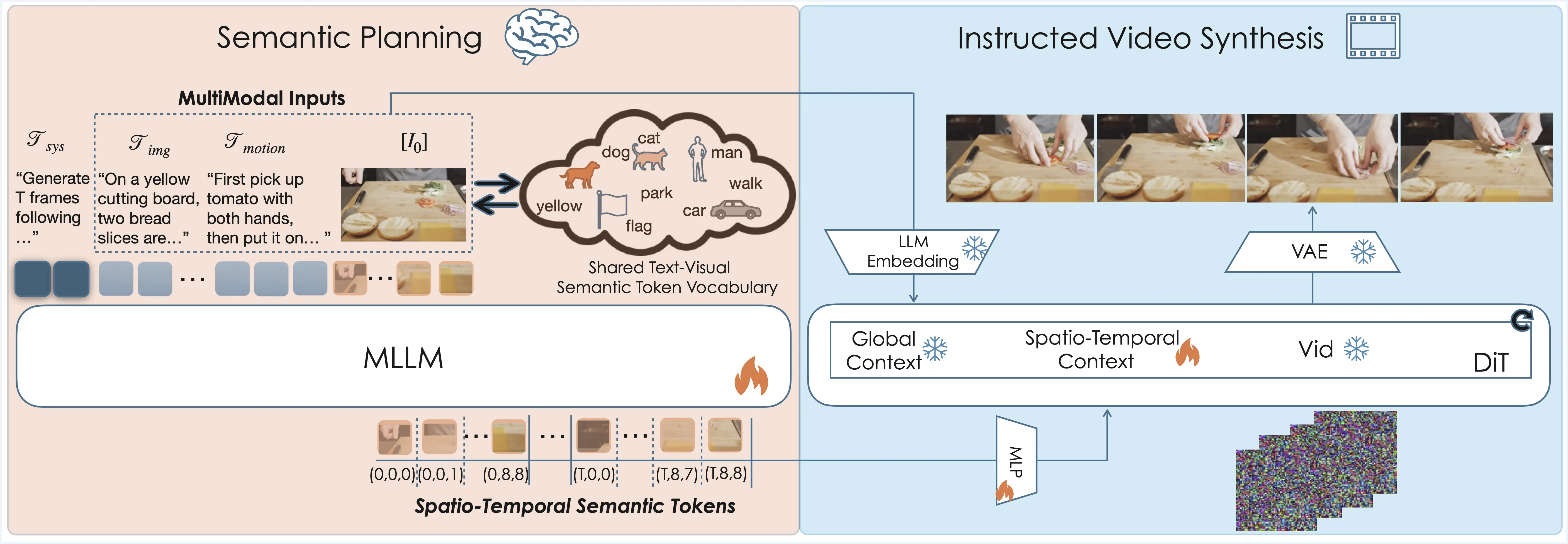
Plan‑X sits between natural language and video synthesis. It uses a planning step to understand what should happen, in what order, and with which objects. Then it passes that plan to a strong video generator to produce the final clip.
Plan-X: Bridging Semantic Planning and High-Fidelity Video Synthesis Overview
Plan‑X connects language planning with video generation. It works with popular video backbones and shows better control of actions and timing. If you are new to this topic, you may also find our short text‑to‑video guide helpful.
| Field | Details |
|---|---|
| Project | Plan‑X: Bridging Semantic Planning and High-Fidelity Video Synthesis |
| Type | Research method for instruction‑guided video generation |
| Purpose | Turn a complex text instruction into a step‑by‑step plan, then render a faithful video |
| Core Idea | LLM‑based in‑context reasoning creates a semantic plan; a diffusion‑based video model renders it |
| Inputs | Natural language instruction; optional context (scene, objects) |
| Outputs | Short video clips that follow the planned actions |
| Backbones Shown | Seedance 1.0 (Base vs Plan‑X‑Seedance), Wan 2.2 (Base vs Plan‑X‑Wan) |
| Strengths | Better action accuracy, timing, object control, and consistency under fixed cameras |
| Demos | Multiple video cases with fine‑grained action steps |
| Source | Official page: https://byteaigc.github.io/Plan-X/ |
Plan-X: Bridging Semantic Planning and High-Fidelity Video Synthesis Key Features
- Step‑by‑step planning before generation: The system parses your sentence and writes a simple, ordered plan. This gives the video model a clear script to follow.
- Strong object and hand control: Hands pick up the right item, move it, and put it down in the right spot. Objects keep their identity through the clip.
- Works across backbones: The team shows results on Seedance 1.0 and Wan 2.2. With the same plan idea, both families improve in action faithfulness.
- Clean motion under fixed cameras: Even in still shots, actions look ordered and stable. Timing matches the plan well.
- Scales to many instructions: From picking up a phone to watering plants, the model keeps the same planning routine.
How Plan‑X Works (Plain and Simple)
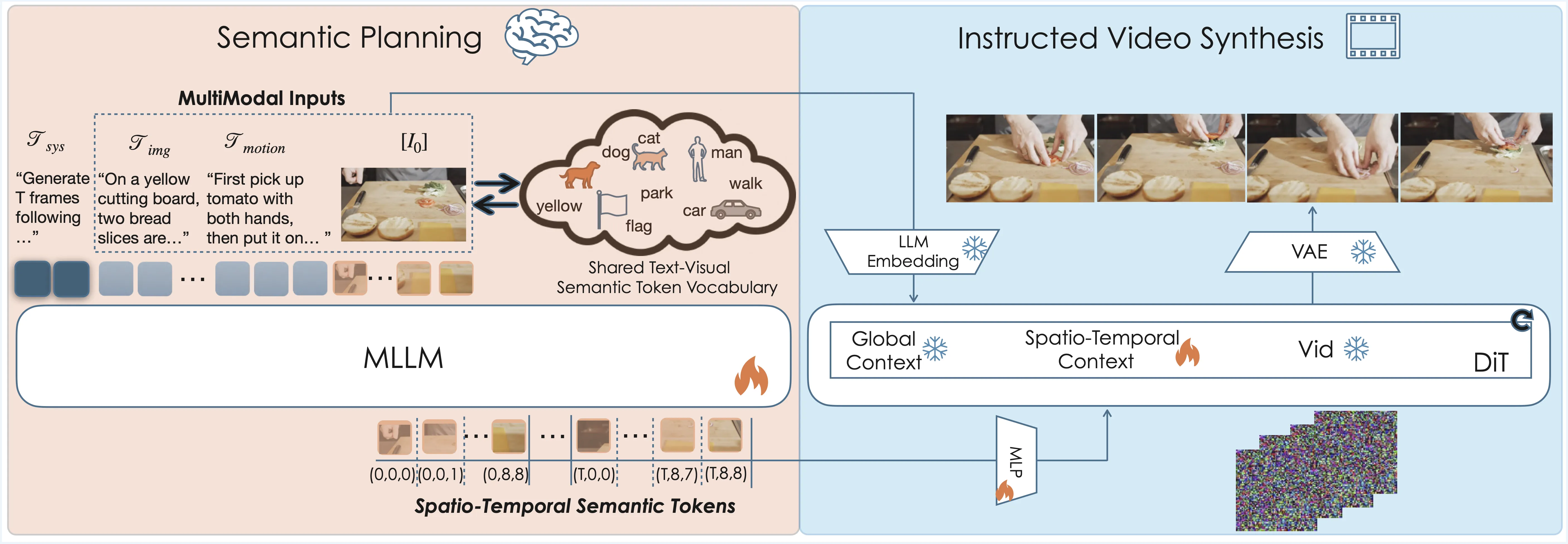
- Read the instruction. The system breaks your sentence into small, ordered steps.
- Write a semantic plan. It chooses the actor, the object, and the action for each step.
- Render the video. A diffusion video model takes this plan and draws frames that follow it.
This extra planning step is the key difference. It tells the video model not only “what,” but also “when” and “in which order.”
The Technology Behind It
Plan‑X blends two parts: a planner based on large language reasoning, and a video generator based on diffusion. The planner produces a light script made of clear, human‑style steps. The generator then turns that script into a short, high‑quality clip.
The team shows the method on models like Seedance 1.0 and Wan 2.2. The planning stage makes both families better at multi‑step tasks. For a related system from the same ecosystem, see our brief note on the Goku model.
Plan-X: Bridging Semantic Planning and High-Fidelity Video Synthesis Use Cases
- Creative clips on demand: Describe a small story, and get a short video that follows your script.
- Education and training: Show step‑by‑step actions, such as lab moves or safe tool use.
- Product demos: Present “pick up, place, turn on” sequences with better object control.
- Content prototyping: Plan a scene with clear beats and test motion before full production.
If you want more context on this project in our site, check the concise project summary.
Performance & Showcases
Showcase 1 — Dog picks and eats a mushroom This clip shows planned steps carried out in order. The dog lowers its head towards the mushroom, gently grips the mushroom stem with its mouth, carefully pulls the mushroom from the log, then swallows it.
Showcase 2 — Boy stacks a green cube on a red fire truck This clip shows careful hand control and balanced placement. The boy extends his left hand towards the green cube, picks it up from the mat, and carefully places the green cube on top of the red fire truck, where it balances precariously.
Showcase 3 — Woman waters a geranium with a silver can This clip shows a complete pick‑tilt‑pour‑place sequence. The woman picks up the silver watering can, tips the can, pouring water into the geranium pot, then places the watering can back on the table.
Showcase 4 — Woman moves a bronze owl statue to an open book This clip shows a slow head raise, reach, pick, and place. Woman slowly raises her head, looks up towards the bronze owl statue, reaches her right hand to the shelf, picks up the owl statue, and places it carefully on the open book.
Showcase 5 — Fixed camera: hand places passport on the record (Base DiT vs Plan‑X) This clip focuses on a simple pick and place under a fixed camera. Fixed camera. A hand reaches out to the passport on the table and places it on the record.
Showcase 6 — Fixed camera: repeat of passport placement test (Base DiT vs Plan‑X) This clip repeats the same test to show consistency. Fixed camera. A hand reaches out to the passport on the table and places it on the record.
Baseline Comparison: What Changes With Plan‑X
Plan‑X compares “Base” models with Plan‑X‑enhanced ones. In the tests, the Plan‑X versions follow action order better and keep objects stable through time. This is clear in fixed camera tests and fine object moves.

You can also see side‑by‑side results listed as “Seedance 1.0 (Base)” vs “Plan‑X‑Seedance (Ours)” and “Wan 2.2 (Base)” vs “Plan‑X‑Wan (Ours)”. The Plan‑X runs show tighter timing and more precise control.
Getting Started (What You Can Do Today)
- Explore the official page: Visit https://byteaigc.github.io/Plan-X/ to watch all demos and read the method notes. You will see comparisons across different backbones.
- Collect your prompts: Write clear, step‑by‑step instructions (who does what, to which object, in what order). This style matches Plan‑X well.
- Follow updates: As the team shares more details, expect instructions for testing with different video backbones.
If you are new to this space, here is a simple primer on terms and flows: our quick text‑to‑video guide explains common steps and model types.
FAQ
What problem does Plan‑X solve?
Many models take a prompt but miss the correct order of actions. Plan‑X fixes this by planning first, then rendering the plan into a video.
How is this different from typical text‑to‑video?
Regular methods try to jump straight from words to frames. Plan‑X adds a planning step in the middle, which improves timing, object handling, and action accuracy.
Does Plan‑X work only with one backbone?
No. The page shows it working with Seedance 1.0 and Wan 2.2. The idea is general, so it can support more backbones over time.
Where can I see more examples?
All demos and comparisons are on the official page. You can watch them and read short notes about each test case.
Can I try it locally right now?
The page focuses on results and method insight. Keep an eye on the project site for any future release notes or test instructions.
Image source: Plan-X: Bridging Semantic Planning and High-Fidelity Video Synthesis