Painting Anything 3D: How MVPaint Revolutionizes Texturing with Synchronized Diffusion
What is Painting Anything 3D: How MVPaint Changes Texturing with Synchronized Diffusion
MVPaint is a research tool that paints 3D models from a simple text prompt. It focuses on making every view of the object look consistent, so the front, sides, and back match well.
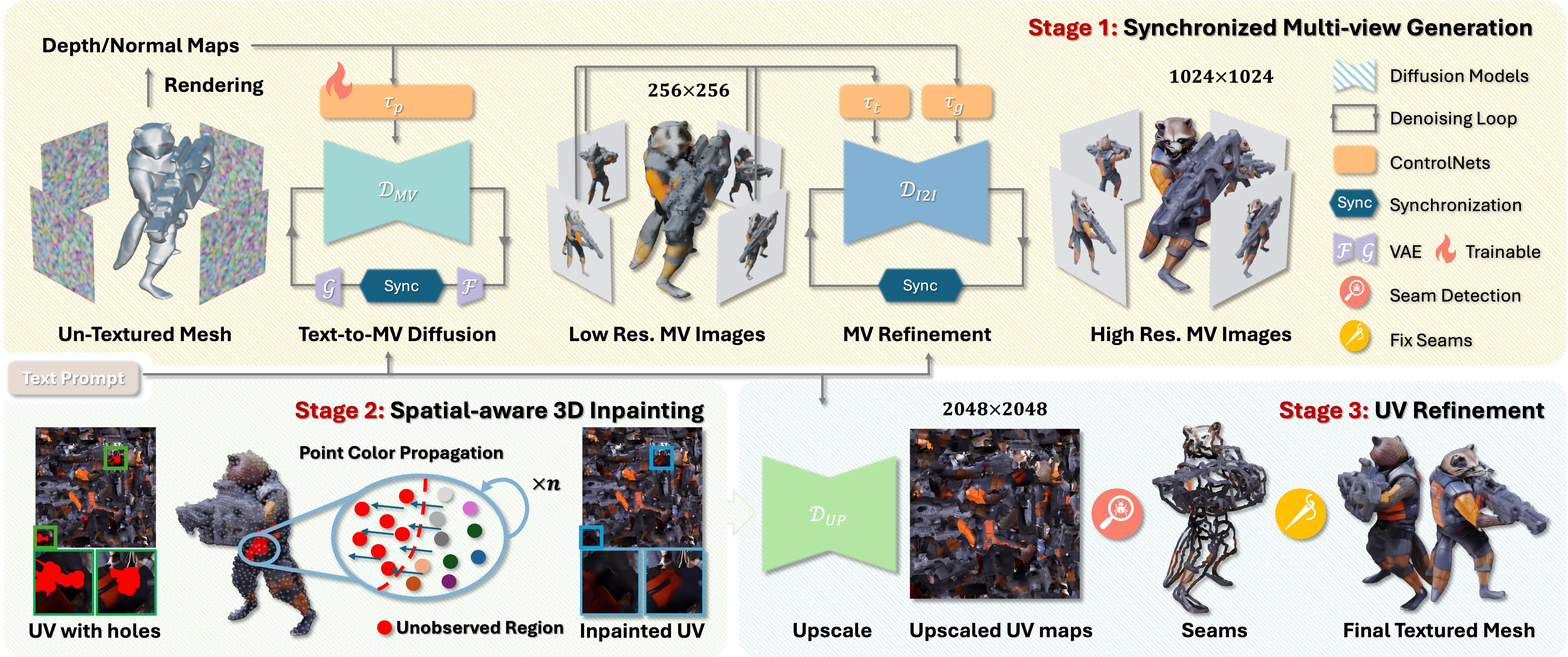
It works in three stages: it first makes pictures from many views at the same time, then fills in missing parts on the 3D shape, and finally polishes the texture to remove visible seams. The result is a high‑quality texture map that fits your mesh and looks natural from all angles.
You can try it with the sample mesh included in the repo. The first run may take a while, as it downloads pretrained models.
Painting Anything 3D: How MVPaint Changes Texturing with Synchronized Diffusion Overview
Project Overview
| Item | Details |
|---|---|
| Type | Research code + text-to-texture pipeline |
| Purpose | Paint 3D meshes from text prompts with strong multi‑view consistency |
| Inputs | 3D mesh (e.g., .obj) + text prompt |
| Outputs | High‑res texture map in UV space, plus renders |
| Core Modules | Synchronized Multi‑view Generation (SMG), Spatial‑aware 3D Inpainting (S3I), UV Refinement (UVR) |
| Key Strengths | Works with arbitrary UVs, fixes unobserved areas, reduces Janus issues, improves seams |
| Pretrained Models | Auto‑downloaded from Hugging Face on first run |
| Sample Asset | Included under ./samples |
| Install Steps | sh env_mvdream.sh, sh env_syncmvd.sh |
| Run Script | Edit run_pipeline.sh paths, then sh run_pipeline.sh |
| Benchmarks | Objaverse T2T benchmark, GSO T2T benchmark |
| Project Page | https://mvpaint.github.io/ |
Read More: Omnihuman 1.Com
Painting Anything 3D: How MVPaint Changes Texturing with Synchronized Diffusion Key Features
- Multi‑view texturing in sync: It generates several camera views together, so details line up across angles.
- Smart 3D inpainting: It fills parts that were not seen in the first pass, directly on the 3D surface.
- UV polish: It boosts texture resolution in UV space and smooths seams to reduce visible breaks.
- Works with many UV unwraps: It can handle different UV layouts and still keep views consistent.
- Fewer “Janus” issues: It reduces the common two‑face problem where front and back fight each other.
- Ready to test: Sample mesh provided; models download on demand.
- Strong baselines: The team built T2T benchmarks on Objaverse and GSO to measure quality.
For related industry context, see our overview of Bytedance.
Painting Anything 3D: How MVPaint Changes Texturing with Synchronized Diffusion Use Cases
- Rapid look creation for 3D assets in ads, product shots, or concept art.
- Texture upgrades for low‑detail meshes in games, films, or AR/VR prototypes.
- Batch texturing for large libraries of meshes where UVs vary a lot.
If you also work with depth in video editing, see Video Depth Anything.
How It Works
-
Step 1: You feed a mesh and a short text prompt. The system sets multiple camera views around the object.
-
Step 2: Synchronized Multi‑view Generation (SMG) produces images for all views at once, giving a strong base look.
-
Step 3: These views are used to build a coarse texture. Some parts may still be plain if they were never seen.
-
Step 4: Spatial‑aware 3D Inpainting (S3I) fills the missing areas on the mesh itself to cover the whole surface.
-
Step 5: UV Refinement (UVR) boosts texture detail in UV space, then applies seam smoothing to reduce visible cuts.
-
Step 6: You get a high‑res texture map and renders that match from all angles.
Installation & Setup
Follow these steps exactly as provided in the repository.
Environment setup
### environment for preprocessing, stage_1_low_res and final ization
sh env_mvdream.sh

### environment for stage_1_high_res and stage_2_3
sh env_syncmvd.sh
Run the demo pipeline
The script needs to download multiple pretrained models from Hugging Face, which may take time to complete during the first run. A sample mesh is included under ./samples so you can test quickly.
### please modify paths in run_pipeline.sh, they are:
### CODE_ROOT, CKPT_PATH, SAMPLE_DIR, prompt_file, OUT_ROOT
sh run_pipeline.sh
Tips before running
- Edit run_pipeline.sh and set CODE_ROOT, CKPT_PATH, SAMPLE_DIR, prompt_file, and OUT_ROOT to your paths.
- First run may be slow due to downloads. Later runs are faster.
Performance & Showcases
Showcase 1 — MVPaint: Synchronized Multi-View Diffusion for Painting Anything 3D MVPaint: Synchronized Multi-View Diffusion for Painting Anything 3D. This clip shows the end‑to‑end flow from prompt to a textured 3D model with consistent views.
Showcase 2 — Texturing is a crucial step in the 3D asset production workflow, which enhances the appeal and rsity of 3D assets. even with recent advanceme Texturing is a crucial step in the 3D asset production workflow, which enhances the appeal and rsity of 3D assets. even with recent advanceme This side‑by‑side view highlights stronger cross‑view match and fewer breaks on the surface.
Showcase 3 — Texturing is a crucial step in the 3D asset production workflow, which enhances the appeal and rsity of 3D assets. even with recent advanceme Texturing is a crucial step in the 3D asset production workflow, which enhances the appeal and rsity of 3D assets. even with recent advanceme You can see how hard areas, like thin parts or backsides, keep a stable look.
Showcase 4 — Texturing is a crucial step in the 3D asset production workflow, which enhances the appeal and rsity of 3D assets. even with recent advanceme Texturing is a crucial step in the 3D asset production workflow, which enhances the appeal and rsity of 3D assets. even with recent advanceme The results show fewer Janus issues and better match across angles.
Showcase 5 — Texturing is a crucial step in the 3D asset production workflow, which enhances the appeal and rsity of 3D assets. even with recent advanceme Texturing is a crucial step in the 3D asset production workflow, which enhances the appeal and rsity of 3D assets. even with recent advanceme Fine details hold up even when you rotate the object or zoom in.
Showcase 6 — Texturing is a crucial step in the 3D asset production workflow, which enhances the appeal and rsity of 3D assets. even with recent advanceme Texturing is a crucial step in the 3D asset production workflow, which enhances the appeal and rsity of 3D assets. even with recent advanceme This demo focuses on areas that are often missed and how the system fills them.
Project Status & Updates

- Paper uploaded on 2024/10/31. A preliminary version of the code was released for testing on 2025/07/29.
- The team notes that the first run downloads several models. Expect some waiting time.
Explore more AI tools and workflows on Omnihuman 1.Com.
Getting Great Results: Practical Tips
- Start with a clean mesh and a short, clear prompt. Vague prompts make vague textures.
- Cover the object with enough view angles during setup. The more you cover, the fewer gaps to fill later.
- Let the pipeline finish all stages. The last UV polish helps reduce visible seams.
Frequently Asked Questions
What do I need before I start?
You need a 3D mesh file and a short text prompt. The repo includes a sample mesh to help you test fast.
Does MVPaint work with any UV unwrap?
Yes, it is built to handle different UV layouts. The final UV step improves detail and smooths seams.
How long does a run take?
The first run may take longer because it downloads models from Hugging Face. Later runs should be faster.
Can I use my own models?
Yes, place your mesh and set the SAMPLE_DIR and prompt file paths in run_pipeline.sh. Then run the script.
Where does the model data come from?
The pipeline fetches several pretrained models from Hugging Face on the first run. These files are cached for later use.
Is there a user interface?
The current release offers shell scripts. You edit a few paths in run_pipeline.sh and run it from the terminal.
Image source: Painting Anything 3D: How MVPaint Texturing with Synchronized Diffusion