MemAgent: Reshaping Long-Context LLM with Multi-Conv RL based Memory Agent
What is MemAgent: Reshaping Long-Context LLM with Multi-Conv RL based Memory Agent
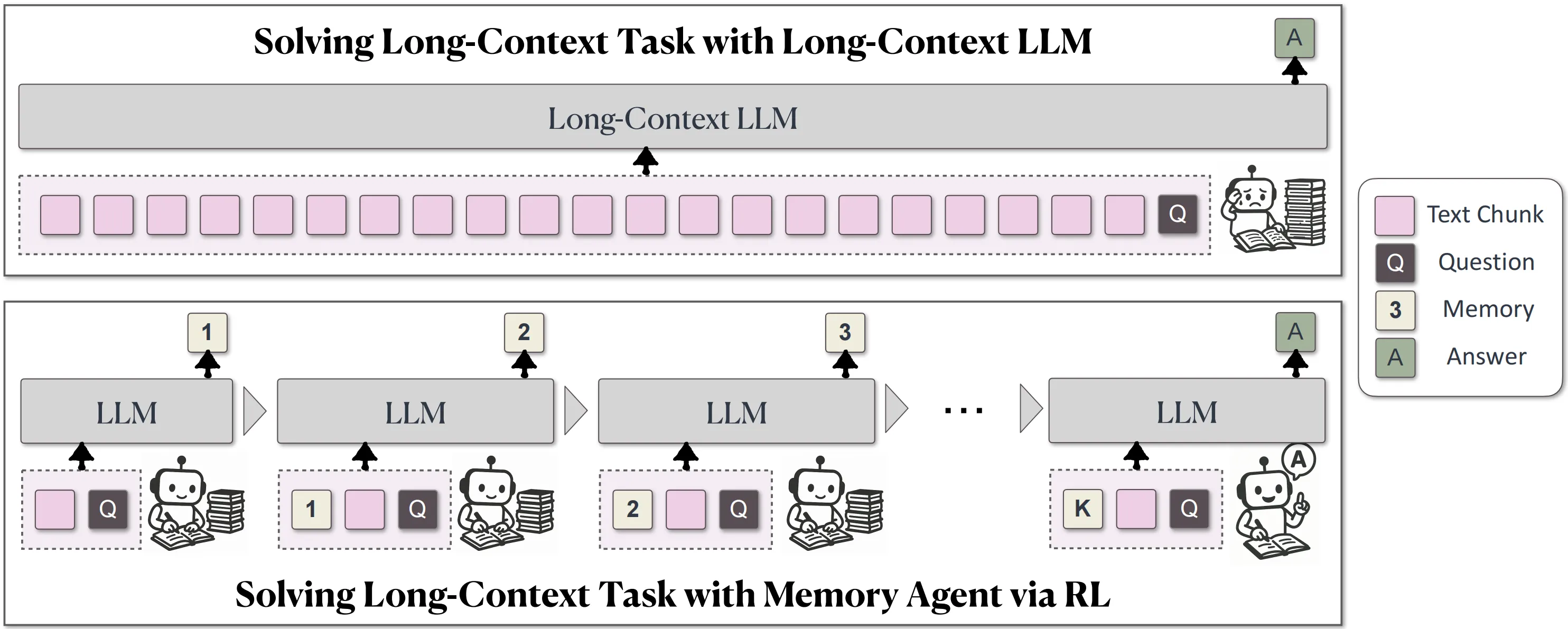
MemAgent is a simple idea with a big impact: give a large language model a small, smart “memory” it can read and write while it works through a very long document in parts. Then train that habit end-to-end with reinforcement learning so the model learns when and how to keep only the most important bits.

It does not change the base model’s architecture. Instead, it adds a fixed-size memory panel and a workflow that splits long text into chunks, updates memory after each chunk, and fuses everything at the end for a final answer.
MemAgent: Reshaping Long-Context LLM with Multi-Conv RL based Memory Agent Overview
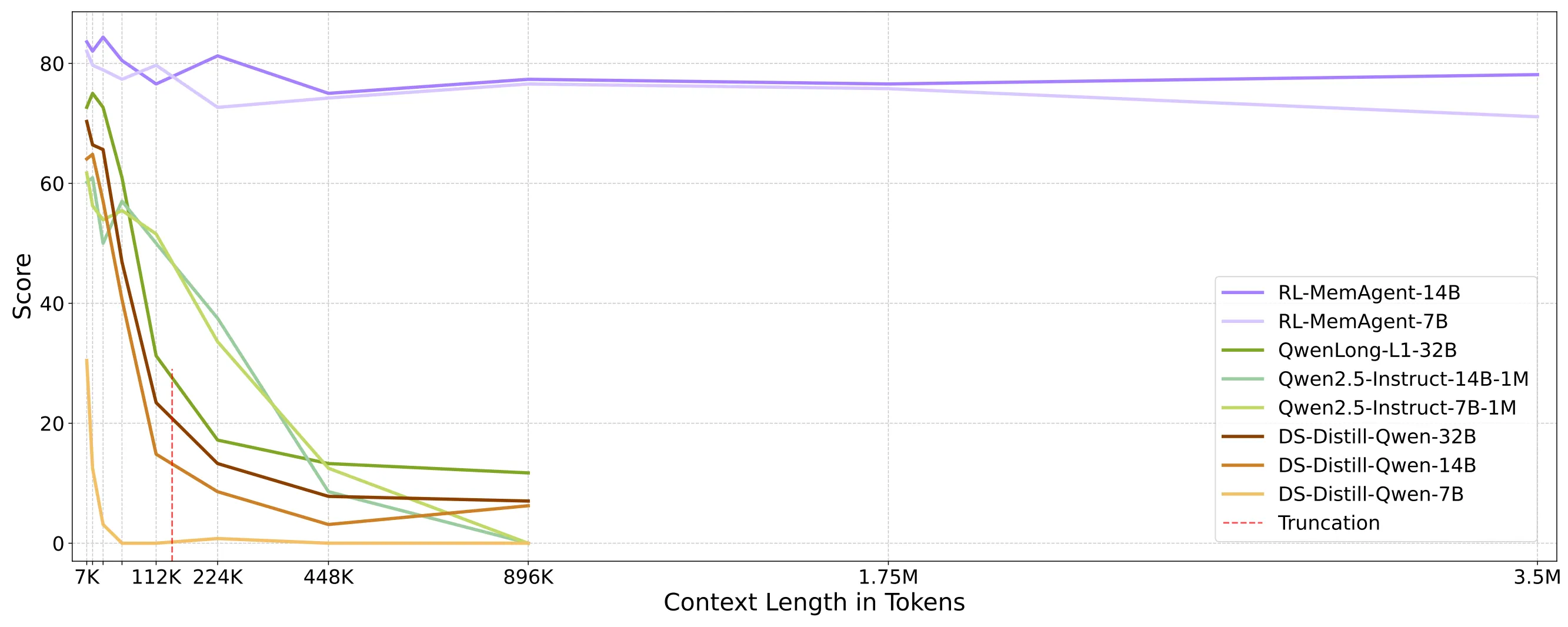
MemAgent is built by the BytedTsinghua-SIA team. It shows strong results on very long inputs, such as 512K tokens (RULER) and tasks reaching 3.5M tokens, while keeping accuracy high and costs in check.
- For a broader look at long-context work, see our short explainer: long-context video.
Project Overview Table
| Item | Details |
|---|---|
| Type | Long-context memory agent for LLMs |
| Purpose | Make LLMs read ultra-long inputs by segmenting text and keeping key facts in a small memory |
| Core Idea | Fixed-length memory panel + chunk-by-chunk processing + final fusion |
| Training | Reinforcement Learning from Verifiable Rewards (RLVR), extended DAPO with multi-conversation (Multi-Conv) setup |
| Models Released | RL-MemAgent-14B, RL-MemAgent-7B |
| Performance Highlights | ~95%+ accuracy on 512K RULER; < ~5.5% drop on 3.5M token tasks (14B) |
| Complexity | Linear in text length (O(N)) per the memory-chunk design |
| Runs With | vLLM local, or online LLM endpoints |
| Good For | Long QA, research reports, multi-hop reading, long meetings, large logs |
MemAgent: Reshaping Long-Context LLM with Multi-Conv RL based Memory Agent Key Features
- Fixed-size memory that updates as the model reads. The model keeps only what matters.
- Works on very long inputs by splitting them into chunks. Each chunk is handled within a normal context window.
- RL-trained workflow. The agent learns to store, update, and later use the right facts.
- Linear time growth. As text grows, the cost scales linearly thanks to chunking and a steady memory size.
- Near-lossless accuracy at extreme lengths. The 14B model shows small drops even at 3.5M tokens.
- Flexible use. Run locally with vLLM or connect to an online endpoint.
How MemAgent Works in Plain Words
MemAgent reads long text in parts. After each part, it writes a short note into its memory panel, keeping only the helpful bits.
When all parts are done, it looks at the memory to form the final answer. This is like taking notes while reading and then writing a summary from those notes.
The Technology Behind It
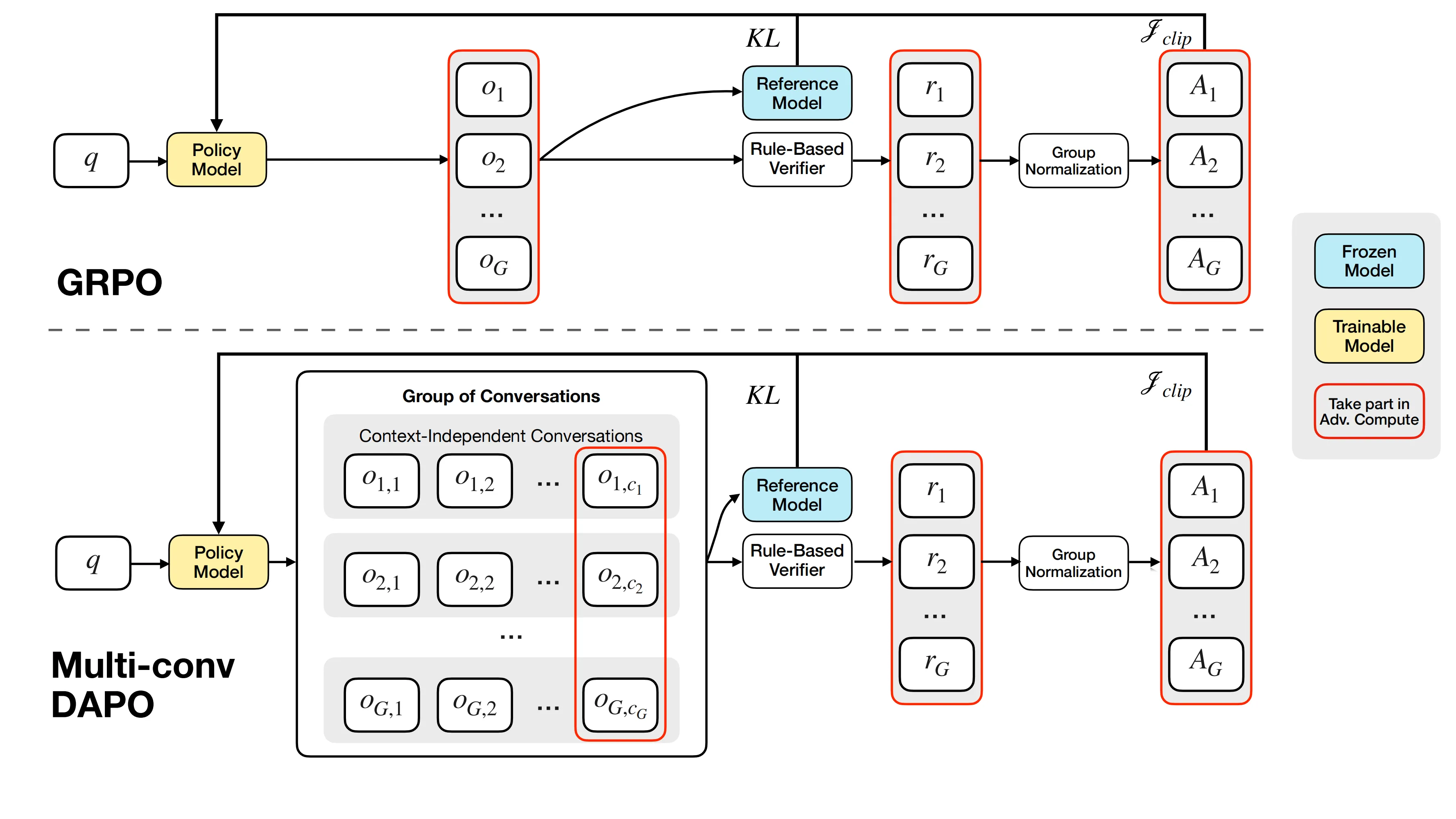
During training, MemAgent uses Reinforcement Learning from Verifiable Rewards (RLVR). The team extends DAPO to support separate, multi-conversation steps that are tied to the same final answer.
In simple terms: the agent tries different ways of reading and remembering. A verifier checks the final answer. The reward goes back to update all the steps that helped.
- Learn more about the team’s broader work here: Bytedance.
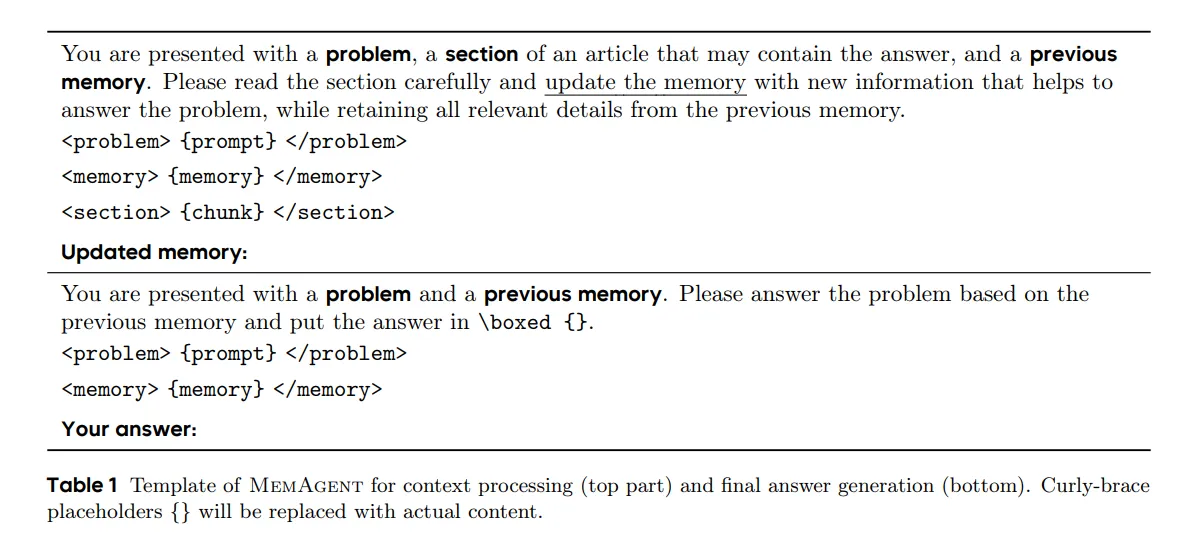
MemAgent also has a clear template for how it processes context and then writes the final answer. This gives a repeatable pattern the RL can improve over time.
MemAgent: Reshaping Long-Context LLM with Multi-Conv RL based Memory Agent Use Cases
- Long research papers and reports: read thousands of pages and keep on-topic facts.
- Complex multi-hop QA: connect facts spread far apart in the text.
- Meeting transcripts: pick key decisions and action items from long calls.
- Logs and incident reports: sift through long logs to answer precise questions.
- Education and study: build study notes while reading a very long source.
Performance & Showcases
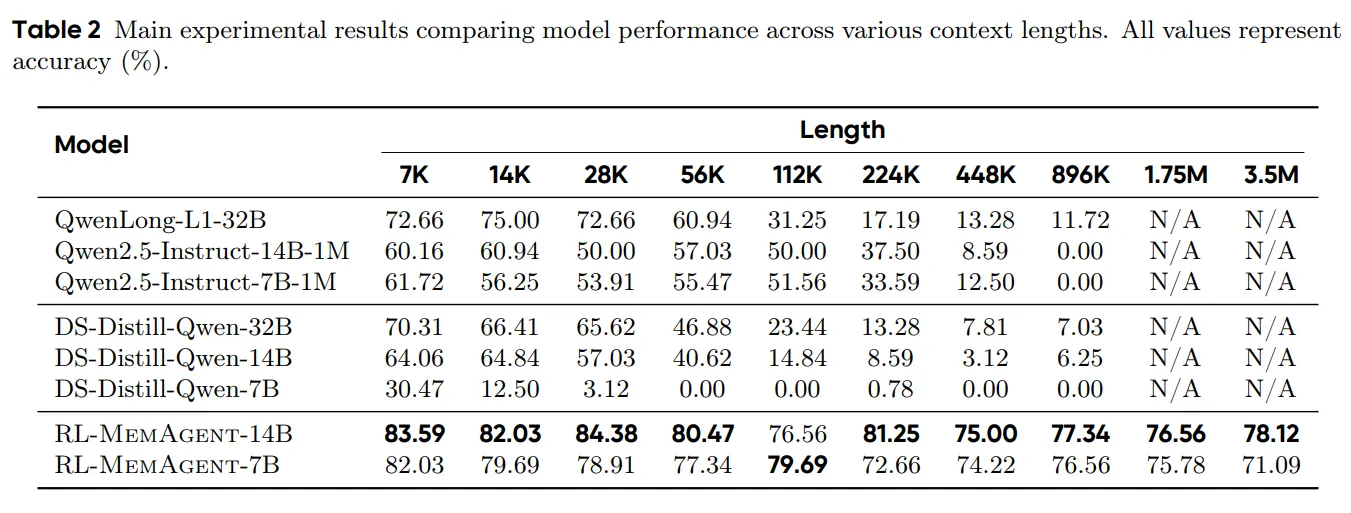
MemAgent is built for stability at very long lengths. Reported results show ~95%+ on 512K RULER tests and small accuracy drops at multi-million token ranges.
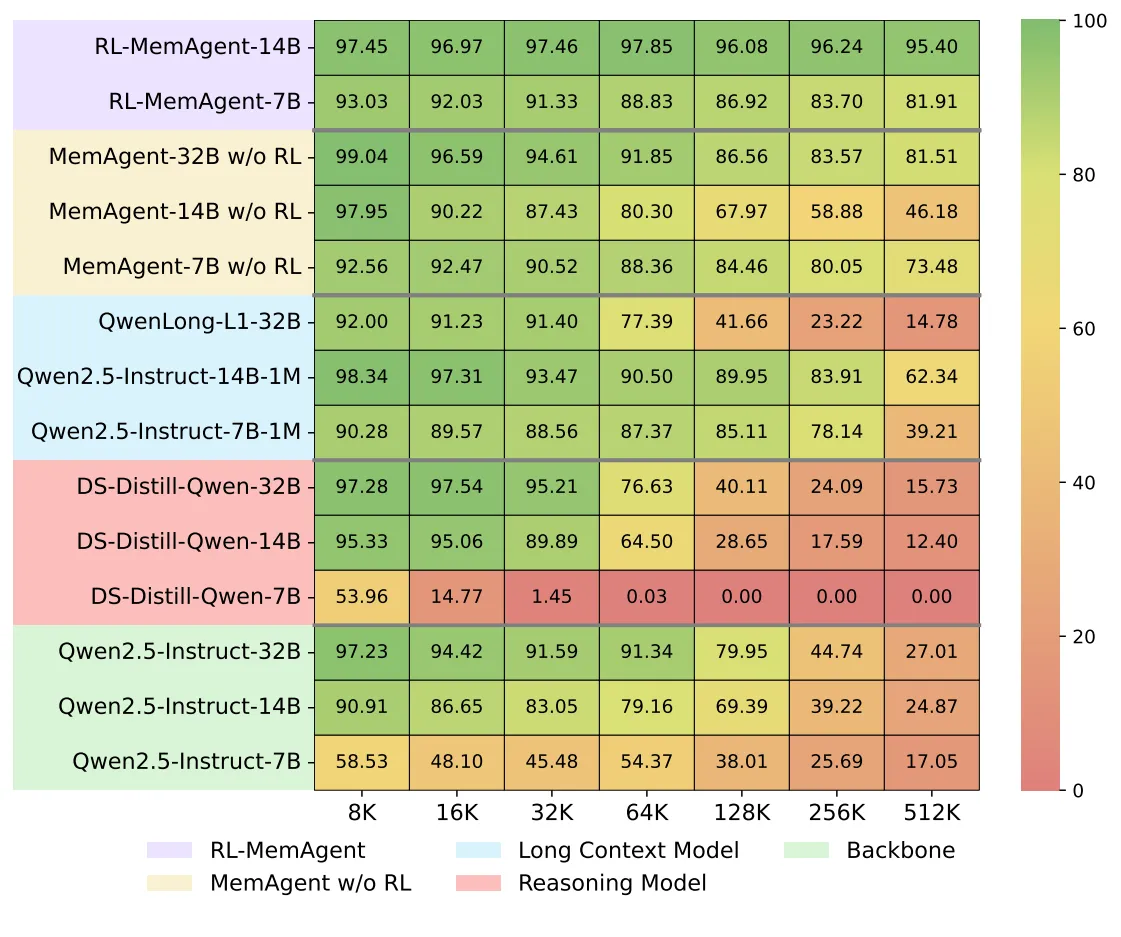
The team also tested across tasks that were not seen during training and with extra QA built from SQuAD. Scores stay high across many lengths and question styles.
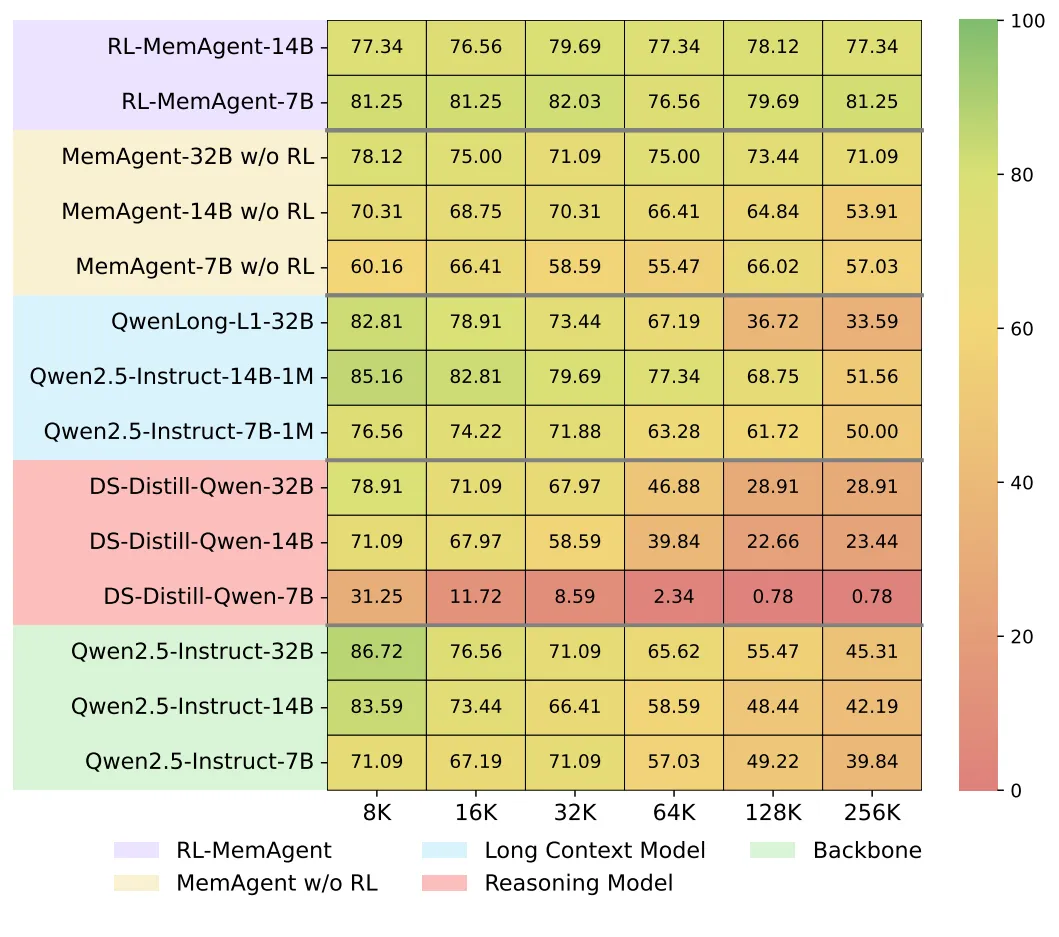
This includes a QA task view from SQuAD within the RULER setup, which helps confirm strong generality.
Installation & Setup (Getting Started)
Below is a step-by-step guide using the exact commands from the repository. Follow them in order.
Quickstart
quickstart.py offers a straightforward way to begin using MemAgent, supporting both local deployment and integration with online model services.
vLLM Local Deployment
- Start the vllm server:
vllm serve BytedTsinghua-SIA/RL-MemoryAgent-14B --tensor_parallel_size 2
Start the vllm server:
vllm serve BytedTsinghua-SIA/RL-MemoryAgent-14B --tensor_parallel_size 2
- Run quickstart.py:
python quickstart.py --model BytedTsinghua-SIA/RL-MemoryAgent-14B
Run quickstart.py:
python quickstart.py --model BytedTsinghua-SIA/RL-MemoryAgent-14B
Online LLM Service
For online LLM services, you'll need to configure your model endpoint and API key as environment variables.
e.g. gpt-4o-2024-11-20:
-
Normal online services: Simply use
https://{endpoint}. -
Azure OpenAI: Use the format
https://{endpoint}/openai/deployments/gpt-4o-2024-11-20.
export URL=
export API_KEY=
python quickstart.py --model gpt-4o-2024-11-20
- Related read on system tooling: CUDA agent notes.
Reproducibility
Performance
In reproduction, you may find that the validation score during training is not equal to the final score (about 50% vs 80%). This behavior is expected because during training we actually used a stricter version of the verifier to prevent reward hacking, while during testing we used a more lenient verifier. Specifically
- In the training verifier, the model’s answer must be placed inside
\boxed{}with exact case matching and no additional characters.
In the training verifier, the model’s answer must be placed inside \boxed{} with exact case matching and no additional characters.
- In the testing verifier, articles like “a/the” are ignored, as are case differences and punctuation.
In the testing verifier, articles like “a/the” are ignored, as are case differences and punctuation.
The stricter training verifier was inherited from earlier math-related RL work, whereas the more relaxed testing verifier aligns with practices in long-context projects such as Ruler and Qwen-Long.
Testing Results
pip install httpx==0.23.1 aiohttp -U ray[serve,default] vllm
- Prepare QA data
cd taskutils/memory_data
bash download_qa_dataset.sh
- Download the dataset
cd ../..
bash hfd.sh BytedTsinghua-SIA/hotpotqa --dataset --tool aria2c -x 10
export DATAROOT=$(pwd)/hotpotqa
- Preparing models
The model used in tests will be downloaded from HuggingFace. However, Qwen2.5-Instruct series models needs to be downloaded manually and properly config their config.json to activate YaRN. Please follow the instruction in Qwen2.5-Instruct Repo
bash hfd.sh Qwen/Qwen2.5-7B-Instruct --tool aria2c -x 10
bash hfd.sh Qwen/Qwen2.5-14B-Instruct --tool aria2c -x 10
bash hfd.sh Qwen/Qwen2.5-32B-Instruct --tool aria2c -x 10
# then change the config.json manually
export MODELROOT=/your/path/to/models # move to your model root directory, this env variable is used in the run.py script
mv Qwen2.5-7B-Instruct $MODELROOT/Qwen2.5-7B-Instruct-128K
mv Qwen2.5-14B-Instruct $MODELROOT/Qwen2.5-14B-Instruct-128K
mv Qwen2.5-32B-Instruct $MODELROOT/Qwen2.5-32B-Instruct-128K
- Running
Note: This will take a few days to run all the tests, you may want to specify which tests/models to run.
cd taskutils/memory_eval
python run.py
Note: This scripts will use all available GPUs to serve the models. If you have multiple GPU nodes, you can create a ray cluster and run the script in one of cluster nodes. Use SERVE_PORT and DASH_PORT to specify the ports for the ray cluster.
cd taskutils/memory_eval
SERVE_PORT=8000 DASH_PORT=8265 python run.py # port numbers here are default values, you may need to specify them as the serve/dashboard port in your ray cluster
Training
Fistly specify PROJ_ROOT (for checkpoints) and DATASET_ROOT (for training data, should be the same as used in testing) in run_memory_7B.sh and run_memory_14B.sh.
Then run this script directly to launch a single-node training, or config a ray cluster properly and run the script in one of the cluster nodes.
Data
Please run the following commnads in this section under thetaskutils/memory_data directory.
cd taskutils/memory_data
pip install nltk pyyaml beautifulsoup4 html2text wonderwords tenacity fire
-
Train & dev split: hotpotqa_train.parquet & hotpotqa_dev.parquet
-
Download qa dataset and synthetic data, skip this step if you have downloaded it in the previous step:
bash download_qa_dataset.sh
python processing.py # Dataprocess, synthetic long context multihop-QA
- Deploy Qwen-7B in localhost:8000 and Qwen-7B-Instruct in localhost:8001
Deploy Qwen-7B in localhost:8000 and Qwen-7B-Instruct in localhost:8001
- filtering
filtering
python filter.py -i hotpotqa_dev_process.parquet -o hotpotqa_dev_result --noresume
python filter.py -i hotpotqa_train_process.parquet -o hotpotqa_train_result --noresume
python3 filter2.py # Filtering out sample which can be answered correctly by LLM without any context:
2. Main task: eval_{50|100|200|...}.json
export DATAROOT="your_dir_to_hotpotqa_dev.parquet"
python convert_to_eval.py # Convert the `hotpotqa_dev` to `eval_200.json`
python different_docs_eval.py.py # Create eval dataset with different number of documents
3. OOD task: eval_{rulersubset}_{8192|16384|...}.json
export DATAROOT="your_dir_to_hotpotqa_dev.parquet"
python download_paulgraham_essay.py
bash download_qa_dataset.sh
bash ruler_data_prepare.sh
- If your work touches media agents too, you may also like this related read: Long Context Video.
Tips for Reproducibility
During training, the verifier is strict. The answer must be inside \boxed{} with the exact case and no extra characters.
During testing, the verifier is more relaxed. It ignores “a/the,” case, and punctuation. So, seeing a higher final score than the mid-training score is normal.
Engineering Notes
Sync mode: From tool-calling to general workflow. Inspired by Search-R1, the code supports a general multi-conversation workflow with independent context, not just a single long concatenated prompt.

- For more related projects and updates, see this collection: work from Bytedance.
FAQ
Does MemAgent change the base LLM architecture?
No. It adds a fixed-size memory panel and a workflow on top. The base model weights and layers stay the same.
What models are available right now?
The team released RL-MemAgent-14B and RL-MemAgent-7B. Both aim for strong results on very long inputs.
Can I run this with an online API?
Yes. You can point quickstart.py to an online endpoint by setting URL and API_KEY. There is also a local vLLM option if you prefer to run it on your own server.
Image source: MemAgent: Reshaping Long-Context LLM with Multi-Conv RL based Memory Agent