Bringing Conversations to Life: The Power of INFP Audio-Driven Head Generation
What is Bringing Conversations to Life: The Power of INFP Audio-Driven Head Generation
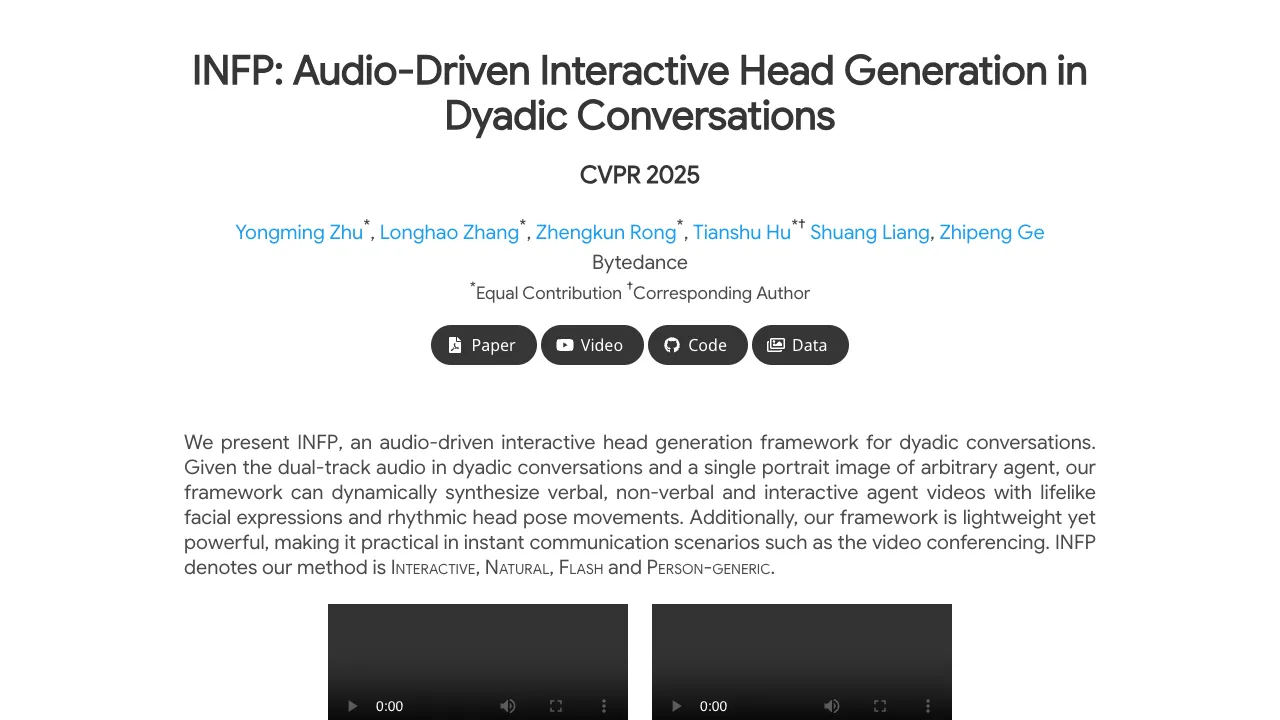
INFP is a research project that turns a single photo and a two-person audio track into a talking and listening head video. It follows who is speaking and who is listening, and switches the face and head moves to match the moment. This makes back-and-forth chats feel natural to watch.
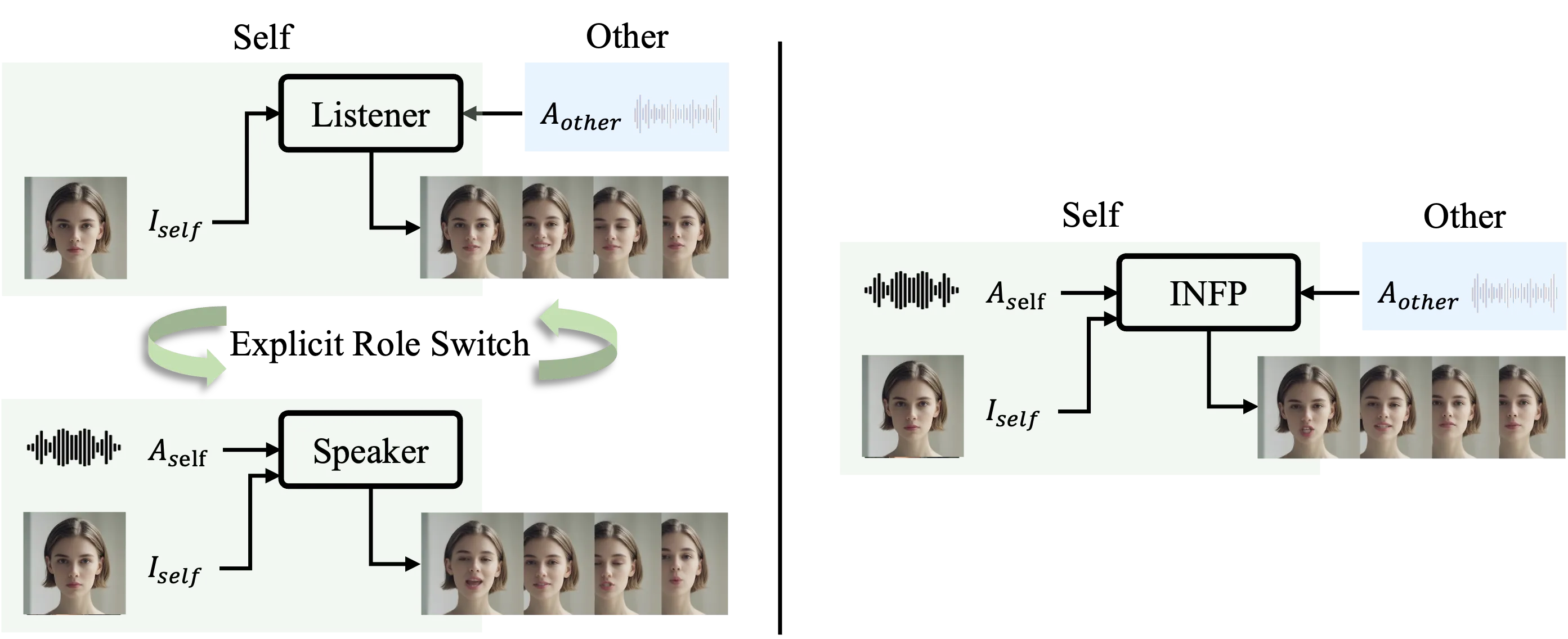
It works for two-party talks, also called dyadic conversations. You give it a portrait image and the audio from both people on separate tracks, and it creates the right mouth, face, and head motions for each part of the chat.
Bringing Conversations to Life: The Power of INFP Audio-Driven Head Generation Overview
Here is a quick look at the project.
| Item | Details |
|---|---|
| Type | Audio-driven head video generation for two-person conversations |
| Purpose | Create responsive speaking and listening head videos from one portrait image and dual-track audio |
| Inputs | Single portrait image; dual-track audio from a two-person conversation |
| Outputs | Short videos with matching speech, expressions, and head moves |
| Main Features | Dynamic role switching (speaker/listener), verbal and non-verbal cues, motion that adapts to audio, runs light and fast |
| Who It’s For | Video chat apps, virtual hosts, customer service agents, education tools, and research demos |
| Data Mentioned | DyConv: a large-scale collection of two-person conversations |
| Project Page | Visit the INFP page |
For more AI projects and guides, see our main hub at Omnihuman 1.Com.
Bringing Conversations to Life: The Power of INFP Audio-Driven Head Generation Key Features
- Switches between speaking and listening on its own, without manual role tags.
- Matches mouth shapes, facial cues, and head nods to speech and pauses.
- Works from only one portrait image of the agent.
- Adapts the motion style to different audio clips from the same image.
- Designed to be light enough for quick responses, like in a meeting app.
- Person-generic: it supports many faces, not just one fixed identity.
If you follow trends from major labs and products, you may also like our short profile of the company powering many media tools here: Bytedance.
Bringing Conversations to Life: The Power of INFP Audio-Driven Head Generation Use Cases
- Video conferencing: turn a static avatar into a talking head that reacts and nods during calls.
- Virtual presenters: create teaching, news, or product clips from a photo and a script read by two speakers.
- Customer support avatars: show attentive listening and then reply with synced face moves.
- Accessibility: create easy-to-watch summaries of talks with clear face cues.
- Research and prototyping: test two-person avatar agents fast.
Read more on high-quality media creation in our short explainer: Goku Video Generation.
Performance & Showcases
Showcase 1 — INFP overview for two-person chats We present INFP, an audio-driven interactive head generation framework for dyadic conversations. Given the dual-track audio in dyadic conversations and a single portrait image of arbitrary agent, our framework can dynamically synthesize verbal, non-verbal and interactive agent videos with realistic facial expressions and rhythmic head pose movements. Additionally, our framework is lightweight yet powerful, making it practical in instant communication scenarios such as the video conferencing. INFP denotes our method is Interactive, Natural, Flash and Person-generic.
Showcase 2 — Another overview clip of INFP in action We present INFP, an audio-driven interactive head generation framework for dyadic conversations. Given the dual-track audio in dyadic conversations and a single portrait image of arbitrary agent, our framework can dynamically synthesize verbal, non-verbal and interactive agent videos with realistic facial expressions and rhythmic head pose movements. Additionally, our framework is lightweight yet powerful, making it practical in instant communication scenarios such as the video conferencing. INFP denotes our method is Interactive, Natural, Flash and Person-generic.
Showcase 3 — Motion changes based on different audio Our method can generate motion-adapted synthesis results for the same reference image based on different audio inputs. This demo shows the effect clearly.
Showcase 4 — More motion variety from the same image Our method can generate motion-adapted synthesis results for the same reference image based on different audio inputs. This demo shows the effect clearly.
Showcase 5 — Another example of audio-shaped motion Our method can generate motion-adapted synthesis results for the same reference image based on different audio inputs. This demo shows the effect clearly.
Showcase 6 — Out-of-distribution behavior Our method can generate motion-adapted synthesis results for the same reference image based on different audio inputs. This demo shows the effect clearly.
How INFP Works in Simple Steps
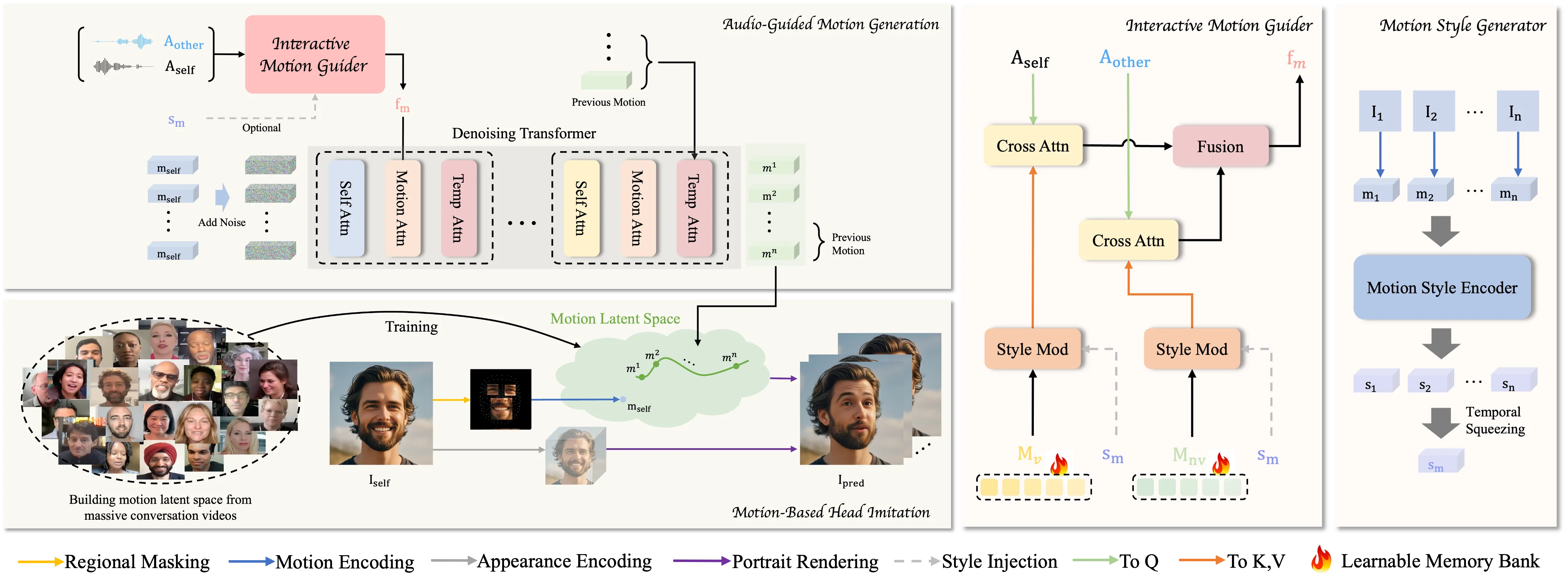
Step 1: Motion-Based Head Imitation. The model studies real talk videos and learns a small set of motion codes that capture mouth, face, and head moves. It then uses these codes to turn a still image into a moving head.
Step 2: Audio-Guided Motion Generation. The system listens to two audio tracks (one per person). It maps the audio to motion codes and adds or reduces noise during training to learn strong timing and style.
Role switching is automatic. The model detects who is speaking and who is listening from the dual-track audio. It then picks the right motion codes to show speech, pauses, nods, or attentive looks.
The Technology Behind It
- Motion latent space: a compact “code” that holds expressive face and head moves learned from many real talks.
- Dual-track audio: two separate audio streams tell the system who is active at each moment.
- Denoising learning: helps the model turn audio into clean, stable motion codes that look natural over time.
If you are exploring related AI media topics, you may also enjoy our short coverage here: Bytedance.
Installation & Setup
There is no public installation guide or runnable code provided in the materials we reviewed. To explore the project, watch the demos and read the details on the project page: INFP Project Page.
For a broader set of AI media tools and guides, visit our main site: Omnihuman 1.Com.
Tips for Best Results
- Use a clear, front-facing portrait with good lighting.
- Provide clean dual-track audio with low background noise.
- Keep the audio tracks aligned in time so the speaking turns are easy to read.
FAQs
What input do I need?
You need one portrait image and a two-person audio recording with each person on a separate track.
Can it react to pauses and listening moments?
Yes, it can show non-verbal cues like nods and listening states based on the audio timing.
Does it work with any face?
It is designed to be person-generic and can animate many different faces from a single image.
What makes dual-track audio important?
It clearly marks who is speaking and who is listening, so the model can switch roles at the right time.
Is this ready for video calls today?
The demos suggest it is light and quick, which fits real-time chat needs. Actual app use depends on product integration.
Image source: Bringing Conversations to Life: The Power of INFP Audio-Driven Head Generation