Helios AI: Redefining the Limits of Real-Time Long Video Generation
What is Helios AI: Redefining the Limits of Real-Time Long Video Generation
Helios AI is a large text-to-video model that focuses on speed and long, steady output. It can make minute-long clips while keeping a stable look and story, and it runs fast enough for near real-time use on strong GPUs.

Built by PKU Yuan Group, Helios is a 14B-parameter model that reaches up to 19.5 frames per second on a single NVIDIA H100. It is built to keep scenes and motion steady over many hundreds of frames, making it useful for longer clips, demos, and live creative work.
Helios AI: Redefining the Limits of Real-Time Long Video Generation Overview
Below is a quick project overview with the most important details.
| Item | Details |
|---|---|
| Project Name | Helios AI |
| Type | Text-to-Video Generation Model |
| Model Size | 14B parameters |
| Key Strength | Real-time speed on a single NVIDIA H100 (up to 19.5 FPS) |
| Long Video Support | Minute-scale generation with steady scenes over hundreds of frames |
| Primary Input | Text prompts |
| Output | Video clips (multi-hundred-frame demos shown) |
| Who Built It | PKU Yuan Group |
| Official Page | Project website |
| Best For | Fast demos, concept videos, long shots, and content that needs both length and speed |

If you are exploring fast video systems from other teams too, check out our short review of Goku Video Generation.
Helios AI: Redefining the Limits of Real-Time Long Video Generation Key Features
- Real-time speed: up to 19.5 FPS on a single NVIDIA H100 GPU.
- Long shots: minute-scale videos with steady motion across many frames.
- Large model: 14B parameters tuned for strong output quality and smooth motion.
- Stable scenes: keeps backgrounds, subjects, and style consistent over time.
- Wide range of looks: from city shots to fantasy worlds, from pets to space scenes.
- Single-GPU focus: designed to run well on one H100 for practical use in labs and studios.
How Helios AI Works
Think of Helios as a fast frame maker that reads your text and then makes the next frame again and again without big slowdowns. It keeps track of what came before so the look and motion stay stable.
This makes it good for long shots where the camera moves or subjects keep going across the scene. For a simple guide to long memory in video models, see our quick explainer on long context video ideas.
The Technology Behind It
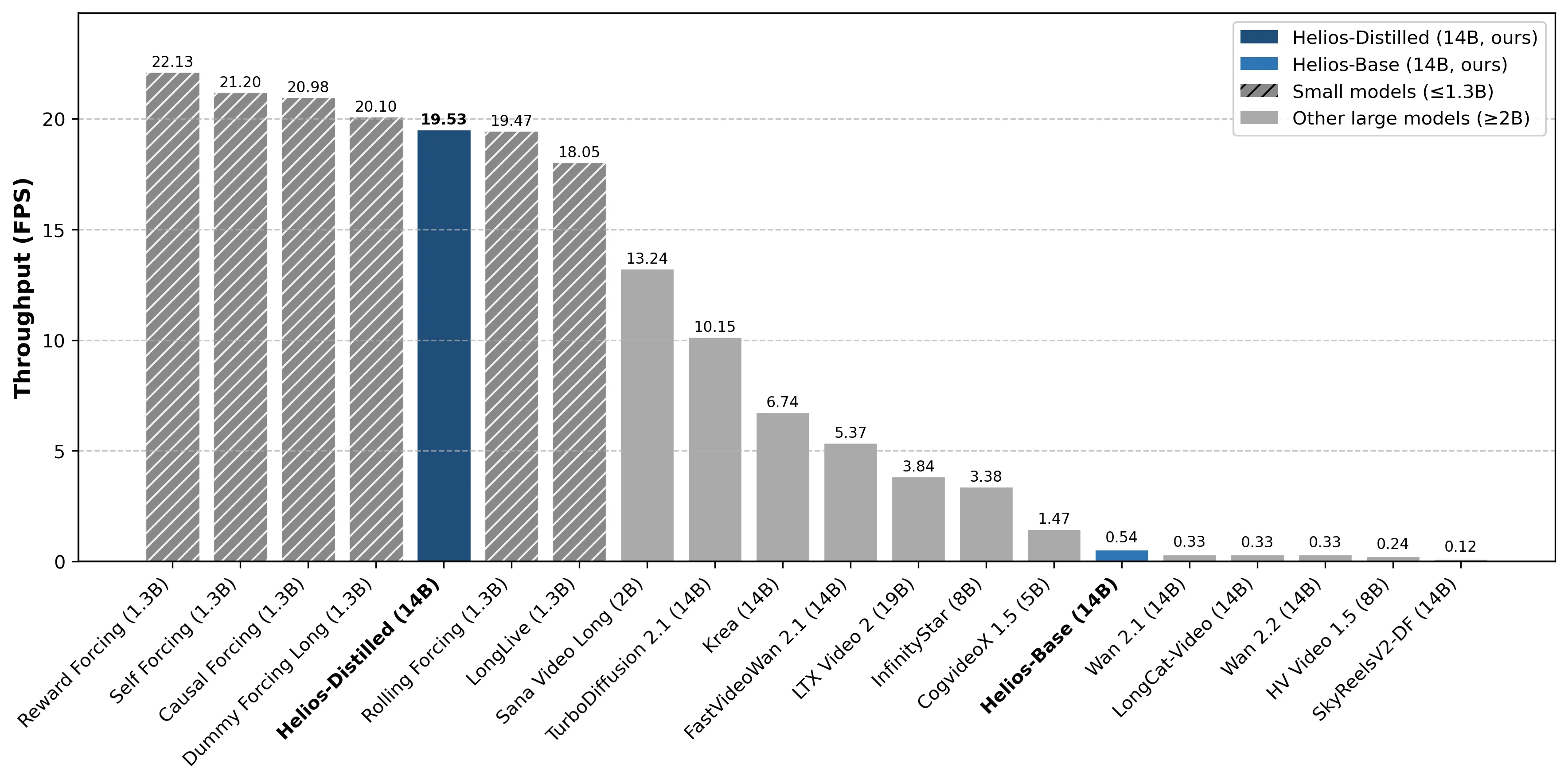
Helios is a 14B model tuned for speed and steady output. The team shows that it can reach 19.5 FPS on a single NVIDIA H100 while keeping minute-scale clips stable.
They also share a throughput chart that compares end-to-end FPS with other video models at the same setup and resolution.
Performance & Showcases
Here are short demos that show how Helios compares with other systems. Each clip highlights a different model name so you can judge speed and look side by side.
Speed at a glance
This highlight shows why speed matters for creators who want quick feedback. At 19.5 FPS on a single H100, Helios enables fast turnarounds for testing ideas and building longer videos.
Showcase 1 — Helios This clip, labeled “Helios,” shows the project’s own output focus: fast frame rates and long, steady motion. Use it to judge the balance between speed and image detail.
Showcase 2 — Pyramid Flow This clip is labeled “Pyramid Flow.” It helps you compare style, motion smoothness, and stability over time next to Helios.
Showcase 3 — MAGI-1 The “MAGI-1” clip offers another point of view on speed and look. Watch for sharpness, motion flow, and how well the scene holds together.
Showcase 4 — InfinityStar The “InfinityStar” clip is useful to compare pacing and detail. Check how motion transitions feel and how the scene keeps its form.
Showcase 5 — SkyReels V2 DF 1.3B This “SkyReels V2 DF 1.3B” clip lets you compare a smaller model’s behavior. Notice motion quality and any changes in fine detail.
Showcase 6 — SkyReels V2 DF 14B The “SkyReels V2 DF 14B” clip gives a match in size to Helios. Look at stability, speed, and how long shots hold their style.
Helios AI: Redefining the Limits of Real-Time Long Video Generation Use Cases
- Content creation: quick concept videos, trailers, and mood pieces for teams that need speed.
- Advertising and social: fast story drafts that can run longer than short clips.
- Education: clear scenes for lessons and explainers with smooth, steady motion.
- Research and labs: test beds for long-context behavior and real-time pipelines.
- Live and events: near real-time rendering for art shows and interactive booths.
What It Can Make: From City Streets to Fantasy Worlds
The public showcases include a wide range of scenes. You can see city views, museums, forests, cats running through gardens, and even space themes.
There are also playful ideas like a corgi with a camera on a Maui beach or a kangaroo walking through a rainy street. Long clips with hundreds of frames show how the model keeps motion steady over time.
Getting Started
- Visit the official page: Helios project website. Watch the demos and read the notes on speed and long shots.
- Check hardware notes: the fastest results shown are on a single NVIDIA H100.
- Follow the project page for updates on releases, model access, or new demos.
If you are comparing teams and methods for fast text-to-video, you may also enjoy our short overview of Goku AI.
Tips for Better Prompts
- Be clear and concrete. Name the subject, camera move, and mood in simple words.
- Add time details. Say if you want slow motion, a long pan, or a steady close-up.
- Include setting hints. For example: city at night, misty forest, or moon surface.
Why Speed Matters for Long Clips
Fast generation cuts waiting time and helps teams try more ideas per hour. When a model stays near real-time, you can adjust the prompt and see changes quickly.
Helios aims to give both length and speed, which is rare for very large models. That mix helps with testing, live demos, and steady long shots.
FAQ
What does “minute-scale generation” mean?
It means the model can keep making frames long enough to form videos that last minutes, not just a few seconds. The key is to keep scenes and motion steady across many hundreds of frames.
What GPU do I need to match the shown speed?
The team’s numbers come from a single NVIDIA H100. Other GPUs can run the model but may not reach the same frames per second.
Can I control camera moves and style?
Yes. Write prompts that say the camera angle, movement, and overall look. Clear, short notes in your text help the model follow your intent.
Where can I watch official demos?
the Helios project website. You will find side-by-side clips, long shots, and model comparisons.
Is the code or model download available?
Check the official page for any updates. Availability can change over time as the team shares more.
How does Helios compare to other fast video tools?
From the shared charts, Helios focuses on speed and long shots on a single H100. You can also review other approaches, like our notes on Goku Video Generation, to see how different teams approach speed and scaling.
Image source: Helios AI: Redefining the Limits of Real-Time Long Video Generation