High-Resolution Video in a Flash: Meet FlashVideo for Efficient Generation
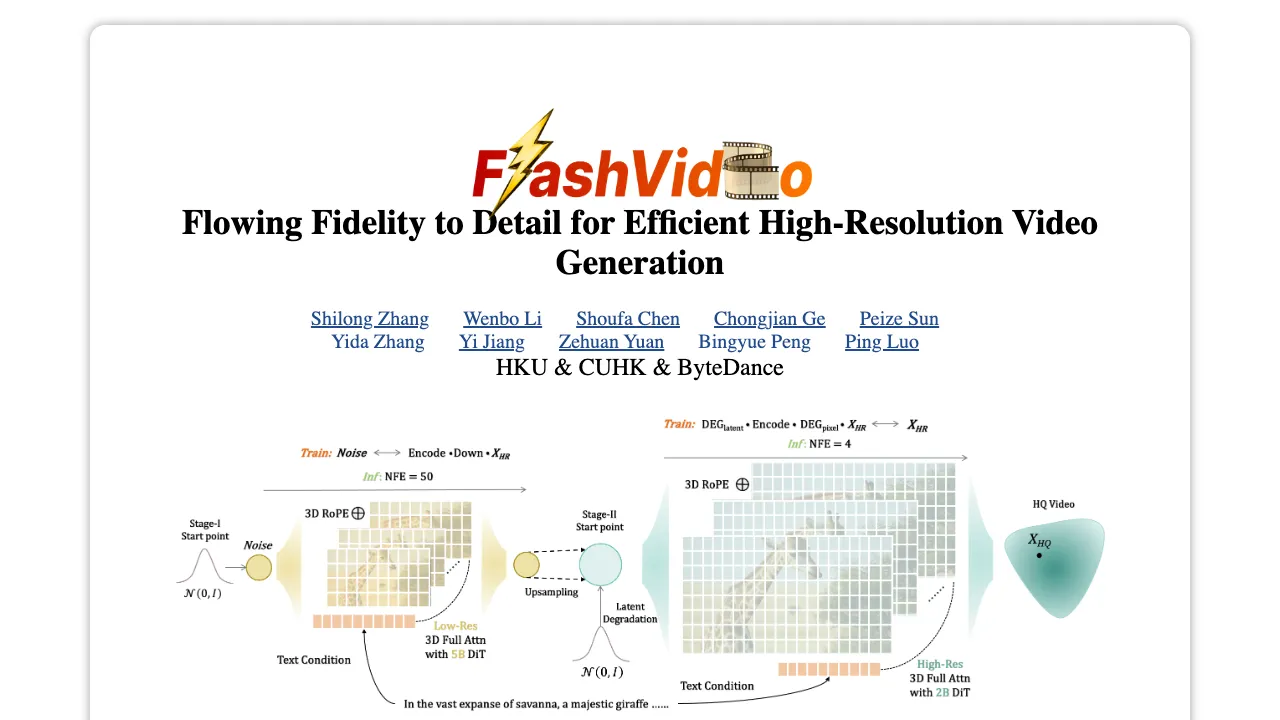
What is High-Resolution Video in a Flash: Meet FlashVideo for Efficient Generation
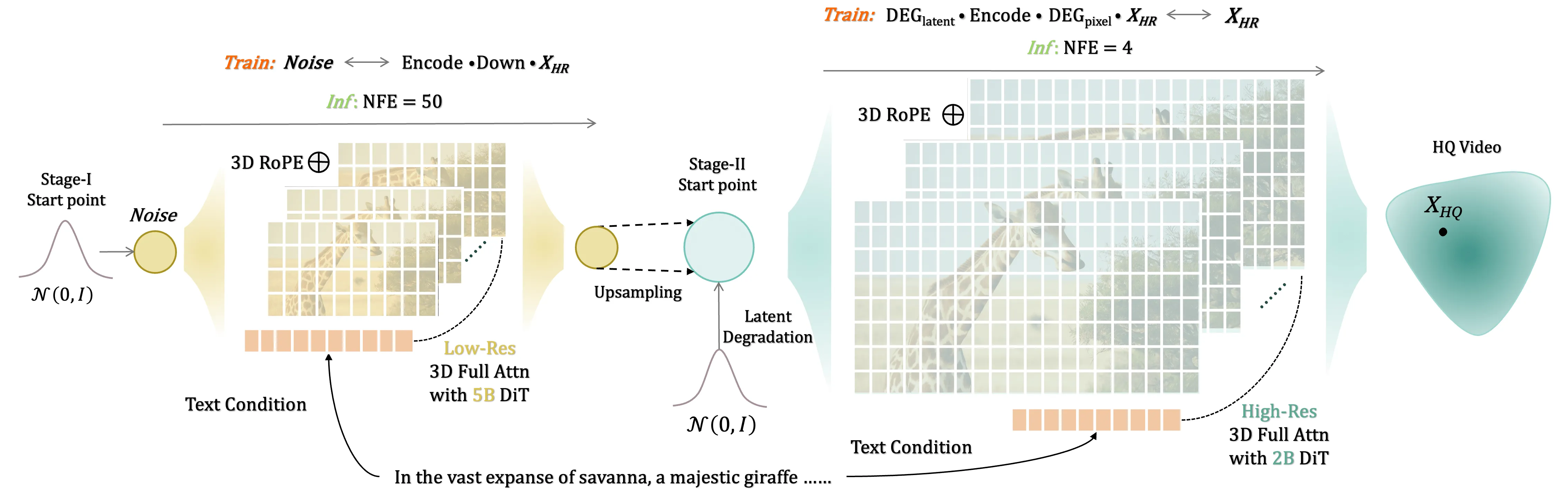
FlashVideo is a two-step tool that turns long, detailed text prompts into crisp videos fast. It first makes a 270p draft, then boosts it to 1080p with extra detail while keeping things quick and light on hardware.

FlashVideo comes with ready-to-use model files, simple commands, and a small demo notebook. It works best when your prompt is rich and specific.
High-Resolution Video in a Flash: Meet FlashVideo for Efficient Generation Overview
Here is a quick view of what the project offers and how it helps you.
| Item | Details |
|---|---|
| Type | Open-source text-to-video toolkit |
| Purpose | Fast, high-resolution video creation from detailed text prompts |
| Main Workflow | Stage-I generates 270p; Stage-II enhances to 1080p |
| Inputs | Long, descriptive text prompts (works best with rich prompts) |
| Outputs | 270p and 1080p videos |
| Speed Notes | 270p: ~30s at NFE=50; 1080p: ~72s at NFE=4 (from 270p) |
| Models Included | Stage-I (270p), Stage-II (1080p), 3D VAE (same as CogVideoX) |
| Run Options | Jupyter notebook or shell script with multi-GPU support |
| Best For | Creators who want good detail and quick results |
| Code & Weights | Inference code for both stages and checkpoints provided |
Tip: If you are new to this topic, see our plain-language intro to text-to-video tools here: simple text-to-video primer.
High-Resolution Video in a Flash: Meet FlashVideo for Efficient Generation Key Features
- Two-stage flow that saves time: a fast 270p draft, then clean 1080p upscaling.
- Ready weights for both stages, plus a 3D VAE identical to CogVideoX.
- Works best with long prompts that clearly describe the scene and motion.
- Easy paths to run: a Jupyter notebook for testing and a bash script for batch jobs.
- Multi-GPU support for faster runs with a single file of prompts.
- Practical defaults tuned for an 80G GPU, with simple slice settings to fit smaller GPUs.

High-Resolution Video in a Flash: Meet FlashVideo for Efficient Generation Use Cases
- Marketing clips from text briefs for quick reviews and edits.
- Storyboards and mood videos for film, ads, or social posts.
- Education snippets to explain topics in short scenes.
- Quick content for creators who need many drafts in a day.
Read More: Goku Video Generation
How FlashVideo Works
- Step 1: Stage-I turns your detailed text prompt into a 270p video. This builds the scene and motion first.
- Step 2: Stage-II takes that 270p output and lifts it to 1080p. It adds finer lines, textures, and cleaner edges.
- A shared 3D VAE keeps structure and timing steady across both steps.
The team recommends rich prompts because both stages were trained that way. Simple or very short prompts may look plain. Use the example in example.txt style for best results.
The Technology Behind It
FlashVideo uses a 3D video auto-encoder (the same one used by CogVideoX) to keep motion and frames aligned. Stage-I focuses on getting the scene right fast at 270p. Stage-II then refines to 1080p with only a few steps (NFE=4), saving time.
There is also a Gradio option and an implementation with diffusers planned in the repo. Training code and augmentation are in progress in their public work stream.
Read More: project page for FlashVideo
Getting Started: Installation & Setup
Follow these steps exactly as shown. Do not skip any lines.
1) Environment Setup
This repository is tested with PyTorch 2.4.0+cu121 and Python 3.11.11. You can install the necessary dependencies using the following command:
pip install -r requirements.txt
2) Preparing the Checkpoints
To get the 3D VAE (identical to CogVideoX), along with Stage-I and Stage-II weights, set them up as follows:
cd FlashVideo
mkdir -p ./checkpoints
huggingface-cli download --local-dir ./checkpoints FoundationVision/FlashVideo
Your checkpoints folder should then look like this:
├── 3d-vae.pt
├── stage1.pt
└── stage2.pt
Generate Your First Video
FlashVideo supports a notebook flow and a multi-GPU script flow. Both are easy to try.
Important
Both Stage-I and Stage-II were trained with long prompts only. For best results, write detailed prompts like the one in example.txt.
Option A: Jupyter Notebook
You can conveniently provide user prompts in our Jupyter notebook. The default configuration for spatial and temporal slices in the VAE Decoder is tailored for an 80G GPU. For GPUs with less memory, one might consider increasing the spatial and temporal slice.
flashvideo/demo.ipynb
Option B: Text File + Multi-GPU
You can conveniently provide the user prompt in a text file and generate videos with multiple gpus.
bash inf_270_1080p.sh
Performance & Showcases
Below are sample clips that match the project’s public “ization Results” section. Timings to keep in mind: 270p from prompt takes about 30 seconds at NFE=50, and 270p to 1080p takes about 72 seconds at NFE=4.
Showcase 1 — Fluffy llama with round glasses in a cozy cafe with warm lighting, working on laptop, amidst large-eyed expressions. Heading: ization Results | Label: Brief Summary of Text Prompt: Fluffy llama with round glasses in a cozy cafe with warm lighting, working on laptop, amidst large-eyed expressions. The clip shows steady motion and warm tones that match the prompt.
Showcase 2 — Fluffy llama with round glasses in a cozy cafe with warm lighting, working on laptop, amidst large-eyed expressions. Heading: ization Results | Label: Brief Summary of Text Prompt: Fluffy llama with round glasses in a cozy cafe with warm lighting, working on laptop, amidst large-eyed expressions. Details like glasses shine and eye size are kept across frames.
Showcase 3 — Fluffy llama with round glasses in a cozy cafe with warm lighting, working on laptop, amidst large-eyed expressions. Heading: ization Results | Label: Brief Summary of Text Prompt: Fluffy llama with round glasses in a cozy cafe with warm lighting, working on laptop, amidst large-eyed expressions. The scene holds a cozy look, and the character remains consistent.
Showcase 4 — Fluffy llama with round glasses in a cozy cafe with warm lighting, working on laptop, amidst large-eyed expressions. Heading: ization Results | Label: Brief Summary of Text Prompt: Fluffy llama with round glasses in a cozy cafe with warm lighting, working on laptop, amidst large-eyed expressions. The movement is smooth and the lighting reads as warm.
Showcase 5 — Fluffy llama with round glasses in a cozy cafe with warm lighting, working on laptop, amidst large-eyed expressions. Heading: ization Results | Label: Brief Summary of Text Prompt: Fluffy llama with round glasses in a cozy cafe with warm lighting, working on laptop, amidst large-eyed expressions. Note how the style and mood stick to the text.
Showcase 6 — Fluffy llama with round glasses in a cozy cafe with warm lighting, working on laptop, amidst large-eyed expressions. Heading: ization Results | Label: Brief Summary of Text Prompt: Fluffy llama with round glasses in a cozy cafe with warm lighting, working on laptop, amidst large-eyed expressions. The final upscale keeps color and shape stable.
Tips for Better Results
- Write full, vivid prompts. Name the subject, mood, setting, and light.
- Keep your first tests short to learn what works with your GPU.
- If memory is tight, increase spatial and temporal slices in the notebook.
Who Made FlashVideo?
FlashVideo is created by a team from HKU, CUHK, and ByteDance. The authors include Shilong Zhang, Wenbo Li, Shoufa Chen, Chongjian Ge, Peize Sun, Yida Zhang, Yi Jiang, Zehuan Yuan, Bingyue Peng, and Ping Luo.
FAQ
Do I need a huge GPU?
No. The default notebook is tuned for an 80G GPU, but you can raise the slice settings to fit smaller GPUs. This trades speed for memory.
Can I use very short prompts?
You can, but results may be weak. The models were trained on long prompts, so detailed text works best.
How fast is it in practice?
From prompt to 270p takes about 30 seconds at NFE=50. From 270p to 1080p takes about 72 seconds at NFE=4.
Where can I learn more about text-to-video basics?
Start here for an easy overview: text-to-video basics. It explains the idea in plain words.
Image source: High-Resolution Video in a Flash: Meet FlashVideo for Efficient Generation