DreamOmni: The All-in-One Solution for Seamless Image Generation and Editing
What is DreamOmni: The All‑in‑One Solution for Image Generation and Editing
DreamOmni is a single AI model that makes new images from text and also edits existing images. It aims to put many image tasks under one roof, so you don’t need separate tools for each job. The team built a simple way to create training data, then taught one model to handle both making and editing images well.
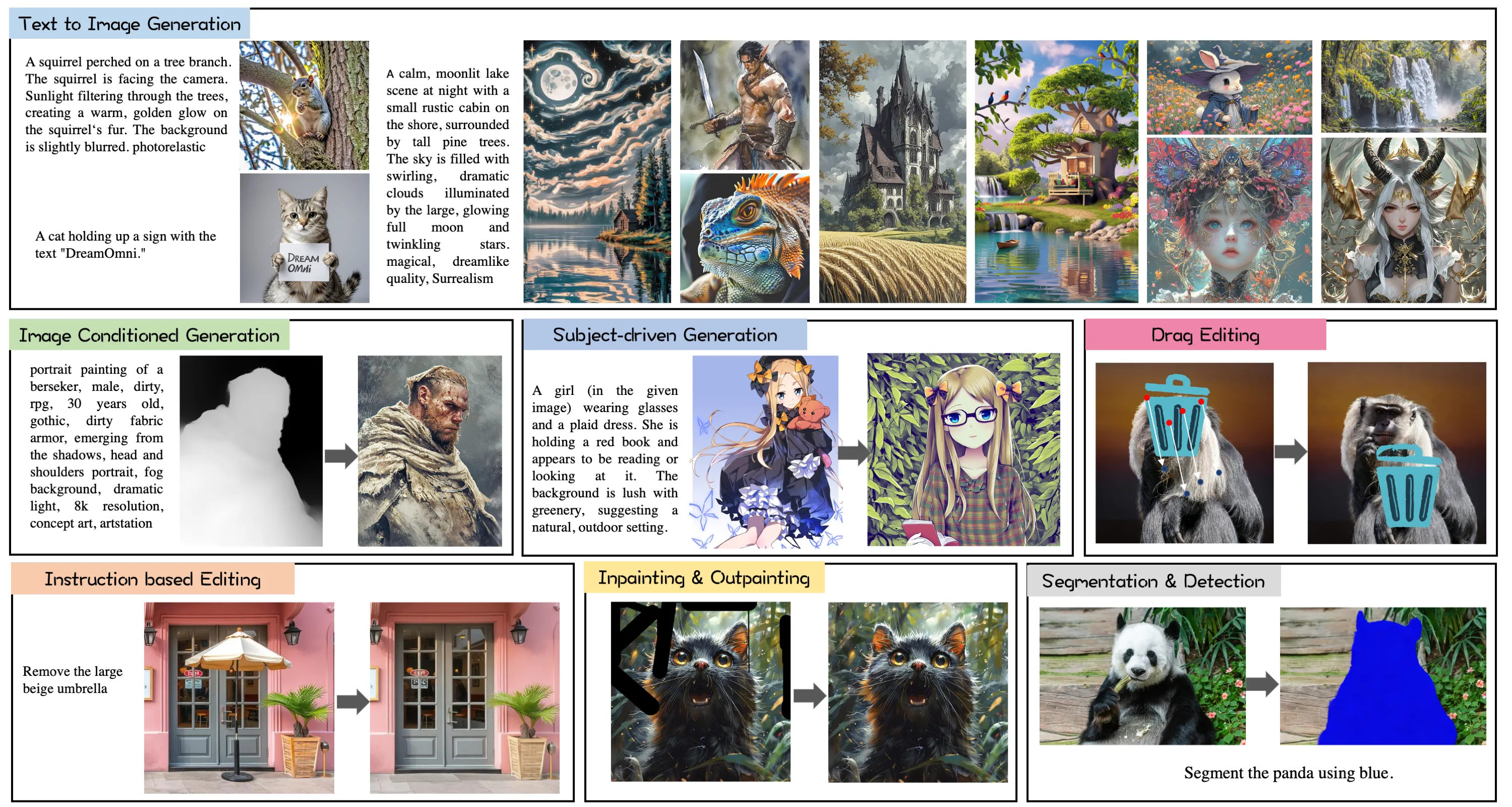
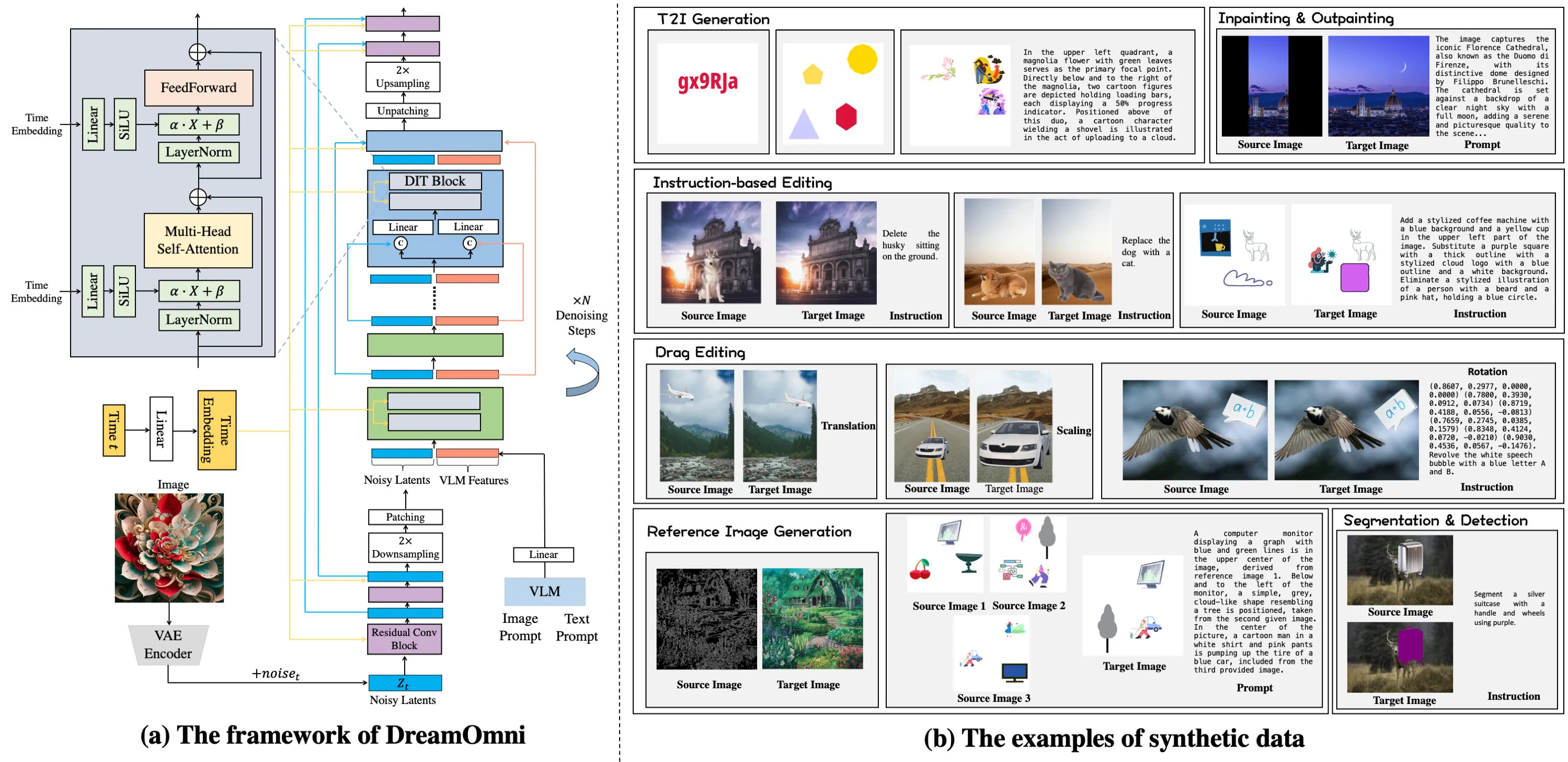
This project focuses on two big ideas. First, it blends text‑to‑image (T2I) with many kinds of edits in one place. Second, it uses a fast “sticker‑like” data pipeline to build clear, high‑quality edit examples, so the model can learn fine changes with good control.
If you follow industry news and want broader context on media AI, see our short overview of Bytedance research for more background on related work.
DreamOmni: The All‑in‑One Solution for Image Generation and Editing Overview
Here is a quick look at the project details.
| Field | Details |
|---|---|
| Project Name | DreamOmni |
| Type | Unified AI model for image creation and editing |
| Purpose | One model that creates images from text and also edits images with simple inputs |
| Main Features | Supports T2I, inpainting, instruction‑based edits, drag‑based edits, subject‑driven, and image‑conditioned generation |
| Data Pipeline | Synthetic “sticker‑like” elements for clean, accurate edit training data |
| Training Setup | Joint training: T2I improves concept learning; editing trains fine control; both help each other |
| Inputs | Text prompts, images, masks, point/drag cues, and edit instructions |
| Outputs | New images or edited images |
| What Stands Out | One unified framework for many tasks and a fast way to scale edit data |
| Performance Notes | Strong results shown by side‑by‑side examples across many tasks |
| Status | Research project (public project page) |
| Project Page | https://zj-binxia.github.io/DreamOmni-ProjectPage/ |
| Code/Repo | Not listed on the public page at the time of writing |
| License | Not stated on the public page |
DreamOmni: The All‑in‑One Solution for Image Generation and Editing Key Features
- One model, many tasks. DreamOmni handles T2I and multiple edit types in one place.
- Clear edit control. It supports instruction text, masks, and drag points to move or tweak parts.
- Strong general quality. T2I training helps the model learn concepts; edit training teaches careful changes.
- Data at scale. A sticker‑like pipeline builds accurate edit examples quickly for training.
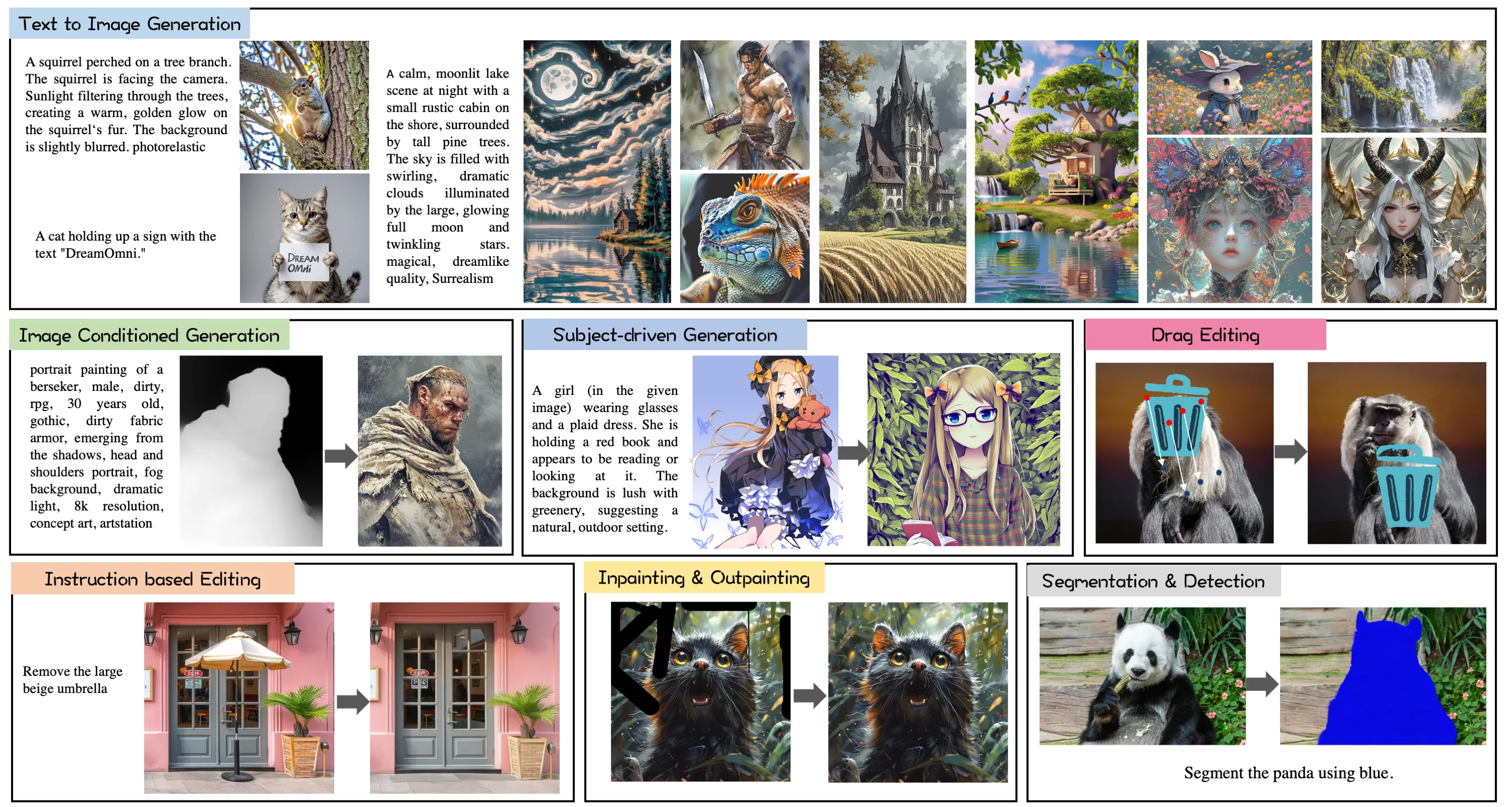
- Wide task coverage. It covers T2I, inpainting, instruction edits, drag edits, subject‑driven, and image‑conditioned tasks.
DreamOmni: The All‑in‑One Solution for Image Generation and Editing Use Cases
- Creative work. Turn a short text into a fresh image, then adjust colors, styles, or small parts without starting over.
- Product shots. Swap backgrounds, fix small flaws, or add stickers and props with clear instructions.
- Marketing and social. Keep a main subject the same but change themes or seasons for fast campaign tests.
- Photo touch‑ups. Remove unwanted bits, fill gaps, or nudge objects from one spot to another with simple drags.
- Education and demos. Show how edits affect results step by step using masks and points.
Read More: Goku Video Generation for a quick look at video creation tools that pair well with image tools like DreamOmni.
How DreamOmni Works (Plain‑English Walkthrough)
-
One shared model for all tasks. The team studied what T2I and edit jobs need, then set one framework that accepts different input types (text, images, masks, and drags).
-
Easy edit data at scale. They built a “sticker‑like” data maker. It adds, moves, and changes parts in clean steps, so the model sees many correct edit examples during training.
-
Joint training helps both sides. T2I training teaches concepts and style; edit training teaches control and precision. Trained together, both tasks improve.
The Technology Behind It (Kept Simple)
- Unified inputs and outputs. No matter the task, DreamOmni maps your inputs to the next image in a consistent way.
- Shared learning. The same model weights learn both “create from text” and “edit an image,” which cuts setup time and can raise quality.
- Sticker‑style data. Because real edit data is hard to get, the team built a simple but strong pipeline that makes large, clean datasets fast.
For more context on the companies and labs pushing media AI forward, see our short guide: Bytedance.
Performance & Showcases
The project page shows side‑by‑side results on T2I and many edit tasks. You can see how the model keeps subjects on target while also following text instructions and point drags.
Getting Started
- Explore the project page. It highlights the idea, the method figure, and many side‑by‑side examples.
- Check each task type. Look at T2I, inpainting, instruction edits, drag edits, subject‑driven, and image‑conditioned results to learn the model’s range.
- Stay tuned for updates. At the time of writing, no code or install steps are listed on the page. Watch the page for future releases.
If you want more AI stories and tools, browse our main site: Omnihuman 1.Com.
Why This Matters
- Fewer tools to manage. One model that does many jobs is easier for teams.
- Better learning. Teaching “create” and “edit” together helps both skills grow.
- Faster data building. Sticker‑like edits make clean, labeled data quickly, which is great for training.
Practical Tips for Strong Prompts and Edits
- Be clear and short. Write simple text with the main subject and a few key traits.
- Edit in steps. Make one or two changes at a time (e.g., color first, then position).
- Use the right cue. For structure fixes, try drags and masks; for style or small changes, try instruction text.
FAQ
What tasks does DreamOmni support?
DreamOmni handles text‑to‑image, inpainting, instruction‑based edits, drag‑based edits, subject‑driven generation, and image‑conditioned generation. These cover most daily needs for making and changing images. The same model does each task.
How does the sticker‑like data help?
It makes many clean edit examples fast. Each example shows what changed and where, so the model learns to follow edits with care. This lifts quality on hard edit jobs.
Why train T2I and editing together?
T2I teaches the model about objects, scenes, and styles. Editing teaches where and how to change parts without hurting the rest. Together they raise both creation quality and edit control.
Is there a public repo and install guide?
On the public page at the time of writing, there is no code or install guide listed. The page focuses on the idea, figures, and results. Check back for updates on releases.
Who should care about DreamOmni?
Creators, marketers, product teams, and educators who need one tool for both making and changing images. It can cut setup time and lower tool switching. It is also helpful for research on multi‑task image systems.
Image source: DreamOmni: The All-in-One Solution for Image Generation and Editing