Bring Human Images to Life: Mastering Expressive Animation with X-UniMotion
What is Bring Human Images to Life: Expressive Animation with X-UniMotion
X-UniMotion turns a single human photo into an expressive, identity-preserving video. It follows the moves and expressions from a “driving video,” then applies them to the person in your photo.
It captures full body motion, hand gestures, and facial expressions with fine detail. The project is built by researchers at ByteDance and presented for SIGGRAPH Asia 2025. For context on the team’s background, see our brief note on Bytedance.
Bring Human Images to Life: Expressive Animation with X-UniMotion Overview
Here is a quick summary of what this project is about and how it works.
| Item | Details |
|---|---|
| Project Name | X-UniMotion |
| Type | Research paper and demo (SIGGRAPH Asia 2025) |
| Purpose | Turn a single human image into an expressive video guided by a driving video |
| Core Idea | Unified motion “codes” for the body, hands, and face that ignore identity and focus on motion |
| Inputs | One reference image (the person to animate) + one driving video (the motion source) |
| Output | A video that keeps the person’s look but follows the driving video’s moves and expressions |
| Key Parts | Image encoder, local hand and face encoders, ViT decoder for retargeting, DiT model for video |
| Highlights | Strong identity match, expressive hands and face, robust body motion, depth-aware motion cues |
| Organization | ByteDance Inc |
| Project Page | X-UniMotion (opens in a new tab) |
| Paper | Linked on the project page |
If you enjoy exploring new AI projects like this, you can also visit our home page at Omnihuman 1.Com.
Bring Human Images to Life: Expressive Animation with X-UniMotion Key Features
- One photo in, expressive video out. You only need a single clear image to start.
- Motion from any driving video. The model reads motion frame by frame and transfers it.
- Whole-body motion done right. It understands body pose, depth, and timing.
- Hands that matter. Left and right hands are handled with their own motion codes.
- Face that feels true. A special face code controls expressions with care.
- Identity stays clean. Color and spatial tricks help remove identity hints from motion codes.
- Robust retargeting. A ViT decoder reshapes the motion to fit your photo’s body.
- Strong video generator. A DiT model turns motion guidance into a clean output video.
Bring Human Images to Life: Expressive Animation with X-UniMotion Use Cases
- Content creation: Turn a portrait into a short expressive clip for social posts or ads.
- Digital actors: Give a character moves and expressions from a performer’s driving video.
- Education and training: Show gestures and face cues for language, dance, or wellness lessons.
- Remote presence: Make a quick talking or gesturing clip from a single profile photo.
- Research demos: Study body, hand, and face motion transfer in one clean setup.
Performance & Showcases
Showcase 1 — Demo video This demo video shows the end-to-end effect: a single image comes to life and follows the driving clip. Watch how body, hands, and face blend into one smooth result. The Demo video helps you understand the full pipeline in action.
Showcase 2 — Results Gallery This Results Gallery shares several examples across different people and poses. It highlights motion quality and identity match across many inputs. The Results Gallery helps you compare outcomes side by side.
Showcase 3 — Results Gallery This Results Gallery focuses on motion detail and timing. Look for how the model keeps hand shape and finger direction. The Results Gallery also shows stable face expressions.
Showcase 4 — Results Gallery This Results Gallery stresses variety in body and hand actions. You can see how it stays steady across many clothing styles and scenes. The Results Gallery points to strong retargeting across frames.
Showcase 5 — Results Gallery This Results Gallery gives more side-by-side clips to check identity and motion. It is useful for close-up face checks and gestures. The Results Gallery adds proof of stable performance on new inputs.
Showcase 6 — Results Gallery This Results Gallery rounds out the set with more people and movements. It shows how the system keeps expressions tight while the body moves. The Results Gallery confirms consistent output quality.
How X-UniMotion Works (Plain-English Guide)
-
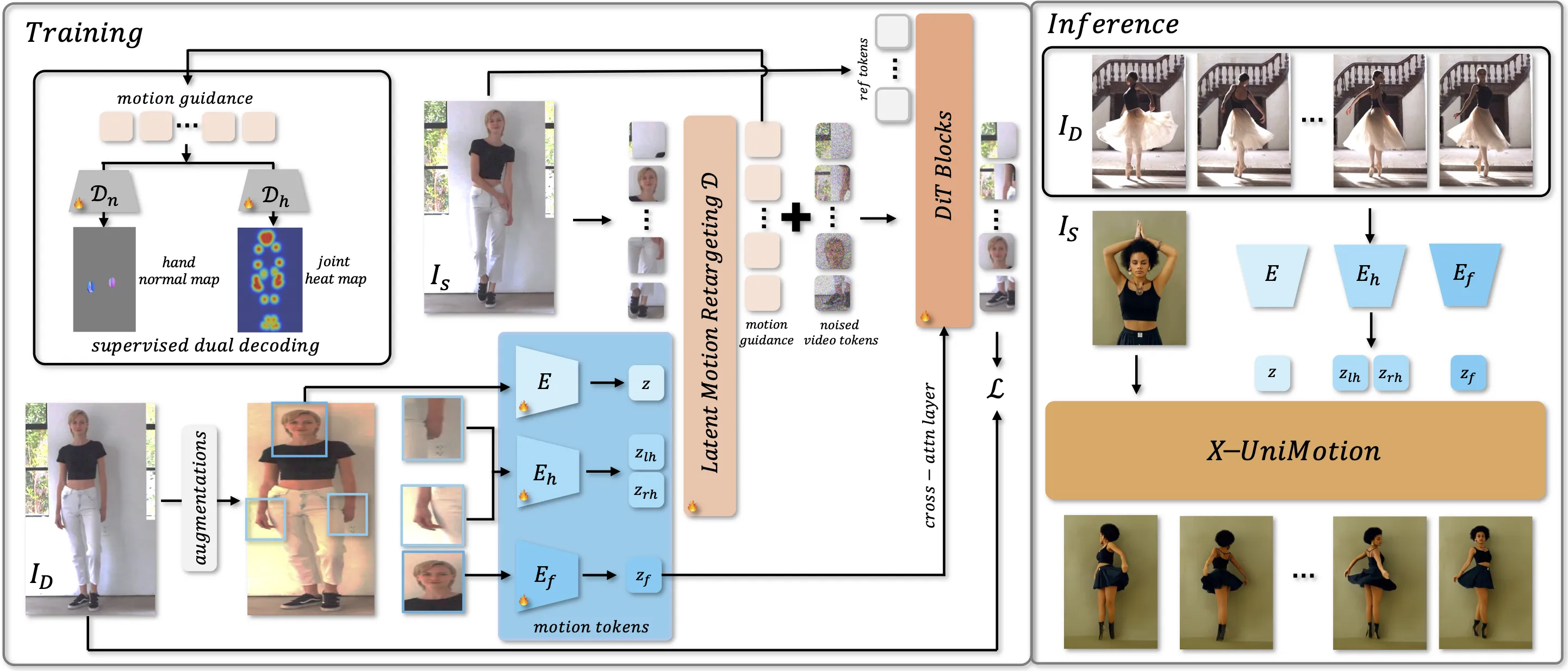
Step 1: You provide a reference image (the person to animate) and a driving video (the motion source). The system reads the driving video frame by frame.
-
Step 2: An image encoder turns each driving frame into a compact motion code for the whole body.
-
Step 3: Two local hand codes (left and right) plus a face code are extracted from hand and face regions.
-
Step 4: Smart color and spatial changes help strip away identity from these codes. This keeps only motion and expression, not the person’s look.
-
Step 5: A ViT decoder retargets the motion to match the body in your reference image. It creates spatial motion guidance that fits your subject.
-
Step 6: A DiT model then generates the final video using that guidance plus your reference image features. The face code also guides expressions through cross-attention.
The Technology Behind It (Explained Simply)
-
Unified motion latents: One global code for the body, plus separate codes for hands and face. This keeps each part crisp.
-
Identity-agnostic design: Color/shape changes during training remove identity traces from motion codes.
-
Dual motion checks: The model learns motion using two targets—joint heatmaps and hand normal maps—to keep pose and hand shape accurate.
-
Retargeting for your subject: A ViT decoder reshapes the driving motion to your reference image’s body layout.
-
Strong video synthesis: A DiT network turns the motion guidance into a clear, identity-matched video.
Getting Started
- Explore the project page: X-UniMotion. You will find the paper link, demos, and comparisons.
- Review the demos first. They show what inputs work best and what quality to expect.
- Check the paper on the project page for training and design details. If you need access or have questions, the authors share a contact email there.
If you want to know more about our team and work style, see our About page.
Tips for Best Results
- Use a sharp, well-lit reference image. Face and hands should be clear if possible.
- Pick a driving video with motions you want to copy. Stable lighting and a clear subject help.
- Match rough pose and framing when you can. This makes retargeting easier and cleaner.
Responsible Use
The authors warn against misuse. Do not make harmful, fake content of real people or spread false information. Use this tech for creative, fair, and safe projects only.
FAQ
What inputs do I need?
You need one reference image of the person you want to animate and one driving video that contains the moves you want to apply.
Does it keep the person’s identity?
Yes. The system keeps the subject’s look while moving their body, hands, and face to match the driving video.
How are hands and face handled?
Hands and face get their own motion codes. This helps keep finger shape, hand pose, and expressions strong.
Can I use any driving video?
Use a clip where the performer’s actions are clear and not blocked. Better input leads to a better output.
Is there public code or a one-click app?
The project page shares demos and the paper. For code access or more info, check the project page and contact the authors if needed.
Where can I see more AI projects like this?
For more coverage and easy guides, visit our main site: Omnihuman 1.Com.
Image source: Bring Human Images to Life: ing Expressive Animation with X-UniMotion