Beyond Pixels: Mastering Reasoning-Centric Image Editing with ThinkRL-Edit
What is Beyond Pixels: Reasoning-Centric Image Editing with ThinkRL-Edit
ThinkRL-Edit is a research project and codebase that teaches an image editor to “think” before it edits. It uses step-by-step planning and checking to make edits that match your instructions more closely.
Instead of jumping straight to pixels, it plans, reflects, and then edits. This leads to edits that are faithful to the prompt and look consistent.
Beyond Pixels: Reasoning-Centric Image Editing with ThinkRL-Edit Overview
ThinkRL-Edit focuses on reasoning-driven edits. It separates thinking from making the image, and it learns from rewards that are clear and stable.
For a friendly intro to AI tools and trends, visit our main site.
| Item | Detail |
|---|---|
| Type | Research project and open-source code |
| Purpose | Make instruction-based image edits with stronger step-by-step reasoning |
| Core Idea | Think first (plan and reflect), then edit |
| Main Features | Planning and reflection, broad exploration, unbiased preference grouping, binary checklist rewards |
| Model Base | Works with unified multimodal editors (e.g., Qwen-Edit) |
| Tech Area | Reinforcement learning for image editing |
| Code Language | Python (PyTorch tools via torchrun) |
| Setup | Conda environment, editable install |
| Demo | One showcase video available |
| Where to Get Models | Hugging Face (see project notes) |
| Project Page | Public webpage with more results |
Beyond Pixels: Reasoning-Centric Image Editing with ThinkRL-Edit Key Features
Think-before-edit planning
The system creates several reasoning paths before changing the image. It compares these paths, keeps the best plan, and only then edits.
Broader exploration beyond noise tweaks
Most editors only tweak randomness in the denoising step. ThinkRL-Edit explores many reasoning options before generation, so it can find better edits.
Unbiased chain preference grouping
When there are many rewards, mixing them can skew results. This project groups chain preferences in a fair way so the best overall plan wins.
Binary checklist rewards
It uses simple yes/no checks, not vague scores. This makes feedback clearer, more stable, and easier to understand.
Multi-GPU ready run script
You can run the example with torchrun on multiple GPUs. It scales to bigger batches and faster trials.
If you track how large teams ship AI tools, see a look at Bytedance.
Beyond Pixels: Reasoning-Centric Image Editing with ThinkRL-Edit Use Cases
- Follow multi-step instructions. For example: “Remove the cup, add a plate with two apples, and keep the light the same.”
- Fix logic errors in edits. If a goal conflicts with the scene, the system can adjust the plan before it edits.
- Keep style and layout stable. It aims to change only what the prompt asks, so the rest of the image stays coherent.
Performance & Showcases (Mandatory if demo videos or examples are available)
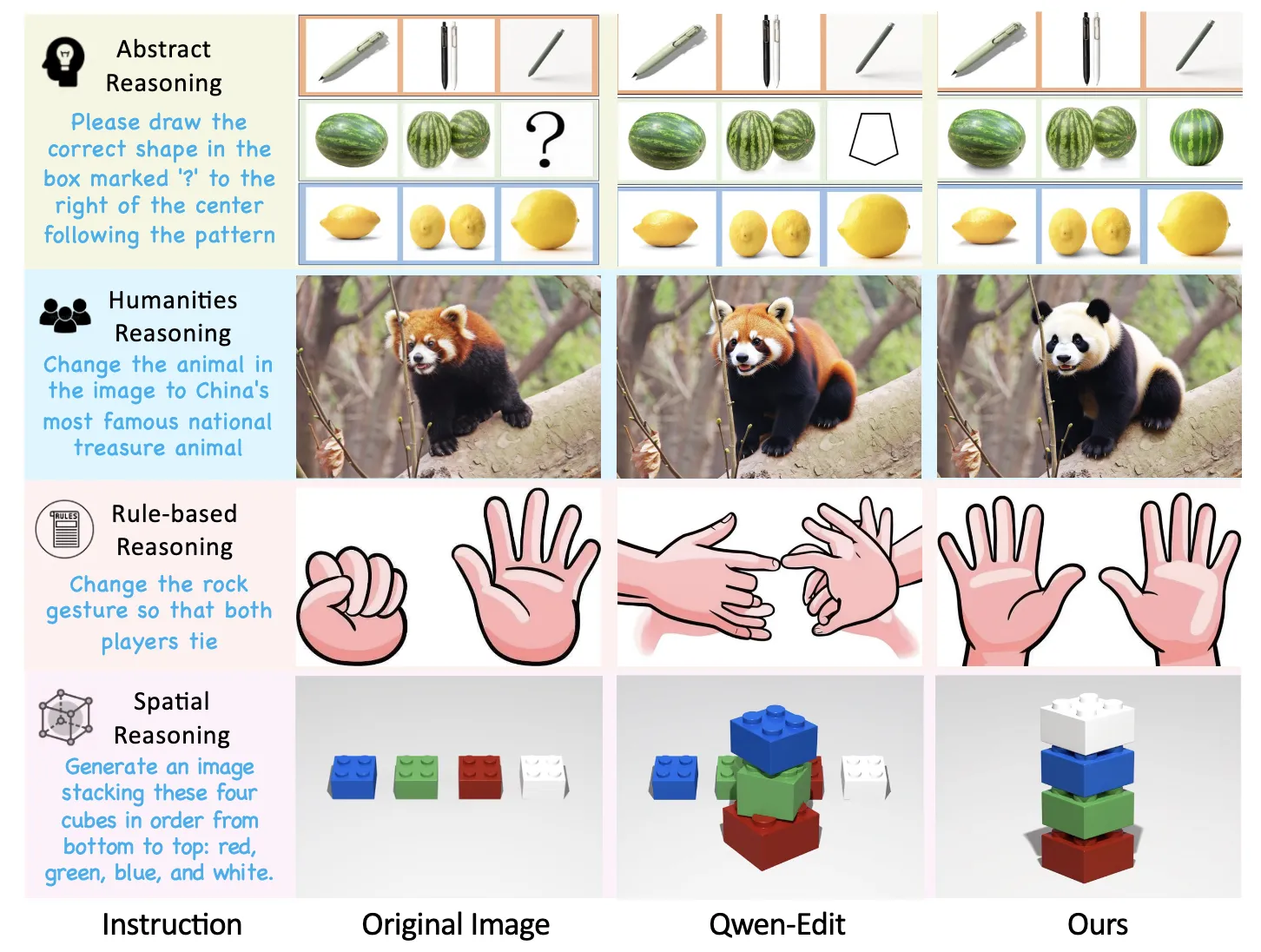
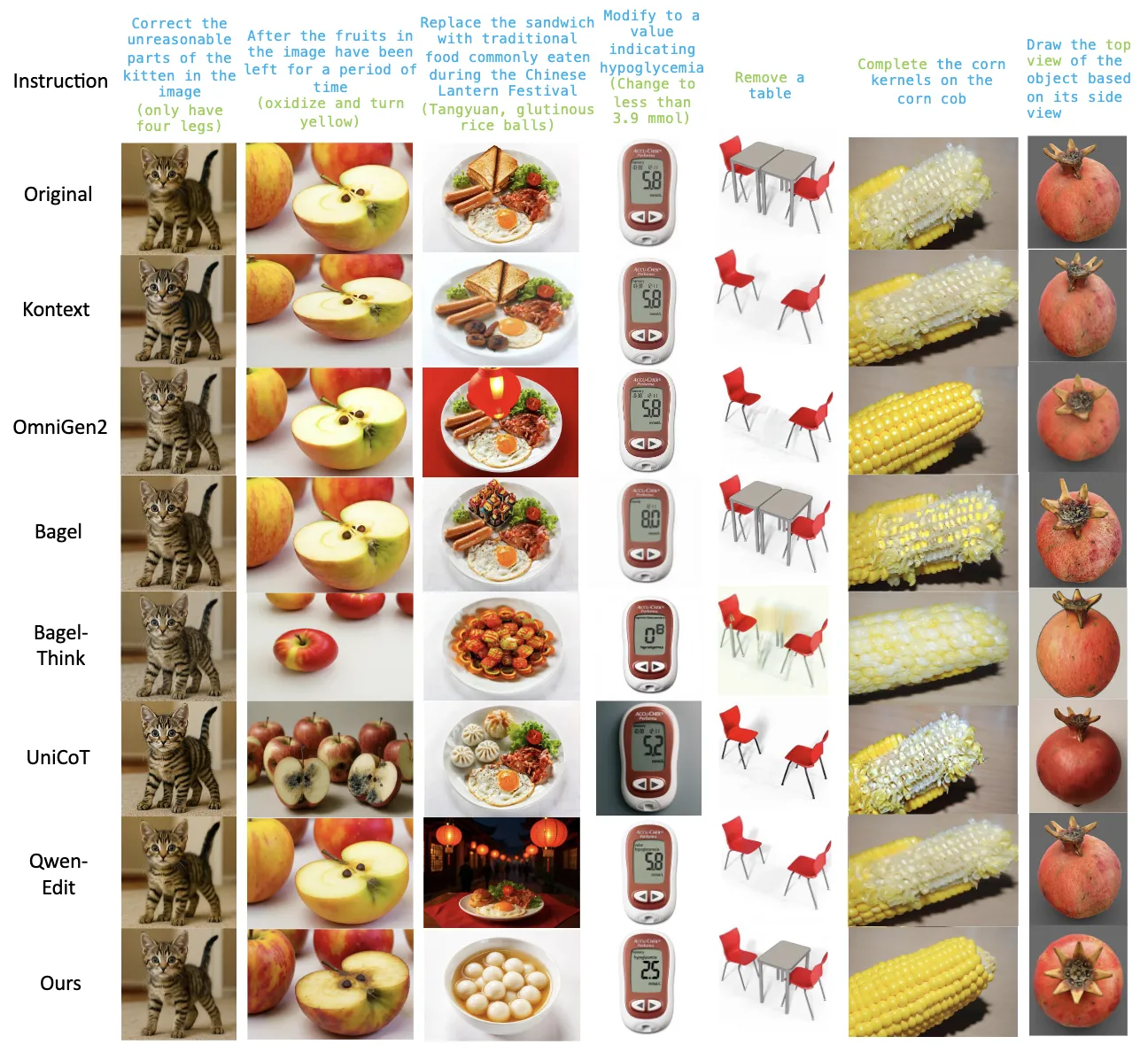
Showcase 1 — Although unified multimodal generative models such as Qwen-Edit have substantially improved editing quality, their underlying reasoning remains underexplored, especially for reasoning-centric editing. In contrast, our method delivers accurate edits with deep reasoning, achieving strong consistency and high perceptual quality across rse reasoning-driven editing scenarios.
How It Works: ThinkRL-Edit in Plain Words
First, the system reads your instruction and drafts several step-by-step plans. Each plan explains what to change and why.
Next, it reflects on these plans to spot weak spots and pick the most promising one. Only then does it run image generation to carry out the plan.
Finally, it checks the result with a clear checklist and learns from the pass/fail signals. Over time, it gets better at picking plans that match your goals.
Installation & Setup
Follow these steps exactly as provided by the project.
Installation
git clone https://github.com/EchoPluto/ThinkRL-Edit.git
cd ThinkRL
conda create -n thinkrl python=3.10.16
pip install -e .
Model Download
Download our model from Huggingface:
Run the Code
You can run an example using the following command:
torchrun --nproc_per_node 8 --_port 60001 infer_qwen.py
The Technology Behind It
Reinforcement learning helps the model learn from rewards. ThinkRL-Edit makes these rewards simple and steady with a yes/no checklist.
It also avoids mixing rewards in a way that could bias training. Grouped preferences keep the learning fair across different goals.
The result is stronger planning, clearer feedback, and edits that follow your instruction closely.
Tips for Best Results
- Write clear, step-by-step prompts. Short, precise requests work best.
- Keep edits focused. Ask for a few changes at a time for higher control.
- Use a proper GPU setup for fast runs. The torchrun script can help you scale.
Read More: About
FAQ
Does it work with my favorite image editor?
It is designed around unified multimodal editors, and the example mentions Qwen-Edit. You can explore the code to connect it to your stack.
Do I need many GPUs?
The sample command uses multi-GPU with torchrun. You can adapt it to your hardware, but more GPUs will speed things up.
Where do I get the model weights?
The note says to download from Hugging Face. Check the project page for the exact link.
Image source: Beyond Pixels: ing Reasoning-Centric Image Editing with ThinkRL-Edit