PersonaTalk: Bring Attention to Your Persona in Visual Dubbing
What is PersonaTalk: Bring Attention to Your Persona in Dubbing
PersonaTalk is a research project that makes lip-sync dubbing look and feel like the real speaker. It keeps the person’s speaking style and face details while matching lips to new audio. It was shown at SIGGRAPH Asia 2024 (Conference Track).
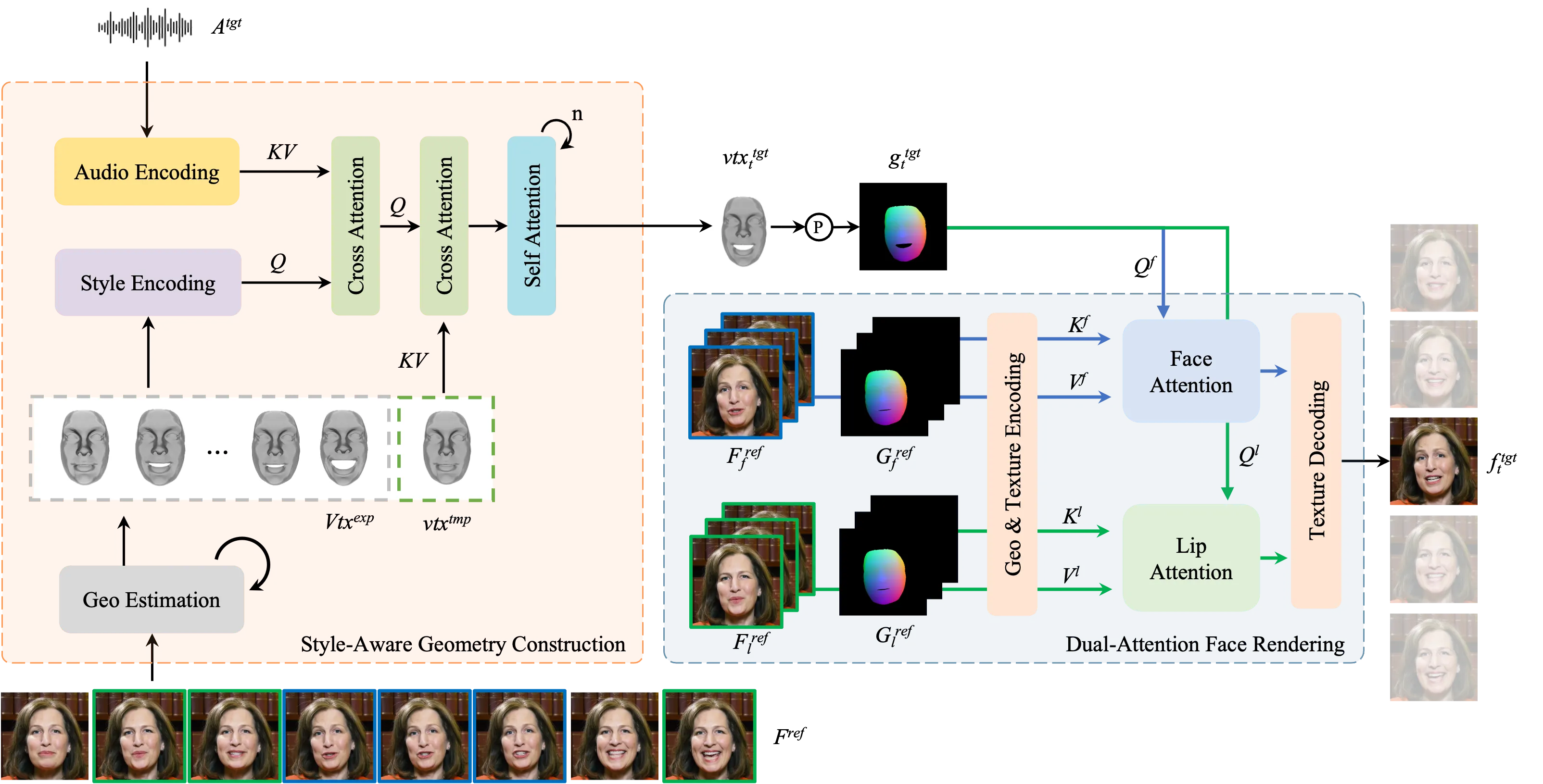
PersonaTalk does this with a clear two-step method. First, it builds clean mouth and face motion. Then, it paints the final face with strong detail, so the person still looks like themselves.
PersonaTalk: Bring Attention to Your Persona in Dubbing Overview
Here is a quick snapshot of the project and what it offers.
| Item | Detail |
|---|---|
| Type | Research project and demo website |
| Purpose | Make lip-sync dubbing that keeps a person’s own style and face details |
| Main Idea | Two stages: geometry motion first, then face texture rendering with focused attention |
| Status | SIGGRAPH Asia 2024 (Conference Track) |
| Inputs | A short video of the person and target audio |
| Output | A dubbed video with accurate lip-sync and strong identity keeping |
| Key Features | Style-aware audio features, lip attention, face attention, strong detail keep |
| Demos | Multiple showcase videos on the official page |
| Code Release | Not provided on the site; the page hosts demos and info |
| Official Page | https://grisoon.github.io/PersonaTalk/ |
For more easy explainers on AI tools and media tech, visit our main site.
PersonaTalk: Bring Attention to Your Persona in Dubbing Key Features
- Style-preserving dubbing: it keeps the person’s unique speaking style.
- Accurate lip-sync: mouth shapes match the sound closely.
- Strong face detail: skin, eyes, and other fine parts stay sharp.
- Two-step method: first motion, then texture, for cleaner results.
- Lip-Attention: focuses on the mouth area for sharp speech shapes.
- Face-Attention: pulls the right texture from good reference frames for the whole face.
- Person-generic: works across people while still keeping identity well.
PersonaTalk: Bring Attention to Your Persona in Dubbing Use Cases
- Movie and TV dubbing across languages while keeping the actor’s style.
- Online lessons or talks where the speaker records once and dubs in many languages.
- Marketing videos where the brand face must stay clear and on-brand.
- Accessibility, such as matching sign-over or voice-over to a host’s look and style.
- Creator studios that need fast, high-quality dubbing for global posts.
How PersonaTalk Works (Simple Walkthrough)
Step 1 — Build the motion: The system takes your audio and mixes in the speaker’s style using a “style-aware audio” step. This drives a template of the face to create lip-synced motion.
Step 2 — Render the face: A “dual-attention” renderer then paints the face. One attention focuses on lips, and the other focuses on the rest of the face, so both look clear and true to the person.
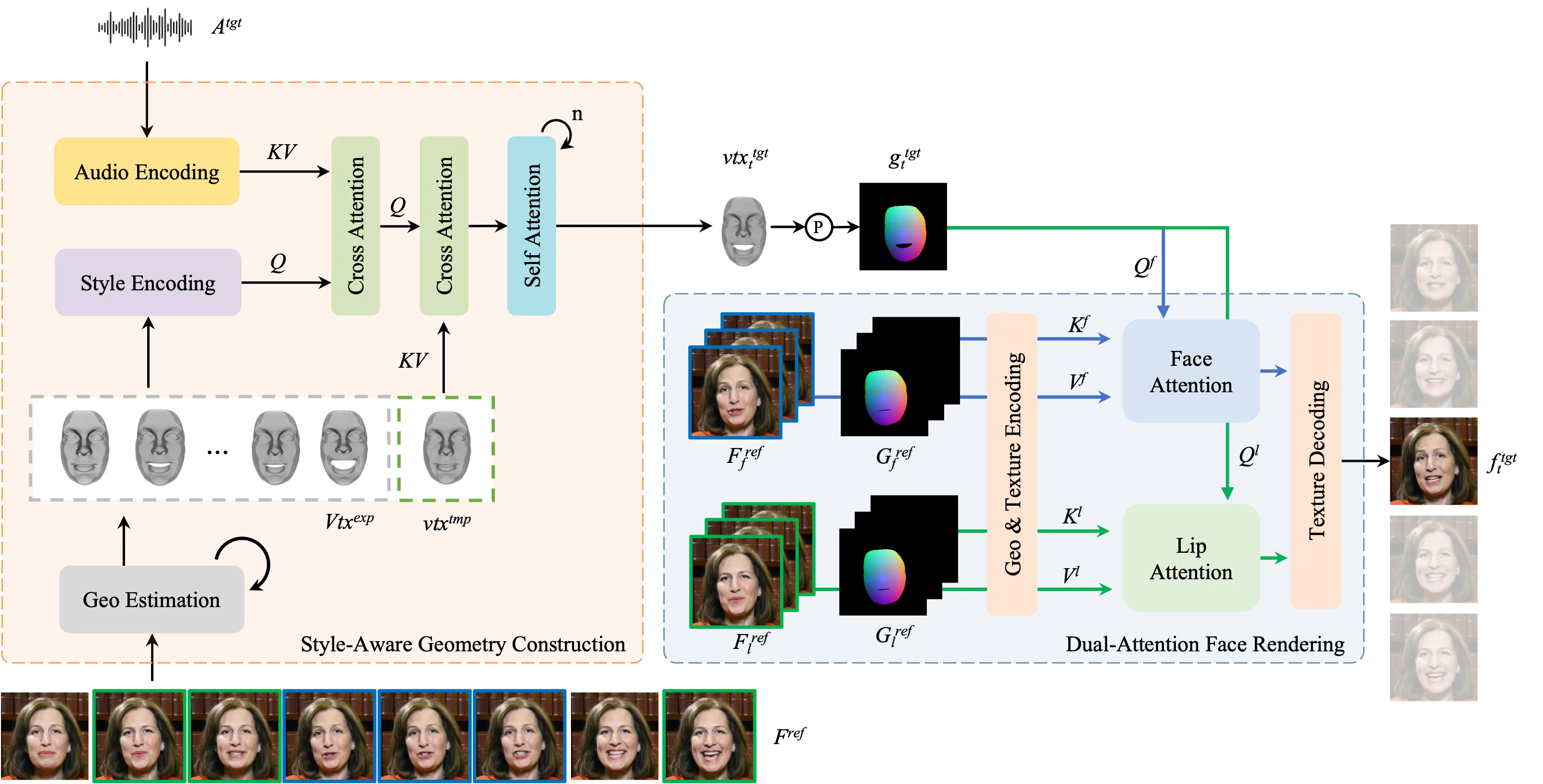
Step 3 — Produce the final video: The system blends the motion and textures to make a clean dubbed clip that keeps identity and keeps mouth timing tight.
If you follow media tools from major creators and labs, you may also like our short note on Bytedance research news.
The Technology Behind It (Plain English)
- Style-aware audio: The audio is not just “sound.” The model adds the speaker’s style to the audio features, so timing and mouth shapes match, but the feel of speech also matches the person.
- Geometry first: The system builds the face and mouth motion from these styled audio features. Think of this as a clean “motion plan” for the lips and face.
- Dual attention for textures: Two attention steps drive the final look. Lip-Attention locks in crisp, correct mouth details. Face-Attention pulls rich textures for skin, eyes, and hair from strong reference frames.
This two-step flow helps keep both timing and identity strong.
Getting Started: Installation & Setup
There is no public install guide on the project page. The website hosts demos, a summary, and links to learn more.
Quick start:
- Open the official page: https://grisoon.github.io/PersonaTalk/
- Play the showcase videos to see results.
- Check the paper link on the site (if listed) for deeper reading.
Want to know who we are and what else we cover? See our about page.
Performance & Showcases
Showcase 1 — Conference highlight with a focus on style and detail PersonaTalk creates lip-sync dubbing while preserving indis' talking style and facial details. It shows strong mouth timing and keeps the person’s look steady across frames. Watch how style carries over while the lips match the words.
Showcase 2 — Another conference clip showing the same strengths PersonaTalk creates lip-sync dubbing while preserving indis' talking style and facial details. See how face texture stays rich, even as the audio changes. This keeps the person’s identity front and center.
Showcase 3 — Side-by-side quality check Qualitative Comparison Comparing with Person-Agnostic Methods Comparing with Person-Specific Methods. This clip highlights where mouth timing, style, and detail differ between methods. Look for sharper lips and more stable identity here.
Showcase 4 — More comparisons for fair testing Qualitative Comparison Comparing with Person-Agnostic Methods Comparing with Person-Specific Methods. You can see where other methods blur or lose style, and where PersonaTalk holds up. Pay attention to small face details through the sequence.
Showcase 5 — Multilingual Translation: English (Original) English (Original). This shows the base clip used for cross-language tests. It sets a fair point of reference for lip timing and style.
Showcase 6 — Multilingual Translation: Chinese Chinese. See how lip timing matches the new language while the speaker’s face still feels the same. Style stays strong across the change.
Tips for Best Results
- Use a clear reference video with good light and a steady face view.
- Use clean audio with low noise. Fewer echoes lead to better mouth shapes.
- Keep head movement moderate in the reference clip so the model can read details well.
FAQs
What does “keep the persona” mean?
It means the system keeps the speaker’s unique style and face details. The dubbed video still looks and feels like that same person.
Do I need many reference videos?
A short, clear clip often works. More clean frames can help the model keep detail better.
Can it dub across languages?
Yes, the demos show cross-language dubbing. The lips match the new audio while the person’s style stays strong.
Is there a public code release?
The project page hosts demos and info. A full install guide or code is not listed on the site at this time.
Where can I learn more?
Visit the official page for demos and links. For friendly explainers on related tools, see our main site.
Credits and Where to Learn More
PersonaTalk appeared at SIGGRAPH Asia 2024 (Conference Track). To watch all demos and read more, visit the official page: https://grisoon.github.io/PersonaTalk/
Image source: PersonaTalk: Bring Attention to Your Persona in Dubbing