Mastering Video Editing: Unleashing the Power of OpenVE and Cross-Attention Control
What is ing Video Editing: Unleashing the Power of OpenVE and Cross-Attention Control
OpenVE is a research effort focused on easy, instruction-based video editing. You tell the system what to change (for example, “make it look like a watercolor painting”), and it edits the video while keeping the original motion and story intact. It brings three parts together: a large dataset (OpenVE-3M), a model for editing (OpenVE-Edit), and a fair test set (OpenVE-Bench).

This project is a joint effort from Zhejiang University and the team at ByteDance. It covers eight common editing types, from style changes to local edits like adding, removing, or changing parts of a scene. It also explores “cross-attention control,” a smart way to keep key details steady across frames during edits.
ing Video Editing: Unleashing the Power of OpenVE and Cross-Attention Control Overview
Here is a quick look at what the project offers and why it matters.
| Item | Details |
|---|---|
| Type | Dataset (OpenVE-3M), Editing Model (OpenVE-Edit), Benchmark (OpenVE-Bench) |
| Purpose | Instruction-guided video editing that keeps motion and story intact |
| Main Features | Eight edit types, large and clean data, fair test set with human-aligned scores, cross-attention control for stable edits |
| Status | Under review (dataset, code, model, and benchmark planned for release) |
| Team | Zhejiang University and ByteDance |
| Edit Types | Global Style, Background Change, Local Change, Local Remove, Local Add, Subtitles Edit, Camera Multi-Shot Edit, Creative Edit |
| Benchmark | OpenVE-Bench with 431 video-edit pairs and three human-aligned metrics |
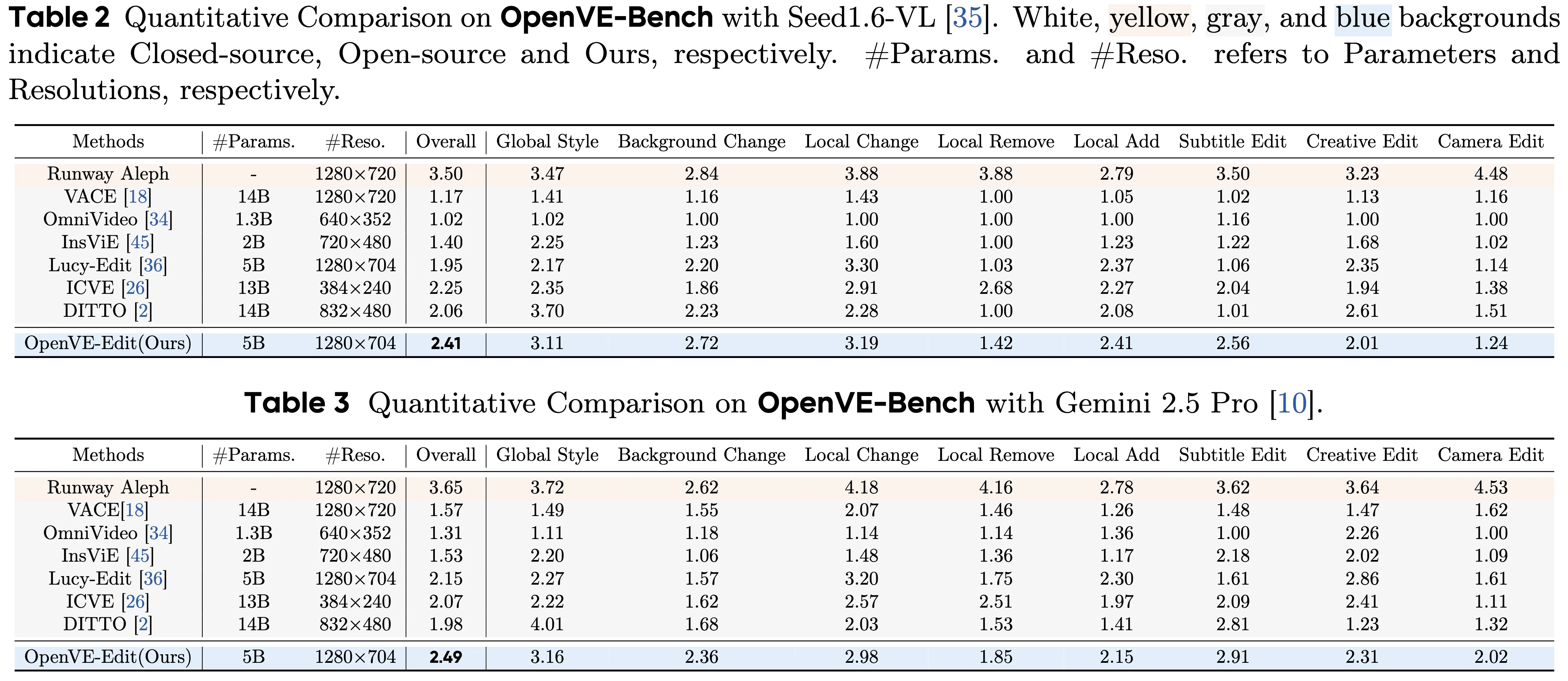
| Model | OpenVE-Edit, a 5B-parameter model trained on OpenVE-3M; sets a top score on OpenVE-Bench |
| Best For | Style changes, targeted edits, creative story edits, and multi-shot edits with consistent motion |
| Project Page | Visit the OpenVE page for updates and examples |

If you want a primer on how AI turns words into clips, check our simple text to video guide for friendly basics before you try instruction-based editing.
ing Video Editing: Unleashing the Power of OpenVE and Cross-Attention Control Key Features
- Edit by instruction. You write what you want, and the model applies the change across the whole clip.
- Eight edit types. From full style changes to local edits (add, remove, swap), subtitles edits, and multi-shot camera edits.
- Strong motion keeping. The edits keep the original actions and camera moves.
- Clean data at scale. The dataset is large, varied, and filtered for clear quality.
- Fair testing. OpenVE-Bench uses three scores that match what people think looks right.
- Cross-attention control. This guides what the model focuses on in each frame, so key subjects stay stable across time.
ing Video Editing: Unleashing the Power of OpenVE and Cross-Attention Control Use Cases
- Style your film: Turn a live video into watercolor, sketch, cartoon, pop art, or oil painting while keeping motion true.
- Targeted fixes: Remove a wire, add a sign, change a shirt color, swap a background, or clean up subtitles.
- Scene editing: Apply edits across cuts or shots while keeping the story flow and look steady.
- Creative tasks: Try “what-if” edits that change mood, time of day, or weather without breaking the action.
For company context and partnerships in this space, see our short Bytedance overview.
Installation & Setup (Getting Started)
The team notes that the dataset, code, model, and benchmark are in review and will be released. Here is the current open-source plan, quoted as listed by the authors:
- OpenVE-3M Dataset
- OpenVE-Edit Model
- OpenVE-Bench Benchmark
- Inference & Multi-gpus Sequence Parallel inference
- Fine-tuning & Lora-tuning scripts
What this means for you:
- Follow the project page for the release. The authors will share links and instructions when ready.
- Expect scripts for running edits, fine-tuning, and multi-GPU setup when the code drops.
- Once available, use the dataset for training or testing, the model for editing, and the benchmark to check quality.
We will update this section with exact commands (conda, pip, git, python) as soon as the team publishes them.
How It Works
- Instructions in, edits out: You give a simple text instruction and a video. The system reads both and decides where and how to apply changes.
- Keep what matters: Cross-attention control helps the model “lock onto” the right parts across frames so the edit is even across time.
- Train, test, improve: The model learns from OpenVE-3M, then gets checked with OpenVE-Bench to see how well it keeps motion, look, and intent.
The Technology Behind It (Plain-English View)
- OpenVE-Edit model: A large model (about 5 billion parameters) trained to follow edit instructions on video. It aims for strong results while being efficient.
- Cross-attention control: Think of it as a spotlight that tracks where attention should stay in each frame. This keeps subjects, lines, and colors steady over time.
- Multi-part design: Prior work shows a helpful mix of components, like a multi-modal language model for reading instructions, a connector to pass info, and a diffusion transformer to do the actual edit. The project applies this idea to video editing at scale.
For a broader view of generative video tools and how people use them day to day, you can also visit our main site: Omnihuman 1.Com.
Performance & Showcases
Below are demos from the Global Style category. They change the overall look while keeping motion and details.
Showcase 1 — Global style change with motion preserved This category involves transforming the global style of a video while preserving the original motion and details. It includes 18 common styles (e.g.,
Showcase 2 — Global style change with motion preserved This category involves transforming the global style of a video while preserving the original motion and details. It includes 18 common styles (e.g.,
Showcase 3 — Global style change with motion preserved This category involves transforming the global style of a video while preserving the original motion and details. It includes 18 common styles (e.g.,
Showcase 4 — Global style change with motion preserved This category involves transforming the global style of a video while preserving the original motion and details. It includes 18 common styles (e.g.,
Showcase 5 — Global style change with motion preserved This category involves transforming the global style of a video while preserving the original motion and details. It includes 18 common styles (e.g.,
Showcase 6 — Global style change with motion preserved This category involves transforming the global style of a video while preserving the original motion and details. It includes 18 common styles (e.g.,
OpenVE-3M Dataset at a Glance
- Two big groups: spatially-aligned edits (Global Style, Background Change, Local Change, Local Remove, Local Add, Subtitles Edit) and non-spatially-aligned edits (Camera Multi-Shot Edit, Creative Edit).
- Built with a careful pipeline and strict quality filters to reduce errors.
- Scaled well beyond prior open-source sets in size, edit variety, and instruction depth.
OpenVE-Bench (Why It Matters)
- 431 video-edit pairs that cover many edit types.
- Three key scores match how people judge quality.
- Helps compare models in a fair way, so progress is clear and honest.
Practical Tips for Better Results
- Write clear instructions. Short and direct sentences work best.
- Keep one main request per edit. Complex, multi-part asks are harder to get right in one pass.
- For local edits, say what, where, and how. Example: “Change the car color to red in the second shot.”
FAQ
Is the code and dataset ready to download?
Not yet. The team says they are under review and will be released. Follow the project page and updates to get the links as soon as they are live.
What kinds of edits are covered?
Eight types: style changes, background swaps, local add/remove/change, subtitle edits, multi-shot camera edits, and creative edits. These cover common needs from color and style to object-level changes.
How does cross-attention control help my edits?
It helps the model keep focus on the right parts of the video in each frame. This keeps lines, colors, and subjects steady across time, so the edit looks consistent.
What is OpenVE-Bench used for?
It is a test set with clear rules. It helps you check edit quality with scores that match what people think looks good and true to the instruction.
Will there be tools for fine-tuning?
Yes. The plan includes fine-tuning and LoRA-tuning scripts, plus multi-GPU inference. These will ship when the team publishes the code.
Image source: ing Video Editing: Unleashing the Power of OpenVE and Cross-Attention Control