MagicArticulate: Make Your 3D Models Articulation-Ready
What is MagicArticulate: Make Your 3D Models Articulation-Ready
MagicArticulate is a tool that turns a still 3D model into a model that can move. It adds a “skeleton” inside your mesh and assigns how each part of the surface should move with that skeleton. With this, your 3D asset is ready for animation in seconds.
It was built by a research team from NTU and Bytedance, and presented at CVPR 2025. The project also comes with a large public dataset to help train and test better rigging methods.
MagicArticulate: Make Your 3D Models Articulation-Ready Overview
Here is a quick look at the project.
| Item | Details |
|---|---|
| Type | Research project with open-source code and data |
| Purpose | Convert static 3D meshes into articulation-ready assets that you can animate |
| Input | A 3D mesh (e.g., OBJ/GLB) |
| Output | A generated skeleton and skinning weights; an animation-ready model |
| Core Steps | 1) Generate skeleton, 2) Predict skinning weights |
| Speed | About 1–2 seconds per model during inference |
| Hardware Needs | About 4.6 GB of GPU memory for inference |
| Dataset | Articulation-XL2.0 with 48K+ models (v1.0 had 33K+) |
| Paper | CVPR 2025: “MagicArticulate: Make Your 3D Models Articulation-Ready” |
| Best For | Animators, game asset creators, AR/VR teams, 3D tool builders |
If you want a broad view of related topics and guides, see our main site.
MagicArticulate: Make Your 3D Models Articulation-Ready Key Features
- Automatic skeleton generation: The tool figures out a joint-and-bone layout that fits your mesh.
- Skinning weights prediction: It assigns how each vertex follows the nearest joints for smooth motion.
- Fast results: Inference takes about 1–2 seconds per model with modest GPU memory.
- Big training data: It ships with Articulation-XL2.0 (48K+ models) for better quality and tests.
- Works on varied meshes: Designed to handle different shapes and categories.
MagicArticulate: Make Your 3D Models Articulation-Ready Use Cases
- Prep assets for animation without manual rigging.
- Speed up 3D pipelines in films, ads, and AR/VR.
- Create training data for research on rigging and motion.
- Batch process large libraries of 3D meshes into rig-ready assets.
- Test new animation ideas on AI-generated meshes or 3D scans.
Installation & Setup
Follow these steps as-is to set up and run MagicArticulate.
- Clone the repo and create the environment:
git clone https://github.com/Seed3D/MagicArticulate.git --recursive && cd MagicArticulate
conda create -n magicarti python==3.10.13 -y
conda activate magicarti
pip install torch==2.1.1 torchvision==0.16.1 torchaudio==2.1.1 --index-url https://download.pytorch.org/whl/cu118
pip install -r requirements.txt
pip install flash-attn==2.6.3 --no-build-isolation
- Download checkpoints and released weights:
python download.py
- Evaluate on test sets:
bash eval.sh
- The run needs about 4.6 GB VRAM.
- Each inference takes about 1–2 seconds per mesh.
- You can change save_name and check results in evaluate_results.txt.
- Try the demo:
bash demo.sh
- You can also test with your own 3D objects. Change input_dir in the script.
Updates and data cleaning:
- If you work with the preprocessed dataset and want to remove entries with known issues, run:
python data_utils/update_npz_rm_issue_data.py
Tip: The team also shared a Blender script to read rigs and meshes from GLB, plus improved skeleton weights to fix a past loader bug.
How it Works
MagicArticulate follows two main steps. First, it generates a skeleton that fits the shape of your mesh. Next, it computes skinning weights so the mesh moves well with that skeleton.
Inside, the tool reads points from the mesh, turns them into short “shape tokens,” and then uses them to predict a full skeleton as a sequence. After that, it assigns weights based on how close parts of the surface are to joints in 3D space.
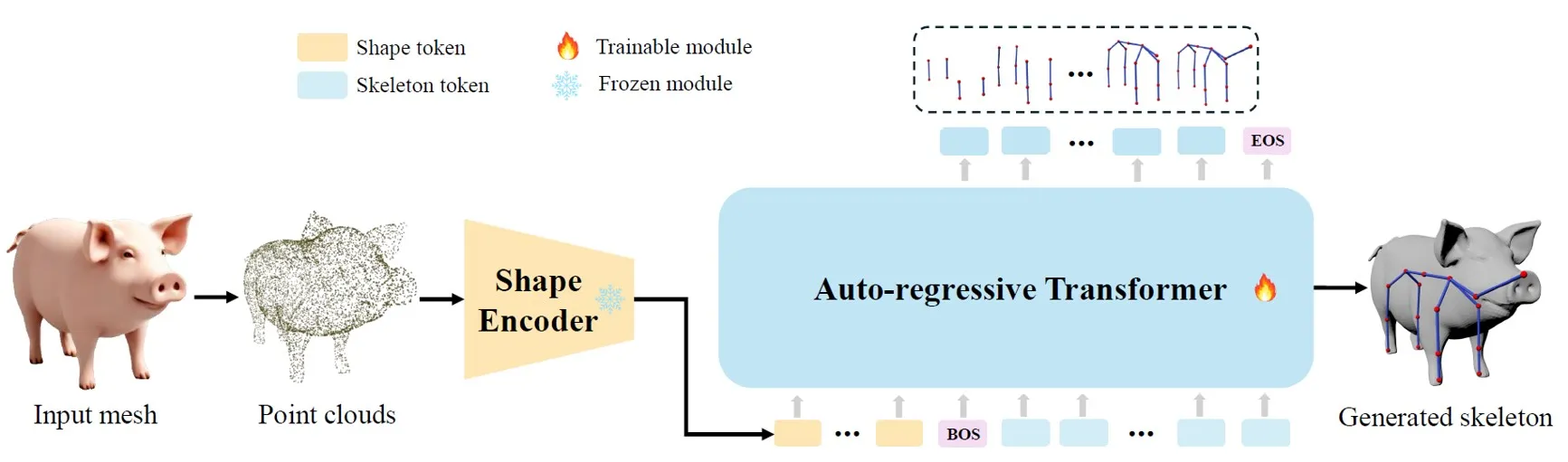
There are two ways to order the joint sequence: spatial order or a parent-child (hierarchy) order. Both help the model build the right structure. For a friendly intro to the people behind projects like this, see our about us page.
Dataset: Articulation-XL2.0
Articulation-XL2.0 is a large set of 48K+ 3D models with clean joint and bone data. It improves on the first version by adding multi-part models and more details.
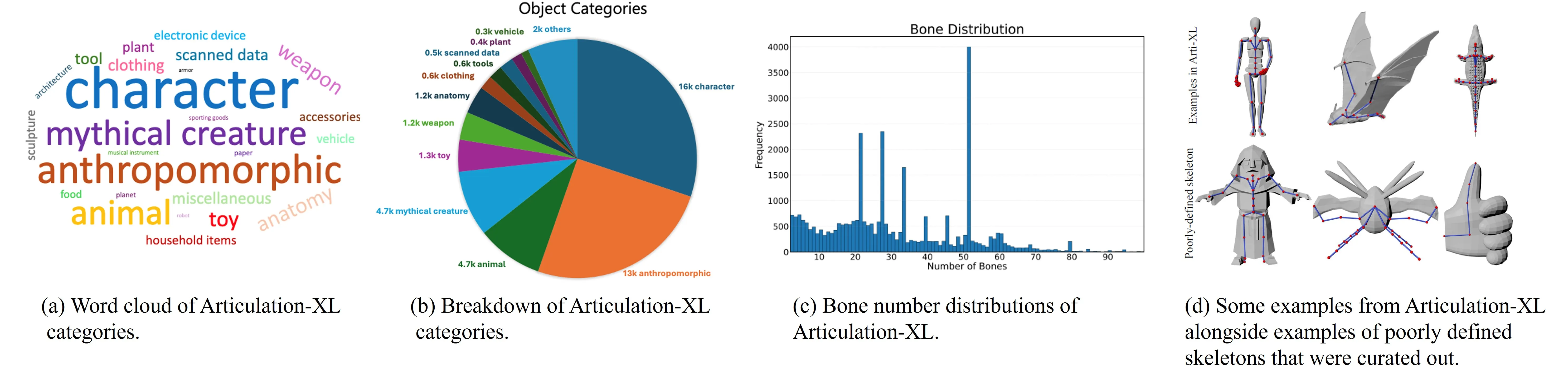
Metadata fields:
uuid,source,vertex_count,face_count,joint_count,bone_count,category_label,fileType,fileIdentifier
Preprocessed NPZ content:
'vertices', 'faces', 'normals', 'joints', 'bones', 'root_index', 'uuid', 'pc_w_norm', 'joint_names', 'skinning_weights_value', 'skinning_weights_row', 'skinning_weights_col', 'skinning_weights_shape'
You can also ize these models with skeletons in Pyrender. The team adapted tools so you can preview meshes and rigs in a simple viewer.
Performance & Showcases
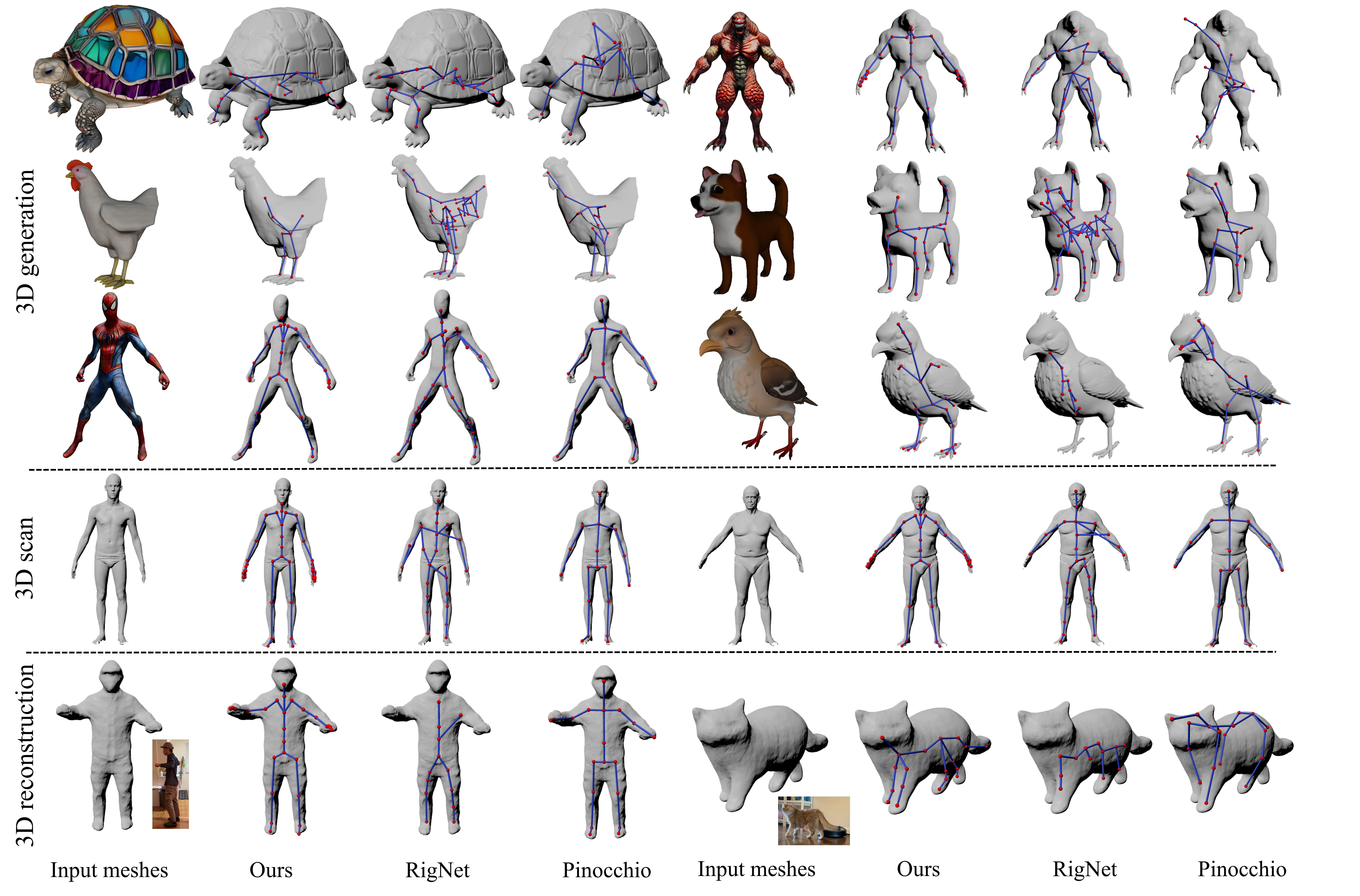
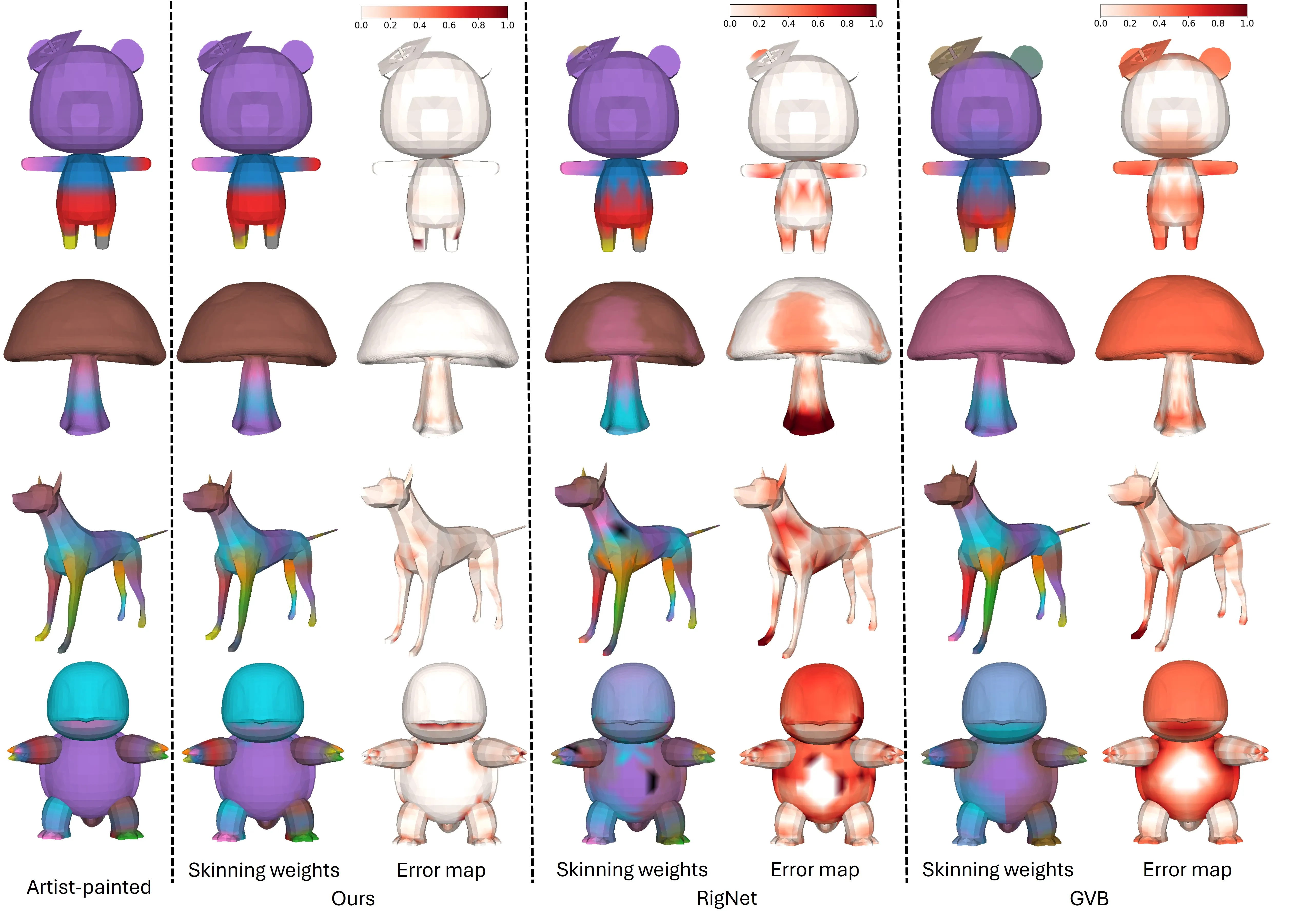
MagicArticulate has been tested on the Articulation-XL2.0 test set and the ModelResource test set from RigNet. It shows strong results across many object types and keeps the mesh and skeleton aligned.
Here is a look at skeleton generation compared to common baselines on hard data, such as AI meshes and 3D scans.
And here is a look at skinning weight quality compared to well-known methods.
Showcase 1 — Auto skeleton and skinning from a single mesh Given an input mesh, MagicArticulate first generates skeleton autoregressively and then predicts skinning weights, making it articulation-ready. This clip shows the full process from a still mesh to a rig-ready asset in a short, clear run.
Showcase 2 — Video Video. Watch this embedded player to see more examples of models being rigged and prepared for motion.
The Technology Behind It
- Skeleton as a sequence: The system treats joints and bones like a list to predict step by step. This makes it easier to support many shapes and different skeleton sizes.
- Sequence ordering: You can order joints by where they sit in space or by parent-child links. Both help the model keep structure.
- Weight prediction: The tool looks at how far each vertex is from each joint in the volume. This helps choose weights that move the surface in a natural way.
If you are curious about the team and related efforts at Bytedance, we wrote a short note that gives more context.
FAQs
Do I need a GPU to run it?
You will get the best speed with a GPU. The team reports about 4.6 GB of GPU memory and 1–2 seconds per model during inference.
Can I try it on my own meshes?
Yes. After setup, use the demo command and change input_dir to point to your files. The tool reads common mesh formats like OBJ or GLB.
How do I get the data?
Use the project’s data links to fetch Articulation-XL2.0 and the preprocessed NPZ files. Then follow the steps above to run evaluation or demo.
Image source: MagicArticulate: Make Your 3D Models Articulation-Ready