Decoding Human Motion: A Deep Dive into the HumanVideo-MME Benchmark
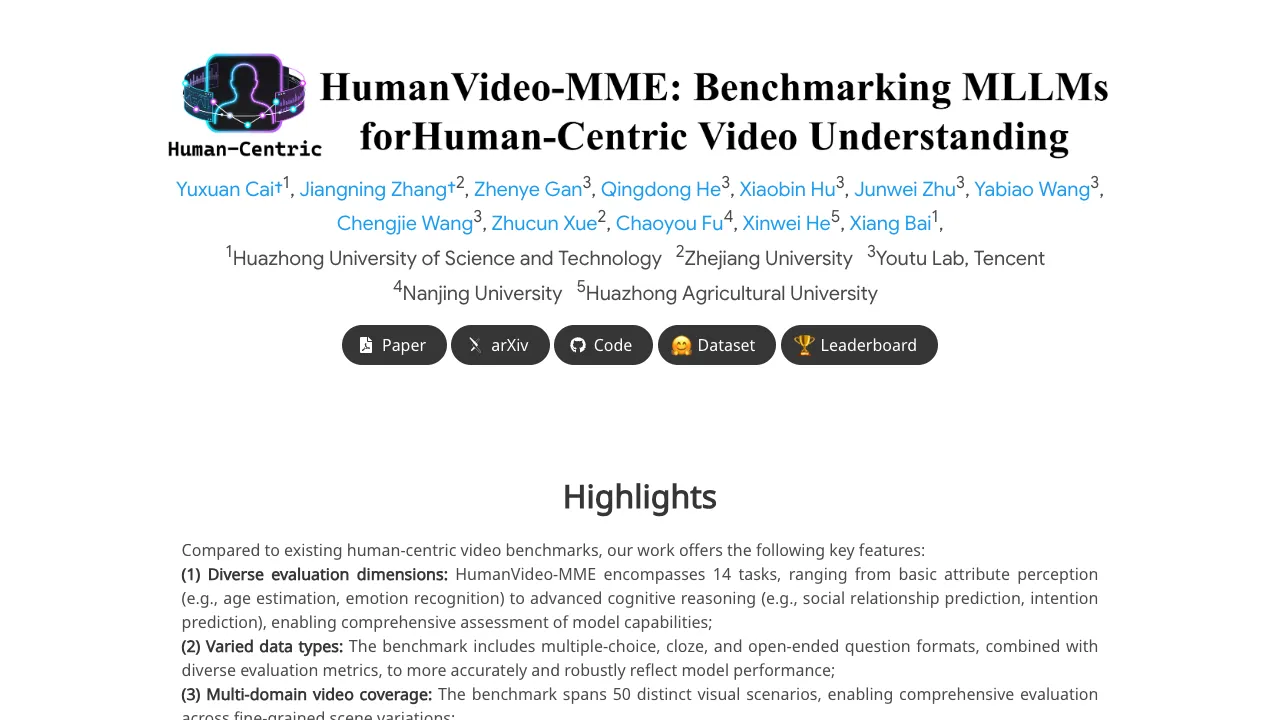
What is Decoding Human Motion: A Closer Look at the HumanVideo-MME Benchmark
HumanVideo-MME is a public benchmark that tests how well AI models understand people in videos. It checks things like age, emotion, actions, and even social hints across many short and long clips.

This project is helpful for anyone building or testing video AI. It shows clear strengths and gaps in today’s models across 50 real-world scenes. To learn more about our work, see our About page.
Decoding Human Motion: A Closer Look at the HumanVideo-MME Benchmark Overview
Here is a quick summary of the project.
| Item | Detail |
|---|---|
| Type | Human-centric video understanding benchmark |
| Purpose | Test and compare AI models on videos about people and their actions |
| Main Features | 13 tasks; 4 question styles (multiple-choice, fill-in-blank, true/false, open-ended); 50 domains; short to long videos (10s to 30min) |
| Tasks (examples) | Age estimation, emotion recognition, social relationship prediction, intention prediction |
| Question Formats | Multiple-choice (MC), Fill-in-Blank (FIB), True/False (TF), Open-Ended Questions (OEQ) |
| Video Coverage | 50 human-focused scenarios; fine-grained scene differences |
| Temporal Coverage | Short clips (around 10 seconds) to long videos (up to 30 minutes) |
| What It Evaluates | Basic perception, temporal understanding, and higher-level reasoning |
| Who It’s For | Researchers, engineers, product teams, educators |
| Model Support | Works with open-source MLLMs; quickstart shown with Qwen2.5-VL |
| Results Sharing | Leaderboard submission by sending model outputs to the team |
| Project URL | https://fantasyele.github.io/projects/HumanVideo-MME/ |
| Code Repo | https://github.com/Fantasyele/HumanVideo-MME |

Decoding Human Motion: A Closer Look at the HumanVideo-MME Benchmark Key Features
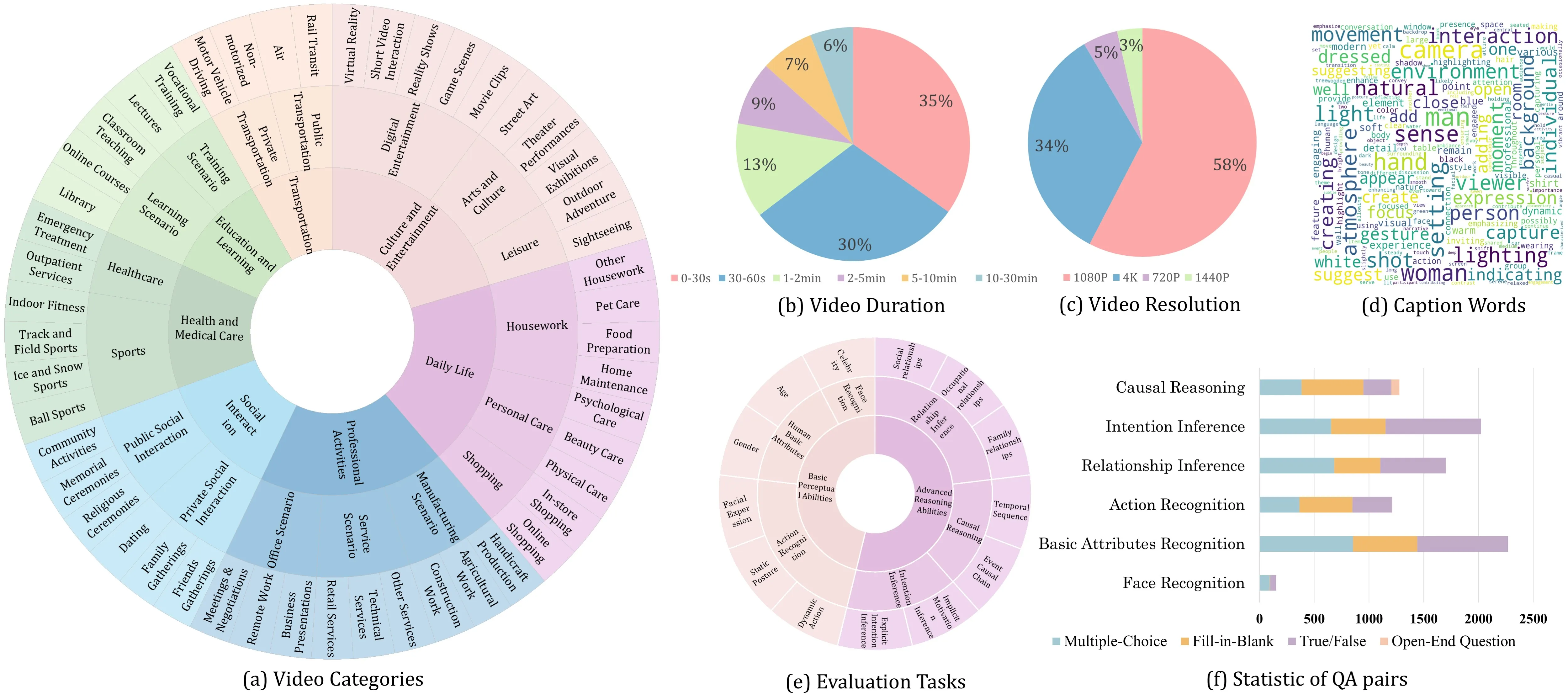
- Covers many skills at once. It checks 13 tasks from simple traits (like age) to deeper reasoning (like intent).
- Uses four question types. It includes multiple-choice, fill-in-blank, true/false, and open-ended questions to get a fair view.
- Rich, real-world video set. It spans 50 types of scenes and clips from 10 seconds up to 30 minutes.
- Tests real reasoning. It shows that models do better on closed-form tasks and struggle more with open-ended answers.
For more simple AI explainers and guides, visit our hub at Omnihuman 1.Com.
Decoding Human Motion: A Closer Look at the HumanVideo-MME Benchmark Use Cases
- Research teams can compare new video models and see where they fail or pass. This helps set fair baselines.
- Product teams can check safety, emotion cues, or human activity understanding before shipping tools.
- Media or social platforms can study action, scenes, and human signals in user videos. See related industry news in our Bytedance coverage.
Performance & Showcases
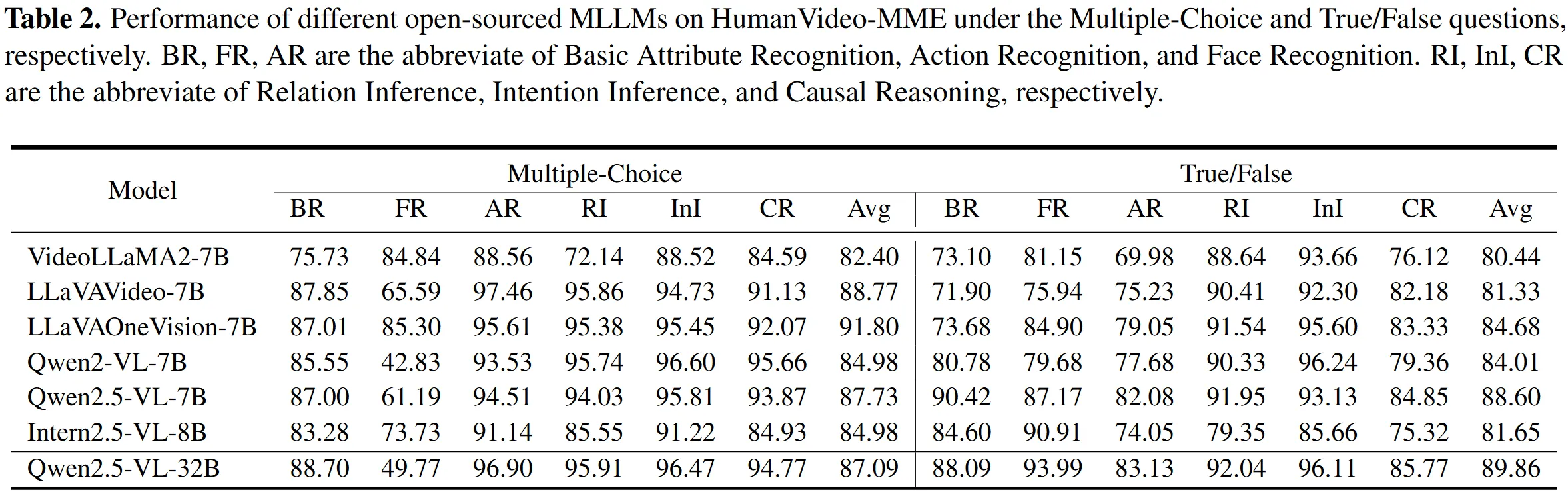
Below are high-level result views that the team reports. The main trend: models do well on fixed-answer formats and drop on open-ended ones. This gap shows the need for better true reasoning.
Multiple-Choice and True/False Results
Many models score higher when the answer space is fixed. Multiple-choice and true/false formats help models pick patterns without full reasoning.
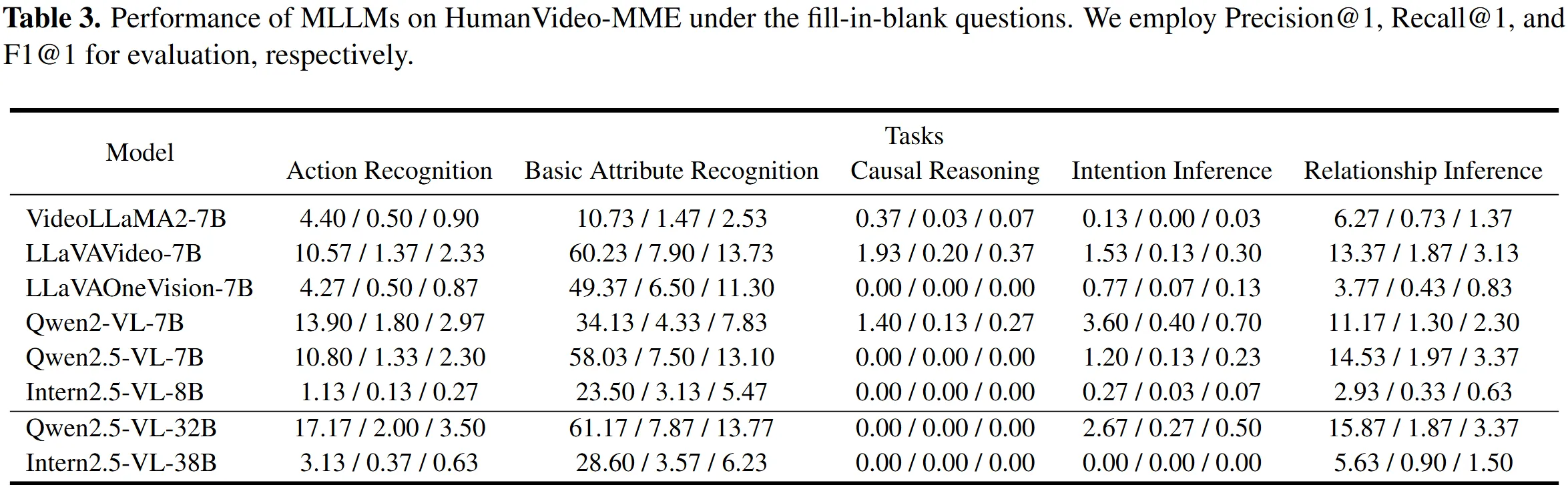
Fill-in-Blank Results
Fill-in-blank pushes the model to recall and connect details across time. Scores are lower than multiple-choice, showing more challenge.
Open-Ended Results
Open-ended questions are the hardest. They reveal gaps in deeper understanding of human behavior and long-term context.

How HumanVideo-MME Works
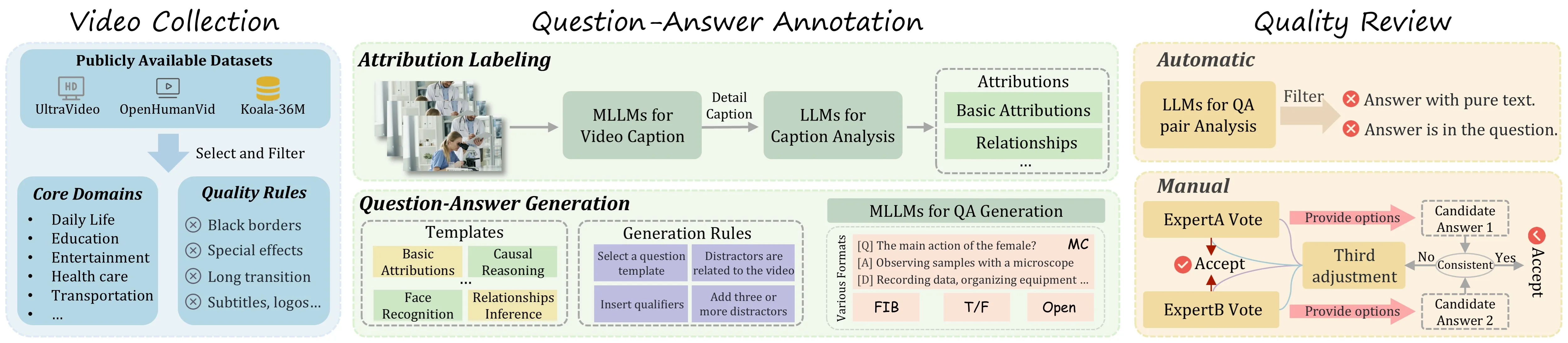
- The team gathers videos across 50 human-focused domains. Clips range from short moments to long scenes.
- They write questions that cover simple traits and deeper social reasoning. Each video can have different question types.
- Models answer the questions, and the system scores them under clear rules. Results show strengths and weak spots across tasks and formats.
The Technology Behind It
HumanVideo-MME is built to test MLLMs (multimodal large language models) that read both video and text. In the quickstart, the team shows how to run Qwen2.5-VL on this benchmark. The evaluation scripts standardize how you get predictions and compute scores.
Installation & Setup
Follow these steps exactly as provided by the project to run a quick test with Qwen2.5-VL.
- Refer to QwenLM/Qwen2.5-VL for environment preparation.
pip install transformers==4.51.3 accelerate
pip install qwen-vl-utils[decord]
pip install -U flash-attn --no-build-isolation
-
Download pre-trained Qwen2.5-VL models for inference.
-
Quick Inference
python eval/human/inference_video_humanbench.py \
 --model-path $MODEL_PATH \
 --question-file $QAFile_DIR/$QA_Type/cleaned_qa_pair.json \
 --video-folder $Video_DIR \
 --answer-file $EVAL_DIR/$QA_Type/results.json
- Evaluation
python eval/human/eval_video_humanbench.py \
 --pred-path $EVAL_DIR/$QA_Type/results.json \
 --fixed-path $EVAL_DIR/$QA_Type/results_fixed.json \
 --save_csv_path $EVAL_DIR/$QA_Type/all_results.json
Notes:
- The team suggests Qwen2.5-VL for environment prep and quick trials.
- Be sure your paths are correct for the model, questions, videos, and output files.
Step-by-Step: Run Your First Evaluation
- Prepare your Python environment based on Qwen2.5-VL. Then install the exact packages shown above.
- Download a pre-trained Qwen2.5-VL model and place its path in $MODEL_PATH.
- Set your question files and video folder paths. Then run the Quick Inference script to generate answers.
- Run the Evaluation script to produce final scores and a results file.
- To share results on the leaderboard, send your model outputs to the team as noted on the project site.
Tips for Better Results
- Use the right question type for your goal. If you want to test reasoning, try open-ended or fill-in-blank.
- Check long videos if you care about memory over time. The 30-minute clips reveal temporal skills.
- Compare across tasks to see strength and weakness. Do not rely on one score only.
FAQ
What makes this benchmark special?
It tests many skills at once across 13 tasks and 4 question formats. It also covers 50 domains and both short and long videos. This helps expose gaps in real understanding.
Do I need a specific model to use it?
No, you can try many MLLMs. The docs show Qwen2.5-VL as a quick way to start.
How hard are the open-ended questions?
They are the toughest part. Models often fall short here, which helps teams see where to improve.
Can I submit my results somewhere?
Yes. The site mentions a leaderboard and asks you to send your model responses to the team. Check the project page for the exact steps.
Where can I learn more about your content?
You can find more guides and news on our main site at our homepage.
Image source: Decoding Human Motion: A Deep into the HumanVideo-MME Benchmark