From Pixels to Precision: How Video Pre-training Is Revolutionizing Robotic Manipulation
What is From Pixels to Precision: How Video Pre-training Is Changing Robotic Manipulation
From Pixels to Precision explains GR-1, a robot control model that learns from large amounts of video first, and then learns from robot data. In plain words, it watches many videos to learn how the world moves, and later uses a small set of robot examples to learn how to act with arms and grippers.
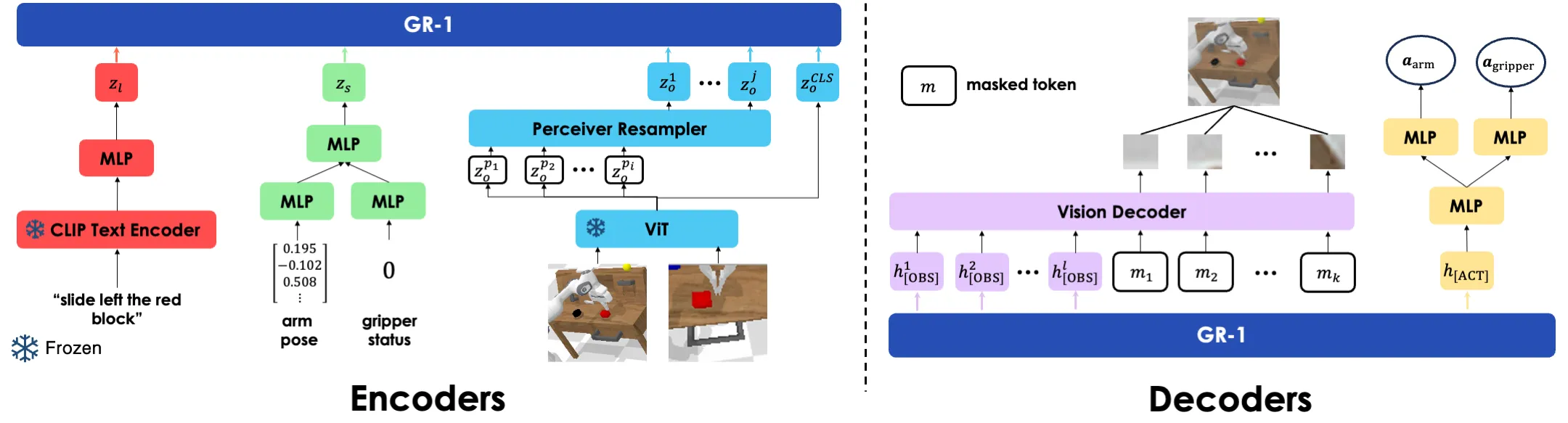
GR-1 reads a short text command, a few recent camera images, and the robot’s state (like joint angles). It then predicts what the robot should do next, and even what the next camera frames will look like. This simple idea gives strong results in both lab tests and real robots.
From Pixels to Precision: How Video Pre-training Is Changing Robotic Manipulation Overview
Here is a quick look at GR-1 and the project behind it.
| Key | Details |
|---|---|
| Project Name | GR-1 ( Robot Manipulation with Video Pre-training) |
| Type | Open-source research code and model |
| Purpose | Teach robots to follow language commands by learning from large-scale videos first, then fine-tuning on robot data |
| Main Features | Predicts robot actions; predicts future images; works across many tasks; handles new scenes and new wordings |
| Inputs | Language instruction, image sequence, robot state sequence |
| Outputs | Low-level robot actions, predicted future frames |
| Pre-training | Large-scale video prediction pre-training |
| Fine-tuning | Robot data (multi-task, language-conditioned) |
| Vision Encoder | MAE ViT-Base (pre-trained) |
| Text Encoder | CLIP text encoder (kept frozen during training) |
| Benchmark | CALVIN (long-horizon, multi-task, language-conditioned) |
| Weights Provided | snapshot_ABCD.pt (ABCD->D split), snapshot_ABC.pt (ABC->D split) |
| Data Needed | CALVIN dataset (A, B, C, D environments) |
| Project Site | gr1-manipulation.github.io (opens in a new tab) |
| Code Repository | GitHub: bytedance/GR-1 |
To learn more about the company behind this research, see this short overview of Bytedance.
From Pixels to Precision: How Video Pre-training Is Changing Robotic Manipulation Key Features
- Video-first learning: GR-1 starts by learning how things move in videos. This builds a strong base before touching any robot data.
- End-to-end control: Given text, images, and robot states, it outputs actions and predicts future images in one pass.
- Strong generalization: Works well on new scenes (different colors, layouts) and even new wordings not seen during training.
- Data efficiency: Keeps good performance even when robot data is limited.
- Long-horizon skills: Can complete several tasks in a row by following a list of text commands.
How GR-1 Works (Simple View)
GR-1 has two training stages. First, it learns “video prediction” on a large video set, so it understands motion and how scenes change over time. Second, it is fine-tuned on robot data with language instructions, so it learns to act.
At run time, text is encoded by a CLIP text encoder. Images are encoded by a ViT model pre-trained with MAE. These are fed into a single transformer (GPT-style) that predicts both actions and upcoming frames.
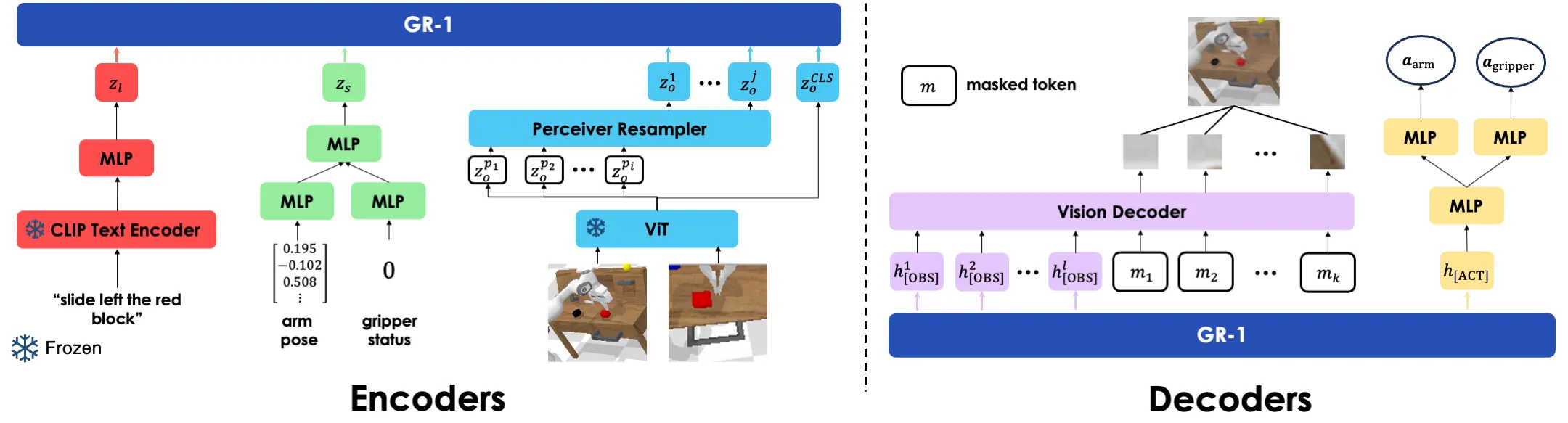
This setup lets GR-1 “think ahead” by predicting what the camera will likely see next. That helps the robot plan and stay on track during long tasks.
From Pixels to Precision: How Video Pre-training Is Changing Robotic Manipulation Use Cases
- Home helpers: Open a drawer, turn on a light, move blocks, and follow short voice-like instructions.
- Factory cells: Repeat small parts assembly, pick-and-place, and switch toggling with fewer re-trains.
- Labs and education: Teach new tasks quickly with limited robot data, while keeping strong results.
- Warehouses: Handle new layouts or colors with less tuning, thanks to scene generalization.
For a friendly intro to video learning methods, check out our short note on text-to-video tools.
Performance & Showcases
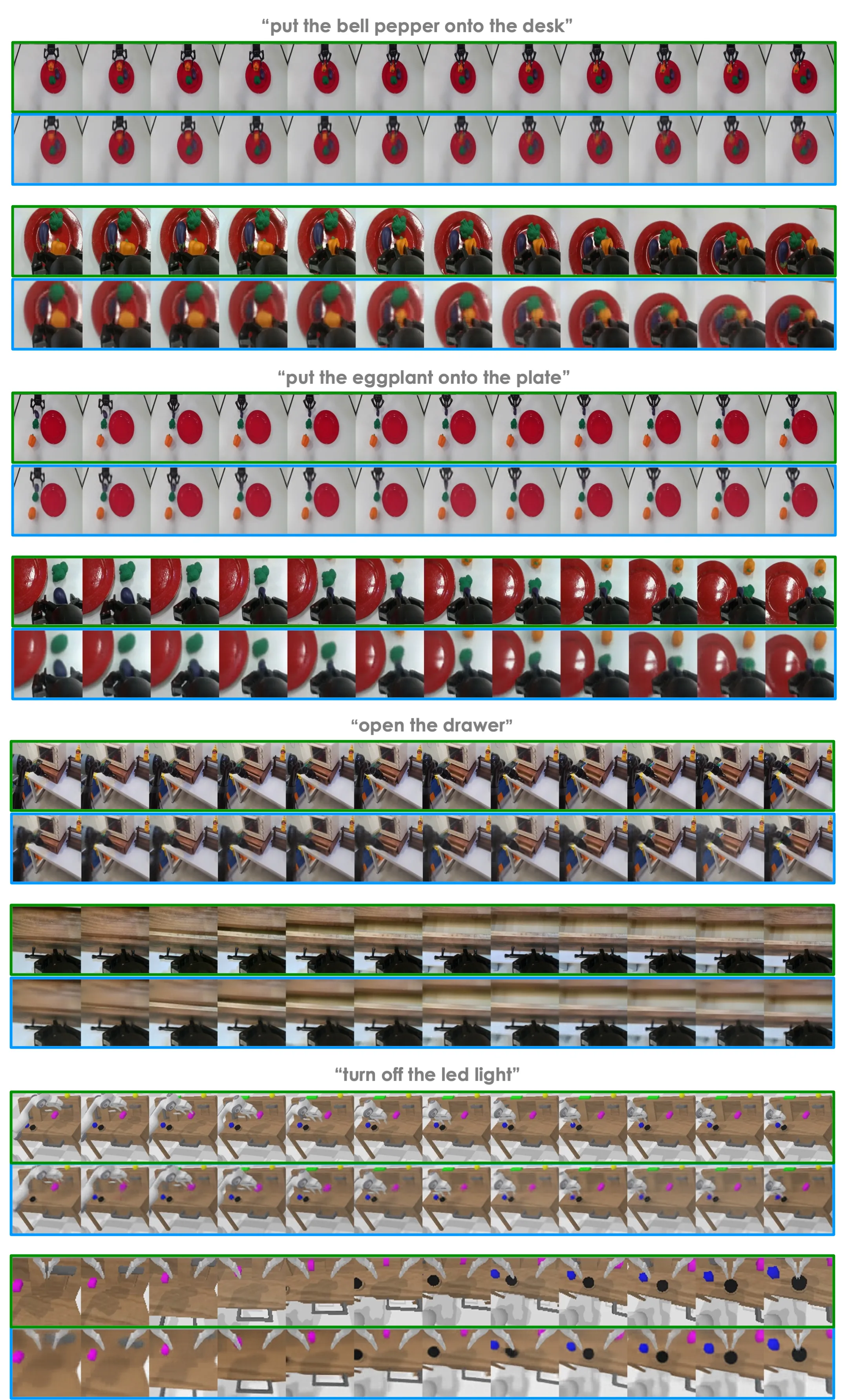
Below are short demos that illustrate how video pre-training helps with language-conditioned robot skills. Each clip highlights “Unleashing Large-Scale Video Generative Pre-training for Robot Manipulation” in action across many tasks and scenes.
Showcase 1 — Unleashing Large-Scale Video Generative Pre-training for Robot Manipulation This clip, Unleashing Large-Scale Video Generative Pre-training for Robot Manipulation, shows how video learning helps the robot plan ahead. You can see the model follow text commands while handling objects with steady, step-by-step moves.
Showcase 2 — Unleashing Large-Scale Video Generative Pre-training for Robot Manipulation Here, Unleashing Large-Scale Video Generative Pre-training for Robot Manipulation is on display with multi-task control. The robot completes a sequence of tasks by reading and acting on a list of instructions.
Showcase 3 — Unleashing Large-Scale Video Generative Pre-training for Robot Manipulation This demo highlights Unleashing Large-Scale Video Generative Pre-training for Robot Manipulation under scene changes. Colors and layouts shift, but the model still follows the text and completes actions.
Showcase 4 — Unleashing Large-Scale Video Generative Pre-training for Robot Manipulation Watch Unleashing Large-Scale Video Generative Pre-training for Robot Manipulation adapt to new wordings of the same tasks. Even when the phrasing changes, the robot keeps the goal and executes well.
Showcase 5 — Unleashing Large-Scale Video Generative Pre-training for Robot Manipulation This clip shows Unleashing Large-Scale Video Generative Pre-training for Robot Manipulation tackling longer sequences. It stays on track across several steps, showing strong planning.
Showcase 6 — Unleashing Large-Scale Video Generative Pre-training for Robot Manipulation In this final demo of Unleashing Large-Scale Video Generative Pre-training for Robot Manipulation, the model predicts what will happen next while choosing actions. This “see the future” skill helps it avoid mistakes.
Real-World Tests
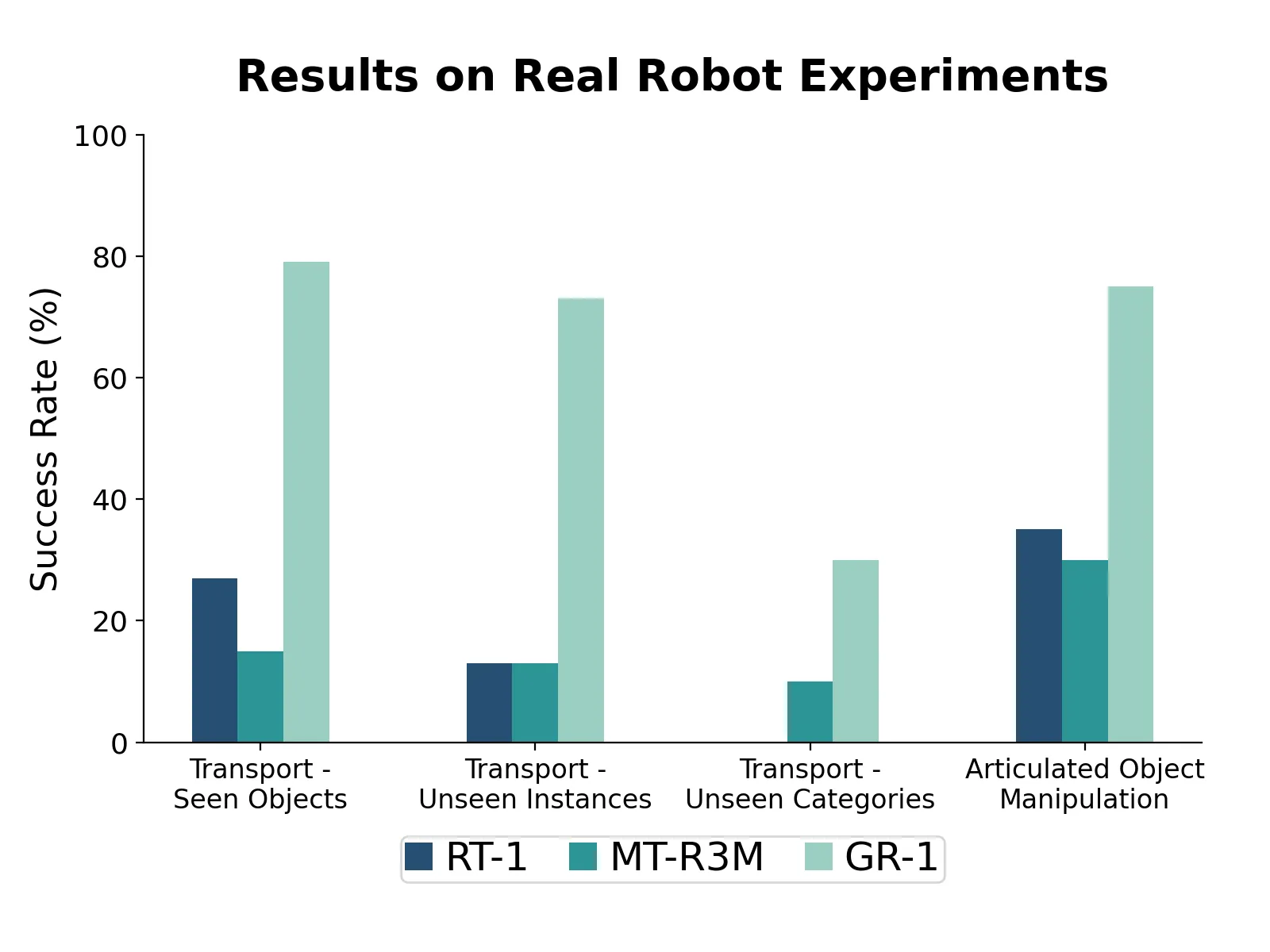
The team tested GR-1 on a real Franka robot arm with a gripper and common desk objects. The model followed text like “open the drawer” or “move the red block” and handled unseen items and scenes well.
Text was mapped with a strong CLIP text encoder. Images were encoded with a ViT pre-trained using MAE. Together, these parts fed into the GR-1 transformer for action and image prediction.
CALVIN Benchmark Results
CALVIN is a well-known test for language-driven, long-horizon robot tasks. It includes 34 tasks across 4 different environments (A, B, C, D) with different desk colors and object placements. GR-1 was tested in four key settings.
-
Long-horizon multi-task (ABCD->D): The robot must solve up to 5 tasks in a row from text prompts. GR-1 improved the 5-in-a-row success from 38.3% to 73.1%, and the average completed tasks from 3.06 to 4.21.
-
Zero-shot to unseen scenes (ABC->D): Trained on A, B, C and tested on new D. GR-1 showed a large gain in success here, helped by exposure to large video data during pre-training.
-
Data efficiency (10% ABCD->D): With only about 10% of the robot data, all methods dropped, but GR-1 stayed strong overall. Tasks with blocks fell more, since they need a good grasp first and then a second correct move.
-
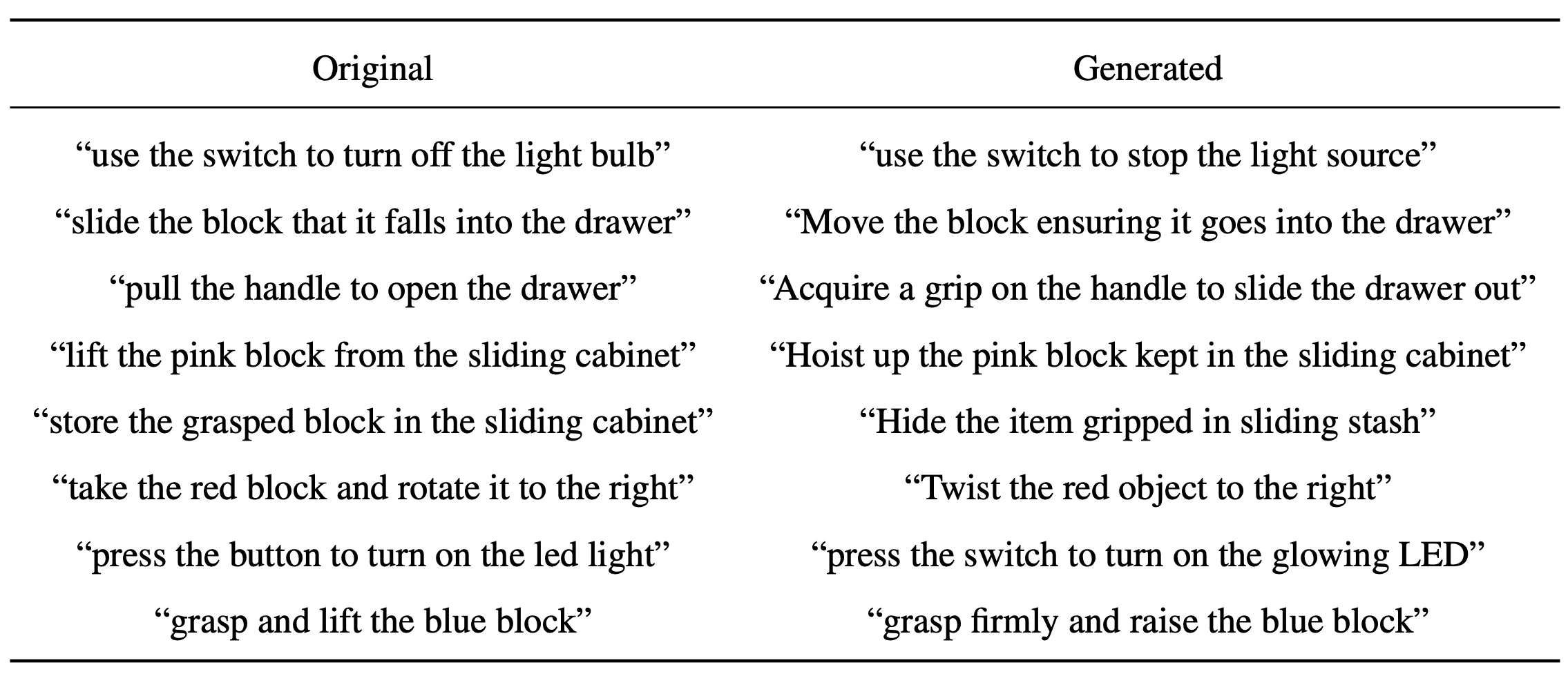
Zero-shot to unseen language: New, synonymous instructions were made with GPT-4 for all 34 tasks. GR-1 kept a high success rate, helped by rse language in pre-training and a frozen CLIP text encoder.
Why Video Pre-training Helps
Before seeing robot data, GR-1 learns to predict how scenes change frame by frame. This makes the model good at timing and contact, which are key in manipulation.
Ablation tests show both “video prediction” and “large-scale” pre-training matter. Together, they boost success across tasks, scenes, and new wordings.
Installation & Setup
Follow these steps to set up GR-1 for the CALVIN benchmark.
-
Install the CALVIN environment. Follow the steps in the official CALVIN repo.
-
Download the CALVIN dataset from the CALVIN repo.
-
Install other dependencies:
bash install.sh
-
Download the MAE ViT-Base pre-trained weight from the MAE repo.
-
Download GR-1 training weights for the splits: ABCD-D and ABC-D. Place the downloaded files snapshot_ABCD.pt and snapshot_ABC.pt in logs/.
Getting Started: Evaluate on CALVIN
Set your paths and run evaluation as shown below. Replace paths with your local directories. Results will be saved into EVAL_DIR.
export CALVIN_ROOT=/path/to/calvin/directory/
export EVAL_DIR=eval_logs/
export POLICY_CKPT_PATH=logs/snapshot_ABCD.pt
export MAE_CKPT_PATH=/path/to/mae/checkpoint/
bash evaluate_calvin.sh --dataset_dir /path/to/calvin/dataset/task_ABCD_D/directory/
To test the ABC-D split, set POLICY_CKPT_PATH=logs/snapshot_ABC.pt. EVAL_DIR will be created if it does not exist. For more AI stories and guides, see the latest posts on our main site.
The Technology Behind It (Plain English)
- Text understanding: A CLIP text encoder turns words into numbers that the model can use.
- Image understanding: A ViT learned with MAE turns frames into tokens that keep object and motion clues.
- Action and prediction: A transformer brings text, images, and robot states together to pick actions and also predict the next images, which helps it plan.
Image source: https://gr1-manipulation.github.io/