FlowAct-R1: Towards Interactive Humanoid Video Generation

What is FlowAct-R1: Towards Interactive Humanoid Video Generation
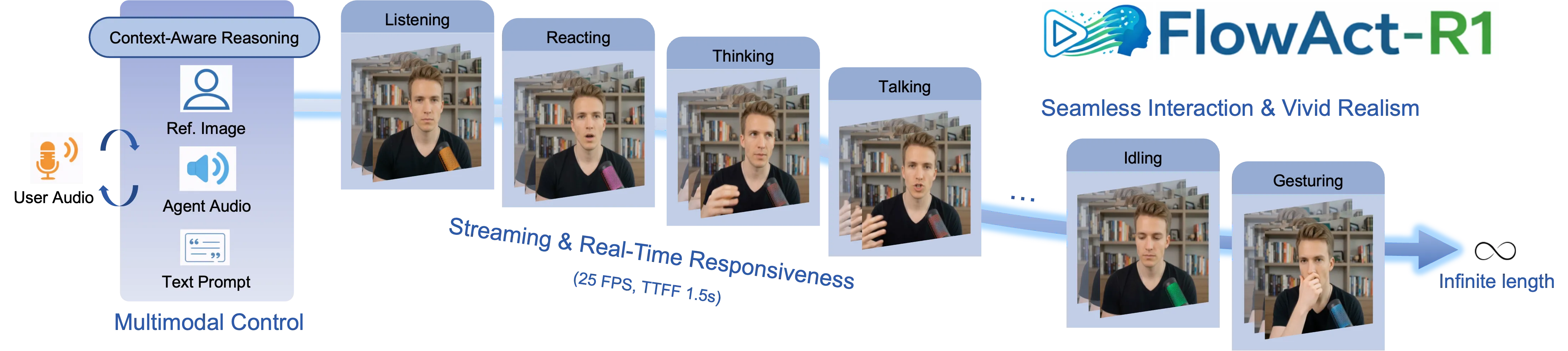
FlowAct-R1 is a research project that makes human-style videos on the fly. It can respond fast, move naturally, and keep going for as long as you need.

It works from a single reference image and turns it into a talking, moving character. The video streams in real time, so you see quick updates as it runs.
FlowAct-R1: Towards Interactive Humanoid Video Generation Overview
| Item | Details |
|---|---|
| Type | Interactive humanoid video generator (research project) |
| Purpose | Create human-style videos that react in real time and can run for an unlimited duration |
| Input | One reference image; interactive prompts or control signals |
| Output | Streaming video of a human-like character |
| Speed | About 25 FPS at 480p |
| Latency | Time-to-first-frame around 1.5 seconds |
| Key Abilities | Real-time streaming, infinite-length video, strong motion consistency, expressive behavior |
| Style Control | Keeps the same character style from one reference image across scenes |
| Core Ideas (high level) | A video model core trained and tuned for speed; generates video in short blocks to stay stable; extra system tuning for low delay |
| Status | Public demo videos available on the project page |
If you want a simple primer on this space, check our short text-to-video guide.
FlowAct-R1: Towards Interactive Humanoid Video Generation Key Features

- Streaming and duration: it keeps generating new frames so the video does not stop.
- Fast response: about 25 frames per second at 480p with around 1.5 seconds to the first frame.
- Natural motion: actions stay steady over time, with smooth changes between poses and expressions.
- One image, many scenes: start from a single picture and keep the same character style across different actions.
- Built for interaction: reacts to inputs quickly, so it feels responsive.
For context on how big companies push video AI forward, see our quick note on ByteDance’s work in media AI.
How FlowAct-R1 Works (Friendly Walkthrough)
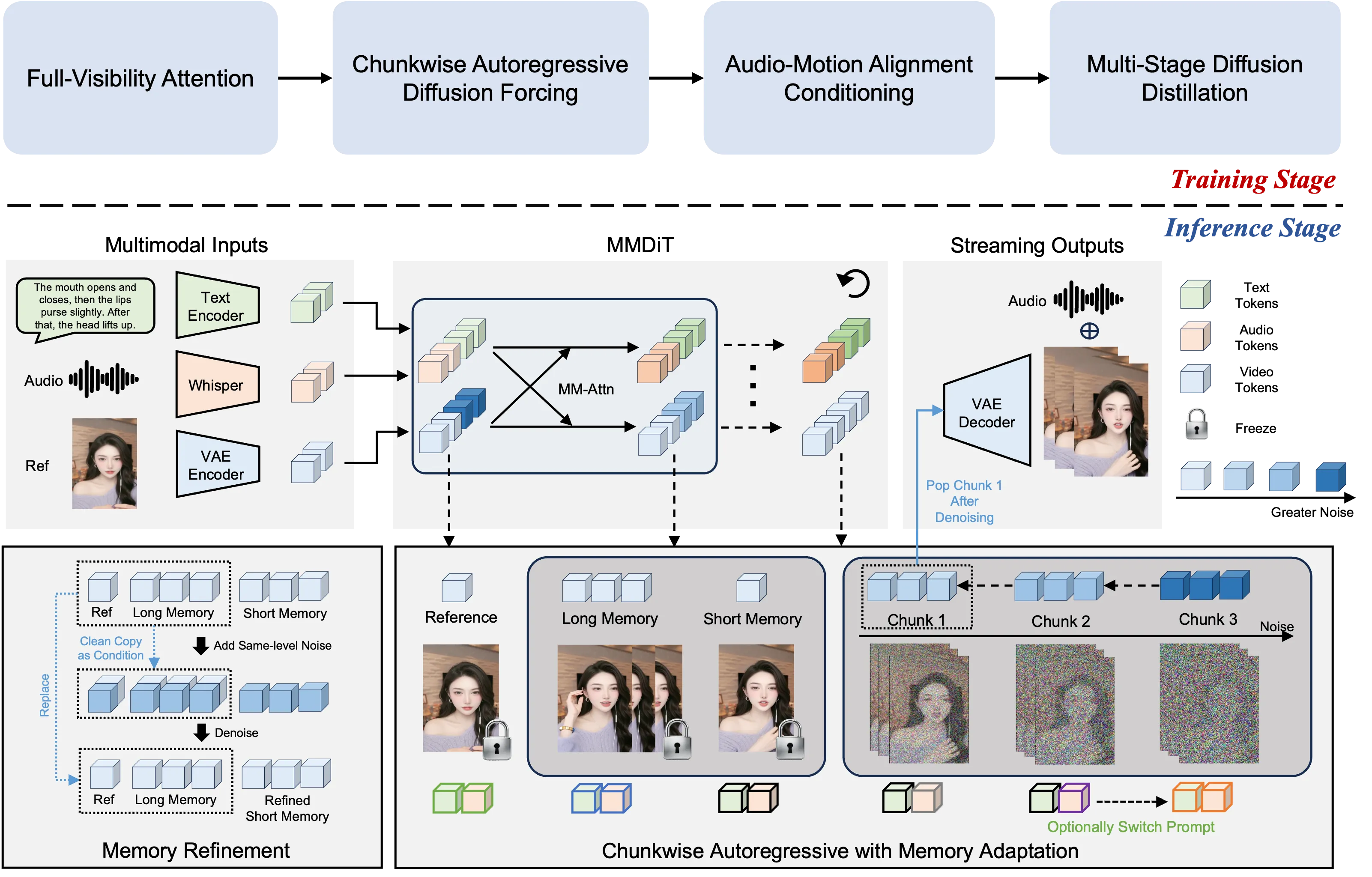
- You provide a single image of a person or character. The system keeps this look and moves it like a real actor on screen.
- It creates video in small chunks and streams them right away, so you do not wait long.
- Because it is chunk-based, it stays steady over long sessions and avoids drift.
- Behind the scenes, the team trained the model and tuned the runtime so it can run fast and react quickly.
The Technology Behind It (Plain English)
FlowAct-R1 uses a strong video backbone (called MMDiT in the paper) to learn motion and keep details. It also uses a “chunkwise diffusion forcing” trick, which means it thinks in short blocks so it can handle long videos while staying stable. Extra training steps (distillation) and system tweaks reduce delay and keep frame rates high.
FlowAct-R1: Towards Interactive Humanoid Video Generation Use Cases
- Live VTubing or streaming hosts that react to chat in real time.
- Customer support avatars that speak and move on live calls.
- Digital teachers or fitness coaches that guide users with gestures and expressions.
- In-app guides for tools or games that need a talking helper.
- Social content, product explainers, or media assets made from a single photo.
For more stories, tools, and quick reads on human + AI video, visit our homepage.
Performance & Showcases
FlowAct-R1 aims for smooth real-time output at about 25 FPS and 480p resolution, with about 1.5 seconds to the first frame. It can keep going for a very long time while holding style and motion steady across segments.
Showcase 1 — Intro demo We present FlowAct-R1, a novel framework that enables realistic, responsive, and high-fidelity humanoid video generation for real-time interac. Watch the demo below.
Showcase 2 — Core capabilities We present FlowAct-R1, a novel framework that enables realistic, responsive, and high-fidelity humanoid video generation for real-time interac. Watch the demo below.
Showcase 3 — Real-time interaction We present FlowAct-R1, a novel framework that enables realistic, responsive, and high-fidelity humanoid video generation for real-time interac. Watch the demo below.
Showcase 4 — Style and movement We present FlowAct-R1, a novel framework that enables realistic, responsive, and high-fidelity humanoid video generation for real-time interac. Watch the demo below.
Showcase 5 — Livestreaming example FlowAct-R1 streamingly synthesizes realistic humanoid videos with naturally expressive behaviors, enabling infinite durations for truly interaction. Watch the demo below.
Showcase 6 — Long-form streaming FlowAct-R1 streamingly synthesizes realistic humanoid videos with naturally expressive behaviors, enabling infinite durations for truly interaction. Watch the demo below.
Getting Started: Try the Demo
- Visit the official project page to explore the public demos.
- Check the clips that match your use case: talking host, streaming, or long-duration runs.
- If an interactive demo is available, prepare a clear reference image so the character style looks consistent.
- For updates on code, models, or downloads, watch the project page and release notes there.
Tips for Best Results
- Use a high-quality, well-lit reference image with a clear face.
- Keep inputs simple first, then add more detail as you test.
- If you stream for a long time, check network stability to keep the frame rate steady.
FAQ
What makes FlowAct-R1 stand out?
It blends quick response, steady motion, and expressive behavior in one system. It keeps the look of your chosen character while moving and speaking on screen.
How fast is it in practice?
The team reports about 25 frames per second at 480p. It shows the first frame in around 1.5 seconds.
Can it run for a very long time?
Yes. It is built for continuous generation, so it can keep streaming new frames without a hard stop.
Do I need to record a video to start?
No. A single reference image is enough to lock in the character’s look. The model then animates that character.
Is the code or model download public?
Details may change over time. Please check the project page for the latest info on releases or downloads.
Read More: Text To Video Read More: Bytedance Read More: Omnihuman 1.Com
Image source: FlowAct-R1: Towards Interactive Humanoid Video Generation