CreatiDesign: A Unified Multi-Conditional Diffusion Transformer for Creative Graphic Design
What is CreatiDesign: A Unified Multi-Conditional Diffusion Transformer for Creative Graphic Design
CreatiDesign is a research project that helps you make polished graphic designs from many types of inputs at once. You can give it product photos, simple layout boxes, and short text like a slogan, and it will build a full poster-style image that follows your plan.

It was created by researchers from Fudan University and ByteDance Intelligent Creation. The team built a single model that listens to all your inputs and keeps each one in the right place with the right look.
CreatiDesign: A Unified Multi-Conditional Diffusion Transformer for Creative Graphic Design Overview
CreatiDesign focuses on clear control. Each element you give it is kept where it should be, without one input fighting another.
For more AI explainers and tools, you can browse our homepage at Omnihuman 1.Com.
| Item | Detail |
|---|---|
| Type | Research project and open-source code |
| Purpose | Create full graphic designs from many inputs (images, layouts, texts) with strong control |
| Model | Unified multi-conditional diffusion transformer |
| Key Features | Multi-conditional generation, precise element control with attention masks, large dataset, benchmark, zero-shot editing |
| Inputs | Product or subject images, semantic layout boxes/positions, short text (titles, slogans) |
| Output | High-quality graphic design images (e.g., ads, posters, social posts) |
| Dataset | 400K design samples with multi-condition labels |
| Benchmark | 1,000 curated test cases for strict checks |
| Institutions | Fudan University and ByteDance Intelligent Creation |
| Authors | Hui Zhang, Dexiang Hong, Maoke Yang, Yutao Cheng, Zhao Zhang, Jie Shao, Xinglong Wu, Zuxuan Wu, Yu-Gang Jiang |
| Year | 2025 (arXiv preprint arXiv:2505.19114) |
| Project Page | https://huizhang0812.github.io/CreatiDesign/ |
| GitHub | https://github.com/HuiZhang0812/CreatiDesign |

CreatiDesign: A Unified Multi-Conditional Diffusion Transformer for Creative Graphic Design Key Features
-
One model for many inputs. It handles product images, layout boxes, and short text at the same time.
-
Strong control over each element. A special attention mask keeps each input in its own area without mixing.
-
Big training data. A 400K-sample dataset and a 1,000-sample benchmark help measure real results.
-
Works for editing too. You can use it to tweak designs without extra training.
-
Built to keep your idea intact. Tests show better subject match and better layout match against past methods.
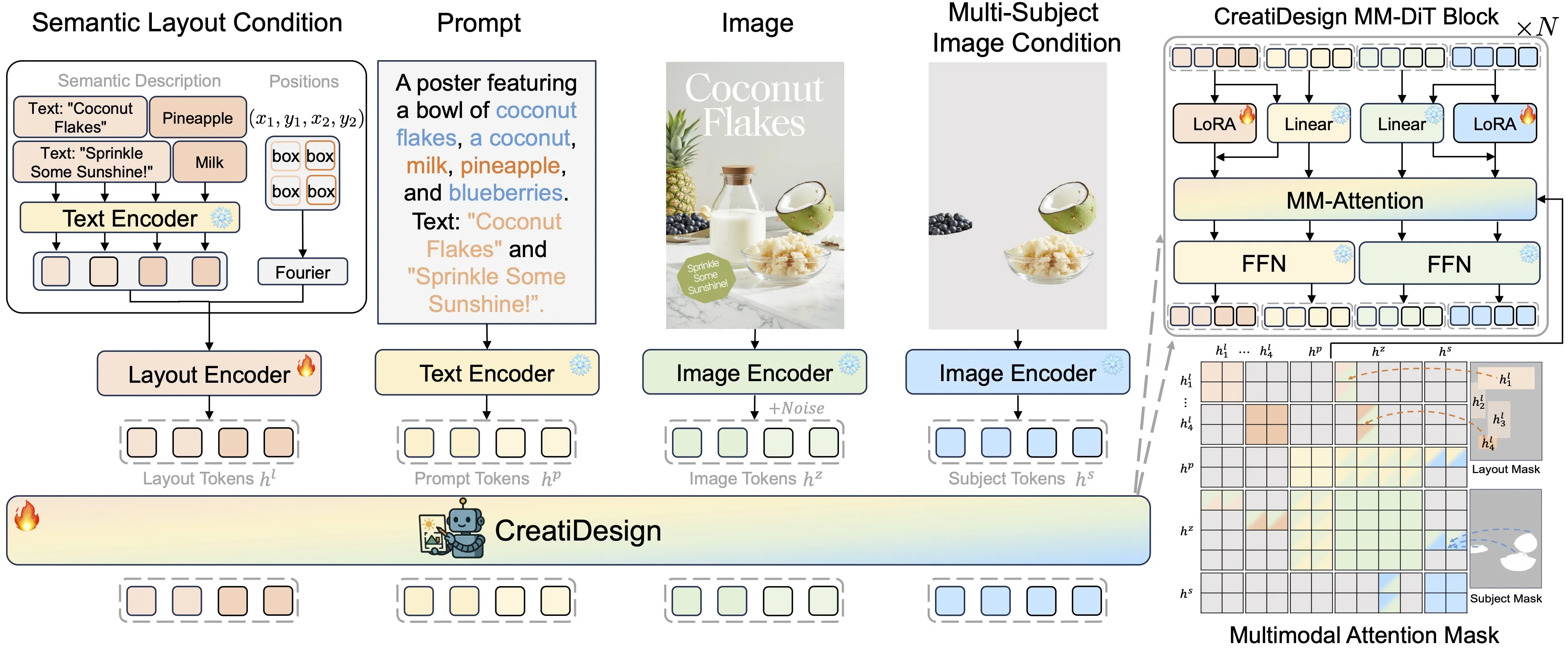
How It Works
-
You provide three kinds of inputs. These are main images (like a product), layout hints (where things go), and small text chunks.
-
The model reads them together. It plans how to arrange items so the final image fits your plan.
-
A “multimodal attention mask” stops inputs from stepping on each other. This keeps the subject sharp, the text in the right zone, and the layout tidy.
Installation & Setup
Follow these steps in your terminal to set up the environment and run the evaluation scripts. Use the exact commands below.
- Environment setup
conda create -n creatidesign python=3.10 -y
conda activate creatidesign
conda install pytorch==2.4.1 torchvision==0.19.1 torchaudio==2.4.1 pytorch-cuda=12.1 -c pytorch -c nvidia
- Requirements installation
pip install -r requirements.txt
To run the benchmark and evaluations:
Generate images:
python test_creatidesign_benchmark.py
Evaluate multi-subject preservation:
python eval/subject.py
Evaluate semantic layout alignment:
python eval/layout.py
python eval/text.py
Datasets and Benchmark
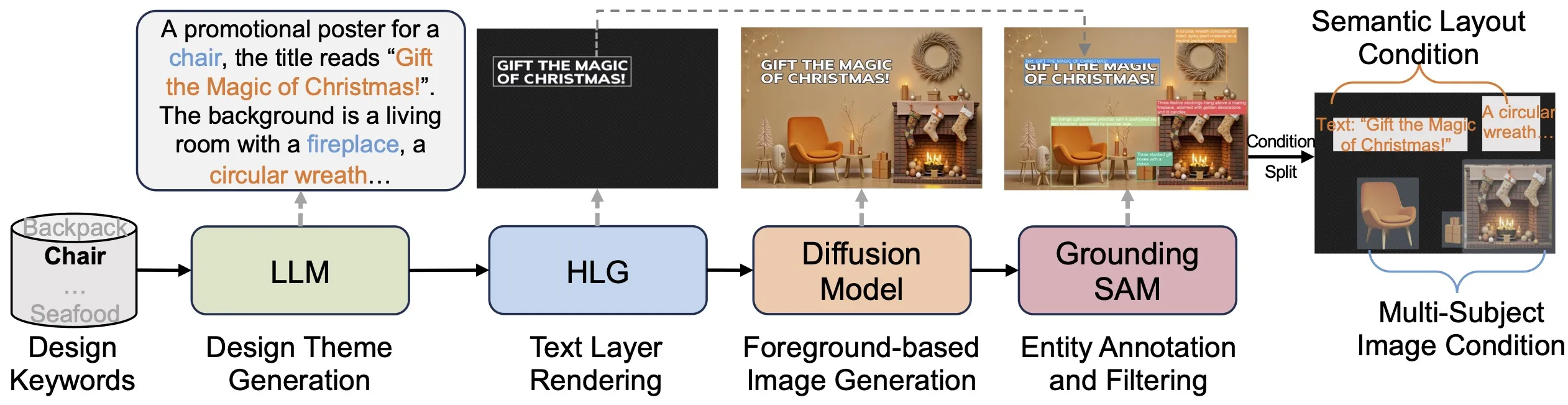
The team built a fully automated pipeline to gather 400K labeled design samples. The data includes ads, movie posters, brand promos, and social content.
The benchmark has 1,000 careful test cases. It checks if subjects are kept, if layouts are followed, and if the image quality is strong.
CreatiDesign: A Unified Multi-Conditional Diffusion Transformer for Creative Graphic Design Use Cases
-
Marketing and ads: Place a product photo, add headline text, and lock key items to set spots for quick campaign assets.
-
Social media posts: Keep a logo and title in fixed areas and auto-fill backgrounds that fit the brand.
-
Posters for movies, events, and promos: Control hero images, taglines, badges, and credits with simple layout boxes.
-
Batch content for A/B tests: Reuse the same layout and vary product shots or taglines to compare.
-
Quick edits: Swap a subject or move a text box without training a new model.
To explore more related work from the parent company, see ByteDance on our site.
Performance & Showcases
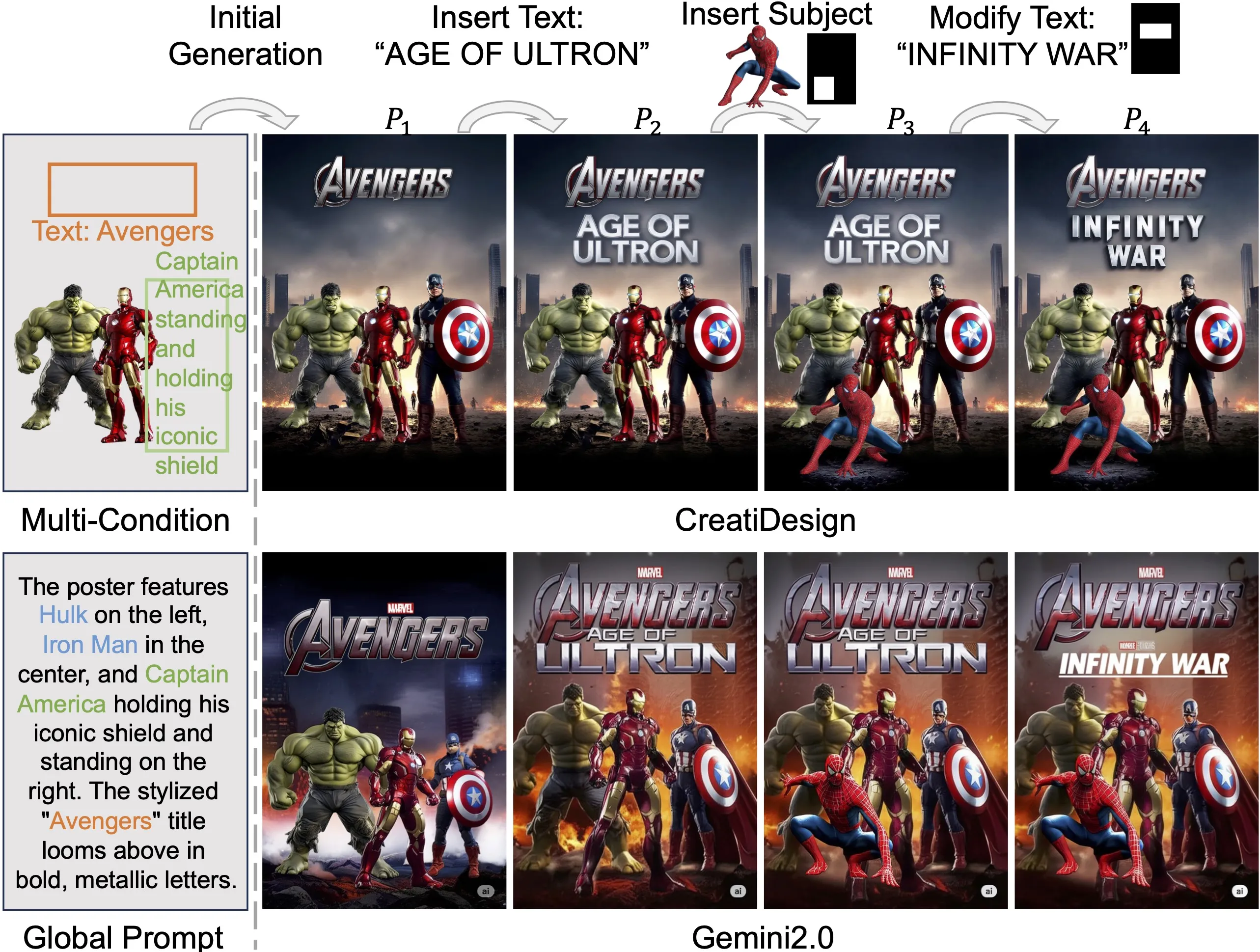
CreatiDesign shows stronger subject keeping and tighter layout match than prior single-condition and multi-condition baselines. It also holds text and decorations in their zones with fewer mistakes.
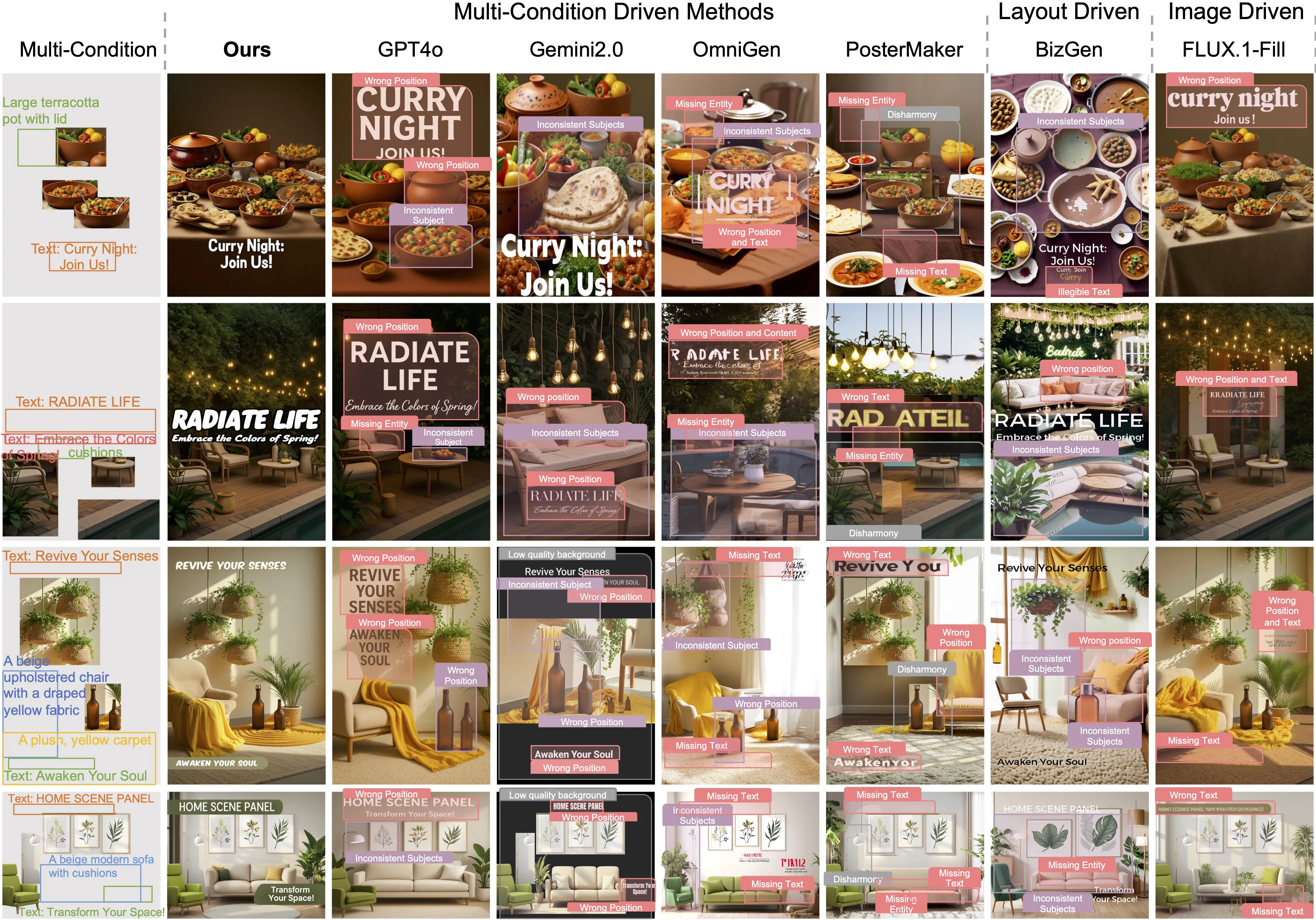
The project also reports broad tests that score how well subjects are preserved and how well the layout lines up with the plan. These checks give a clear view of real design quality and control.
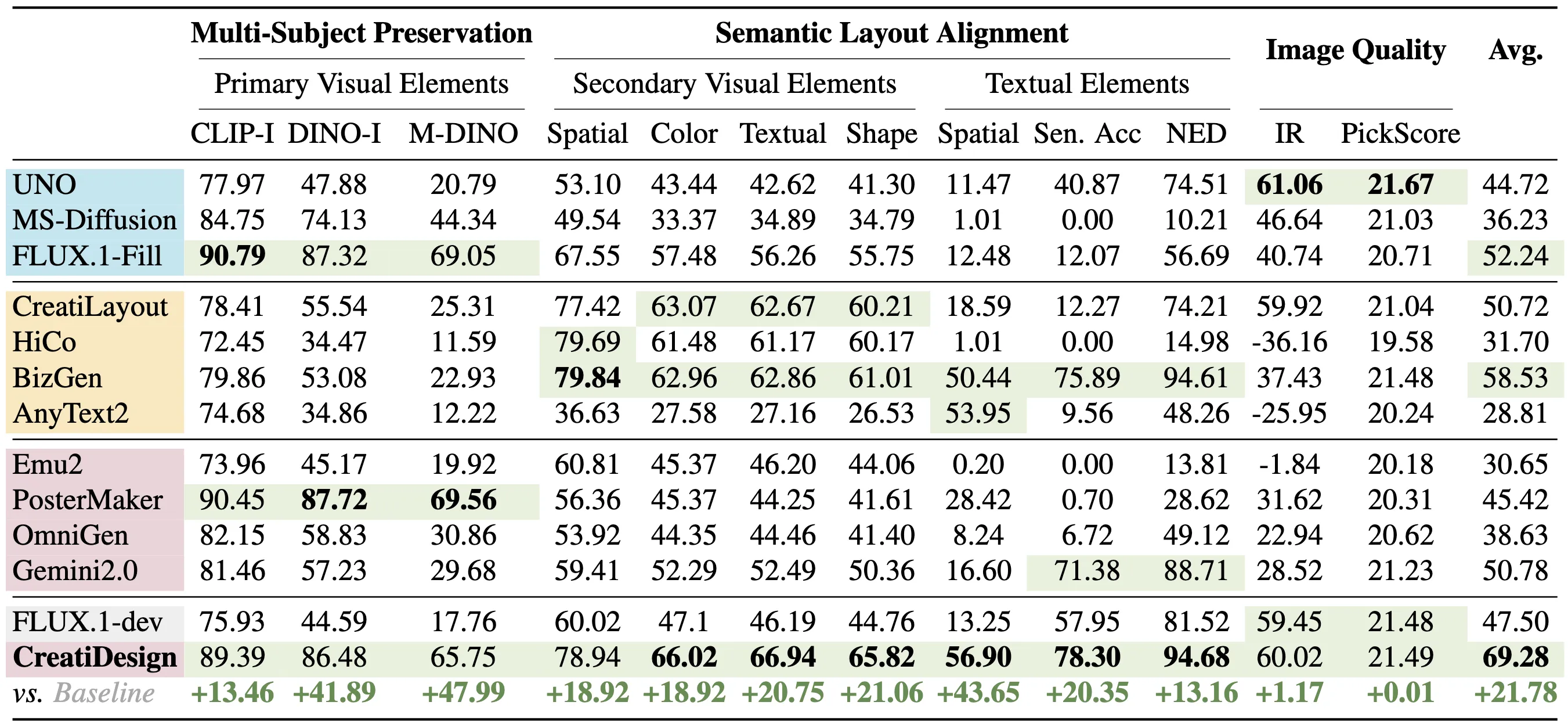
The Technology Behind It
-
Unified design model: One transformer-based diffusion model reads images, layouts, and text together, so it works as a single brain.
-
Attention masks: These masks tell the model which parts of the image each input can affect. This keeps the design balanced.
-
Minimal base changes: The team kept core changes small, which helps stability and training.
Step-by-Step: Run the Benchmark
Here is a short guide to test the model’s skills with the provided scripts.
- Create the environment and install packages.
- Use the “Environment setup” and “Requirements installation” commands above.
- Generate benchmark images.
- Run:
python test_creatidesign_benchmark.py
- Evaluate results.
- For subject keeping:
python eval/subject.py
- For layout match:
python eval/layout.py
- For text checks:
python eval/text.py
Tips for Best Results
-
Prepare clean product shots with clear edges. This helps the model keep the subject strong.
-
Keep layout boxes simple and non-overlapping. Clear plans lead to cleaner designs.
-
Use short, readable text for titles and slogans. This avoids clutter and helps placement.
FAQ
Who is CreatiDesign for?
It is for marketers, designers, content teams, and researchers who need fast, controlled design creation. It also helps teams run tests across many layout and content options.
Can I edit an existing design with it?
Yes. It supports editing tasks without extra training, so you can replace a subject or adjust text and keep the rest in place.
What do I need to run it?
You need a Python 3.10 environment with PyTorch 2.4.1 and CUDA 12.1 support. Follow the “Installation & Setup” commands above.
What kinds of inputs work best?
Use a clear subject image, simple layout boxes with positions, and short text strings. The cleaner the inputs, the better the final design.
Where can I read more about the team and project updates?
Visit our site’s info page here: About.
How It Helps Your Workflow
CreatiDesign speeds up mockups and keeps brand rules steady across many assets. It can turn a rough plan into share-ready designs with fewer manual tweaks.
For more helpful guides and updates, you can always check in at Omnihuman 1.Com.
Image source: CreatiDesign: A Unified Multi-Conditional Diffusion Transformer for Creative Graphic Design