Stable-DiffCoder: The New Frontier of AI-Powered Code Generation
What is Stable-DiffCoder: The New Frontier of AI-Powered Code Generation
Stable-DiffCoder is a new code-focused AI model from the ByteDance Seed Team. It writes, completes, edits, and reasons about code in many programming languages. It trains with a special “diffusion” method that helps the model learn better rules and structure in code.
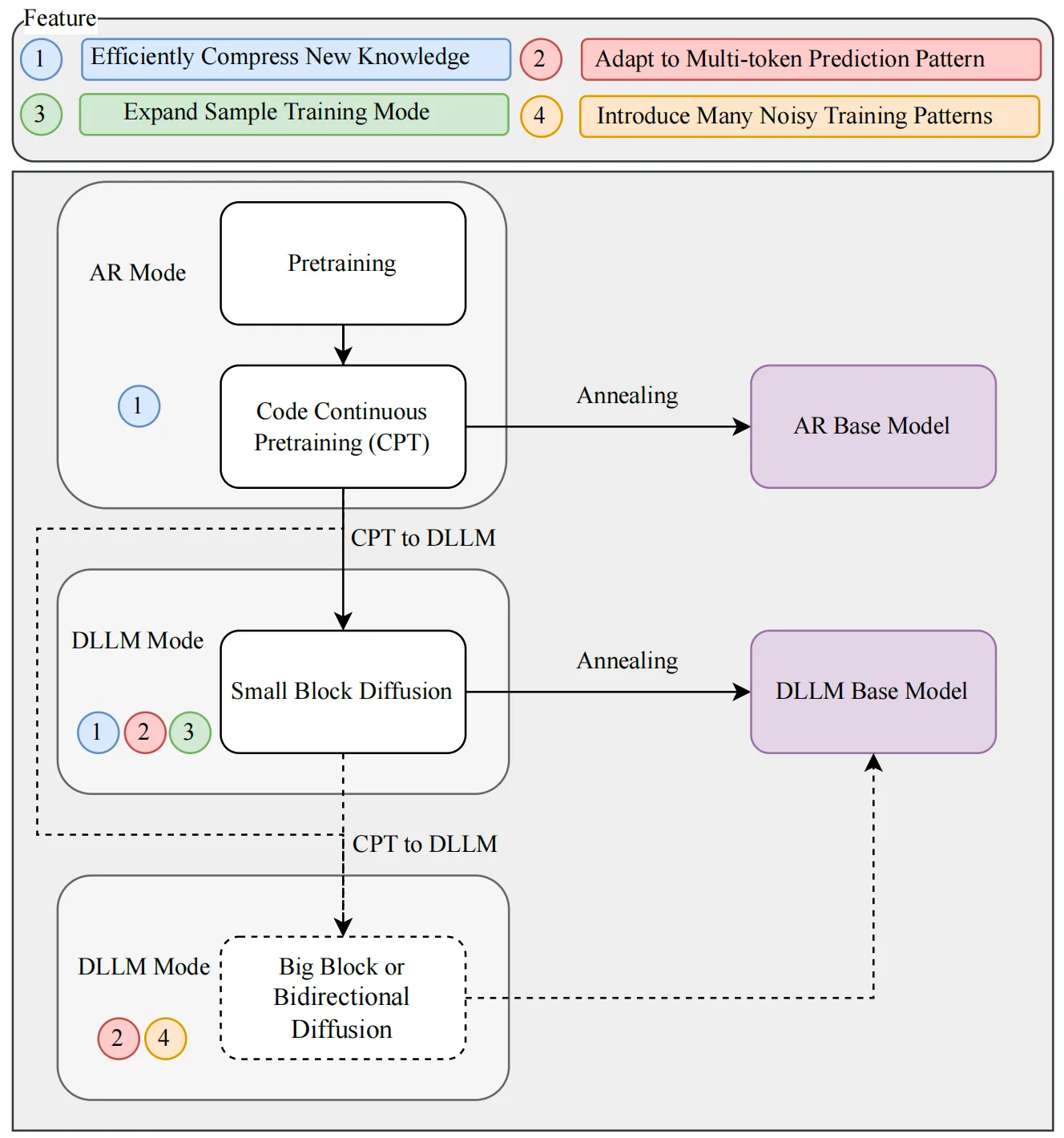
This project builds on the Seed-Coder family and adds a new training step called block diffusion continual pretraining (CPT). In simple terms, it learns code patterns in small, stable steps and gets better at tasks like code repair and structured edits.
Stable-DiffCoder: The New Frontier of AI-Powered Code Generation Overview
Here is a quick snapshot of the project.
| Item | Details |
|---|---|
| Type | Code diffusion large language model (DLLM), ~8B scale (Base and Instruct) |
| Goal | Better code generation, completion, editing, and reasoning |
| Core Method | Block diffusion CPT with warmup + block-wise clipped noise schedule |
| Why It Matters | Improves over a same-size autoregressive (AR) baseline in fair tests |
| Good At | Handling structured code edits and low-resource programming languages |
| Training Recipe | Pre-annealing AR checkpoint → small block diffusion stage |
| Models | Three public models in a Hugging Face collection |
| Where To Learn More | Homepage, Hugging Face, arXiv |
| Release Notes | 2026/01/22: Project release. 2026/03/09: Update for transformers v5.3.0. |
| Maintainer | ByteDance Seed Team |
If you want a quick look at other work from the same group, check our short read on this Seedance project.
Stable-DiffCoder: The New Frontier of AI-Powered Code Generation Key Features
- Fair comparison setup. The team kept model size, data, and base training the same as a standard AR model. This makes the improvement from diffusion training clear and easy to trust.
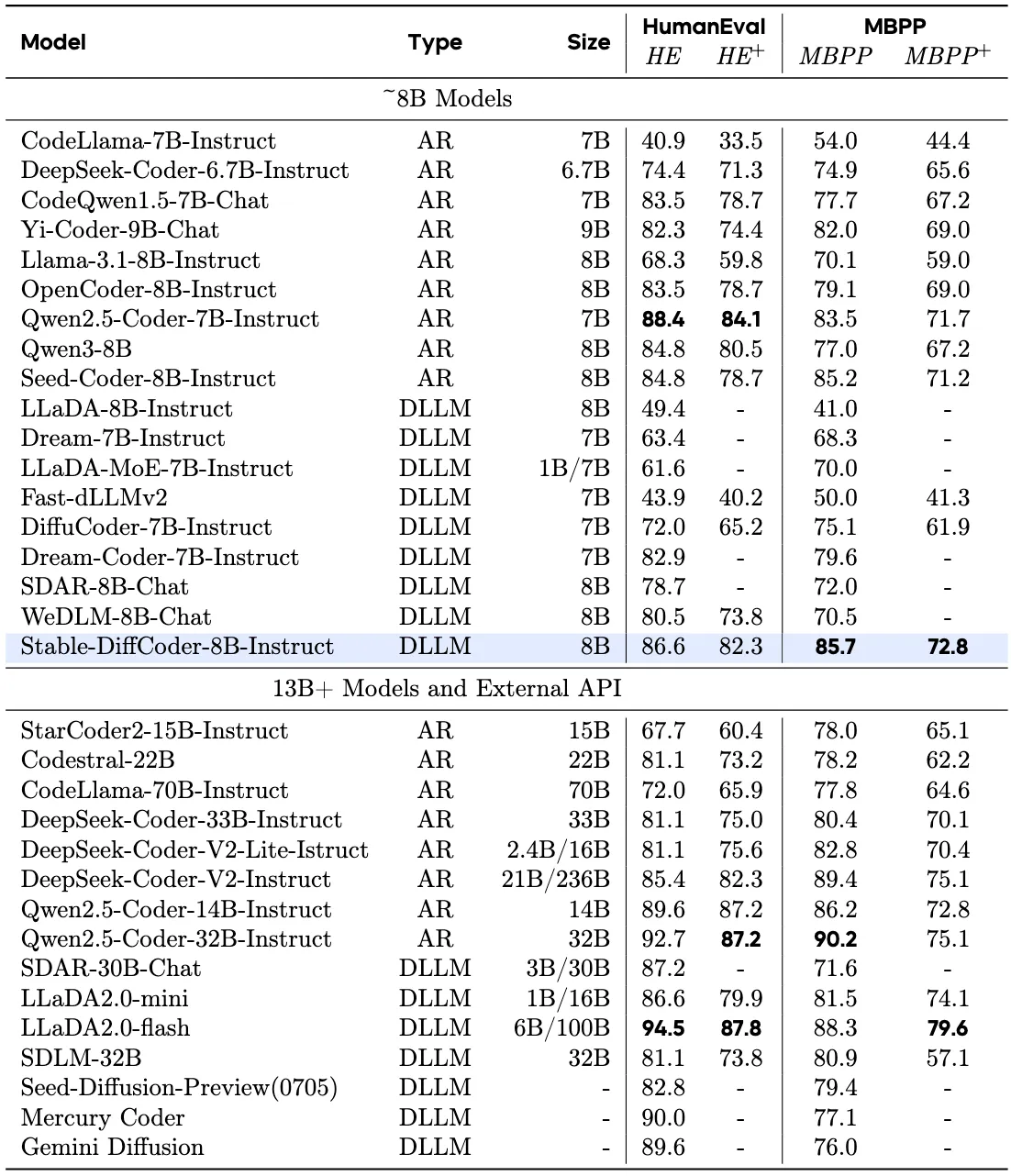
- Strong with less training. With only CPT plus supervised fine-tuning (SFT), it beats many ~8B AR and diffusion code models.
- Better structure handling. Any-order modeling helps with code that needs edits in many places, not just left-to-right text.
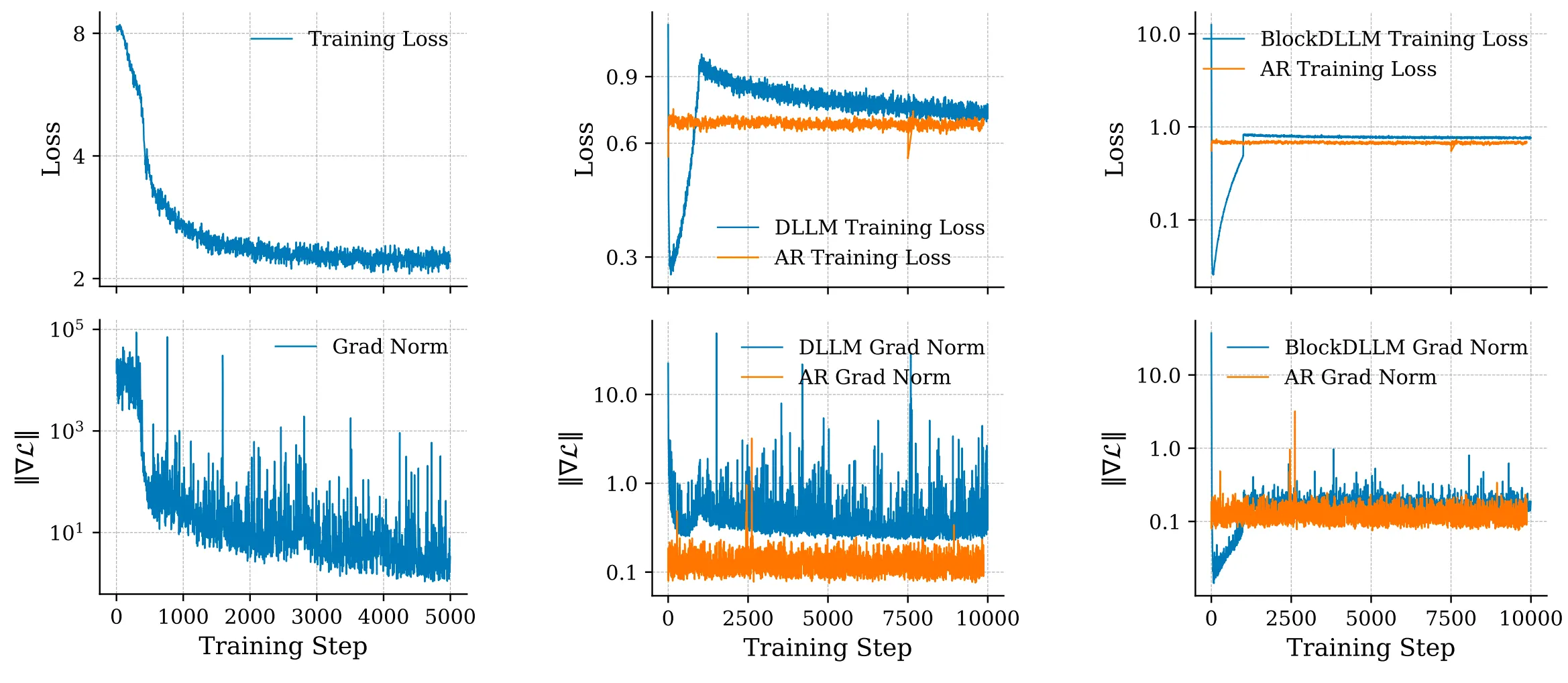
- Stable training. A warmup phase and a block-wise clipped noise schedule reduce training spikes and keep learning smooth.
- Wide task coverage. It does well on code generation, completion, editing, and reasoning.
Curious how it compares with other ByteDance tools? See our quick take on this Goku AI overview.
Stable-DiffCoder: The New Frontier of AI-Powered Code Generation Use Cases
- Write new functions fast. Give a prompt like “Write a quick sort algorithm,” and it returns ready-to-run code.
- Fix and edit code. Ask it to rewrite a method, add tests, or refactor a class with clear steps.
- Help with tricky languages. Diffusion-based training helps the model learn small languages that don’t have much data.
- Explain code. Ask it to describe what a code block does line by line.
Building UI helpers for apps? You may also like this quick read on this UI Tars helper.
Installation & Setup: Stable-DiffCoder
Follow these steps to try the Instruct model with transformers.
- Install the right version of transformers, then load the model and tokenizer.
- Prepare a simple chat-style prompt.
- Generate code with the provided generate() call.
Exact code from the project:
# pip install transformers==5.3.0
from transformers import AutoTokenizer, AutoModelForCausalLM
import torch

device = 'cuda'
model = AutoModelForCausalLM.from_pretrained('/opt/tiger/mariana/stable_diffcoder_instruct', trust_remote_code=True, torch_dtype=torch.bfloat16).to(device).eval()
tokenizer = AutoTokenizer.from_pretrained('/opt/tiger/mariana/stable_diffcoder_instruct', trust_remote_code=True)

prompt = 'Write a quick sort algorithm.'
m = [{"role": "user", "content": prompt}, ]
prompt = tokenizer.apply_chat_template(m, add_generation_prompt=True, tokenize=False)
input_ids = tokenizer(prompt)['input_ids']
input_ids = torch.tensor(input_ids).to(device).unsqueeze(0)

out = model.generate(input_ids, steps=512, gen_length=512, block_length=4, temperature=0., remasking='low_confidence', tokenizer=tokenizer, shift=False, threshold=None, eos_id=tokenizer.eos_token_id)
print(tokenizer.decode(out[0][input_ids.shape[1]:], skip_special_tokens=True))
Tip: Replace the model path with your local or remote path from the Hugging Face page. Keep transformers at v5.3.0 to match the update note.
How Stable-DiffCoder Works
The team studied Diffusion LLMs (DLLMs) and found two needs: clean training signals and a match between training and inference. They start from a “pre-annealing AR” checkpoint, which keeps knowledge clean and easy to adapt. Then they add a short block diffusion stage to learn clear rules and improve data signals.
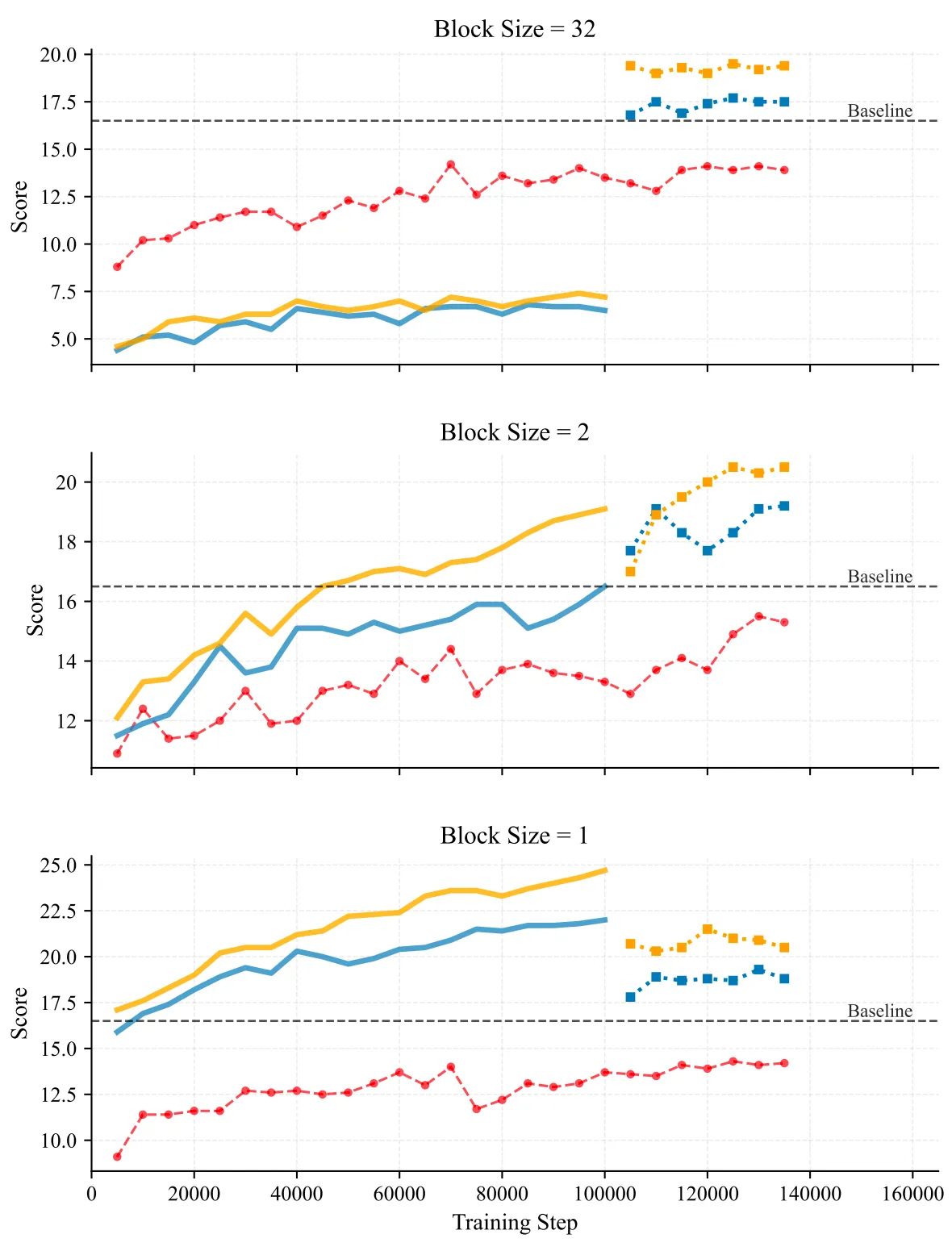
They also saw training spikes during continual pretraining (CPT). So they added a warmup to ramp up mask difficulty slowly and removed extra cross-entropy weights during warmup. This gives a stable handoff from AR to diffusion training without tricky hyperparameter tuning.
To make the small-block learning stable, they set a block-wise clipped noise schedule. This narrows the noise range in each block, which keeps gradients under control and makes training steady.
The Technology Behind Stable-DiffCoder
- Block diffusion, in plain words: The model edits parts of the code in blocks, in any order. This helps it fix and build structure without getting stuck in a strict left-to-right path.
- Warmup for stability: The model starts with easy masks, then moves to harder ones. This keeps loss and gradient spikes low.
- Block-wise clipped noise: Noise is kept in safe limits at the block level. This makes small-block learning more reliable.
Together, these steps raise the “ceiling” on quality under the same size and data as a standard AR model.
Performance & Showcases
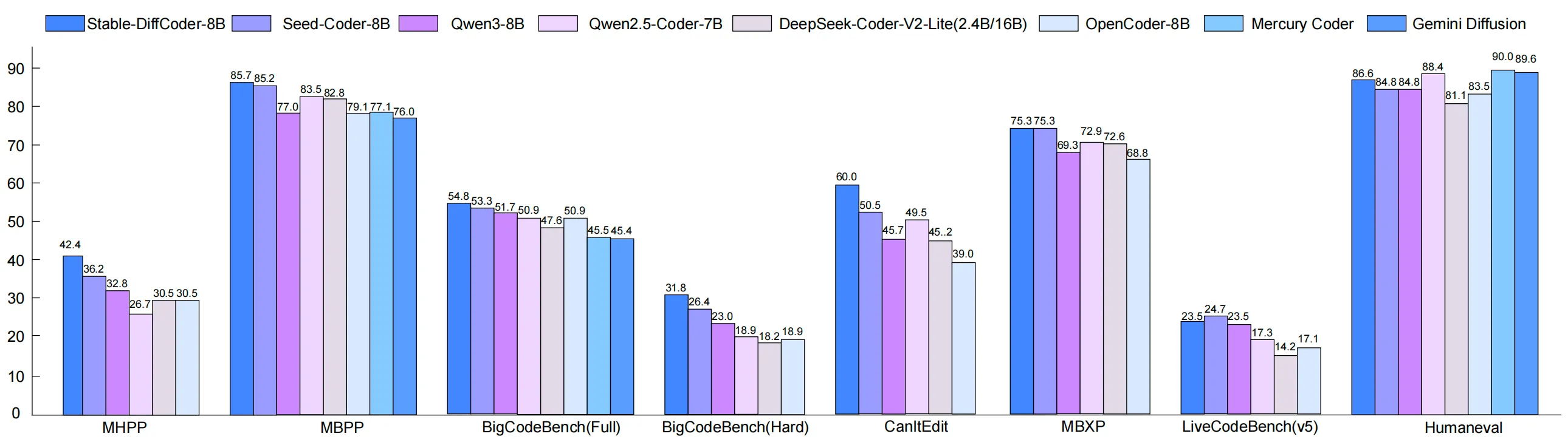
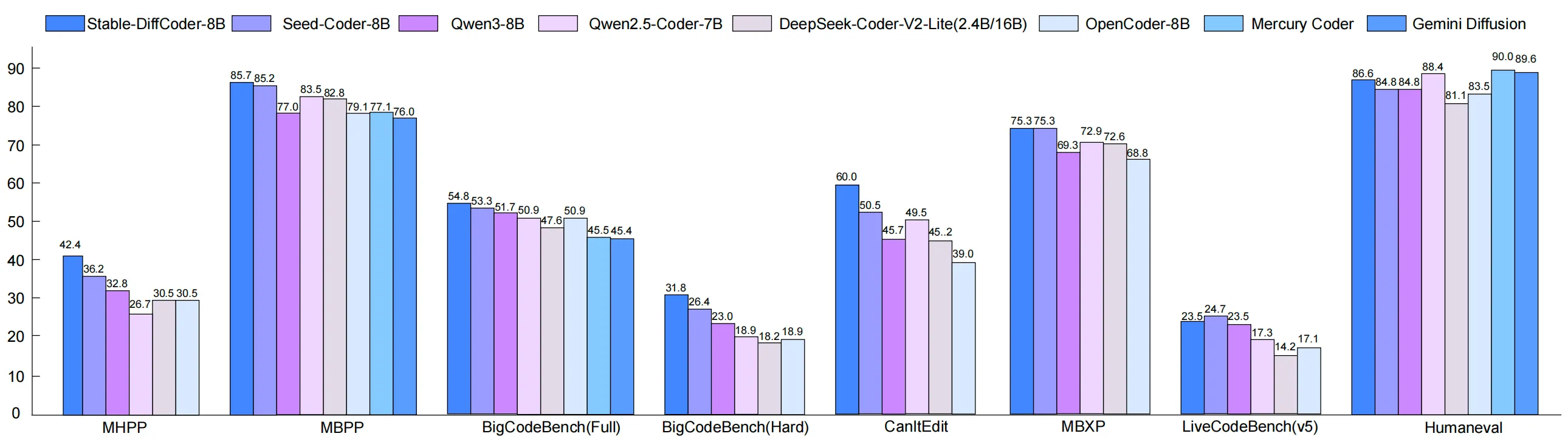
Stable-DiffCoder was tested on many code tasks: generation, completion, editing, and reasoning. Under a fair setup, it beats the same-size AR baseline and does well even with minimal training stages. It also shows strong results on both Base and Instruct models.
Here is a look at one of the Instruct results that highlights strong task performance across code tasks. You can expect better handling of structured edits and multi-step fixes.
Tips for Best Results
- Keep transformers at v5.3.0 as shown in the setup code. Version drift can break things.
- Provide short, clear prompts with the task and language. For edits, paste the code and say what to change.
- For longer tasks, raise steps or gen_length in the generate() call, but watch latency.
FAQ
What makes Stable-DiffCoder different from a normal code model?
It trains with diffusion in blocks and in any order, not just left-to-right. This helps it handle edits and structure in a cleaner way.
Does it only work for big languages like Python?
No. The diffusion training helps when data is small too. That gives it a boost on low-resource languages.
Do I need a big GPU to run it?
An 8B model is still large, so a modern GPU with bfloat16 support is helpful. The example code sets torch_dtype to bfloat16 to save memory.
Can I use it for code reasoning and fixes?
Yes. It was tested on code reasoning, editing, and completion, and shows strong results. The any-order method helps on tasks that jump across the file.
Image source: Stable-DiffCoder: The New Frontier of AI-Powered Code Generation