InterActHuman: The Future of Multi-Concept Human Animation and Audio-Sync Technology
What is InterActHuman: The Future of Multi-Concept Human Animation and Audio-Sync Technology
InterActHuman is a research project that makes talking videos with many people, objects, or even animals in the same scene. It takes a text prompt plus one or more pairs of a face image and an audio clip, and puts each voice on the right person at the right time. It builds layout masks inside the model so lips and speech line up for each subject.
It supports group dialogue, single-person clips, and human–object moments. You only need a prompt and N paired inputs: {reference image, audio segment}. The lip match happens inside the model layers, so no extra sync tool is needed.
InterActHuman: The Future of Multi-Concept Human Animation and Audio-Sync Technology Overview
Here is a short overview of what the project is and what it can do.
| Item | Details |
|---|---|
| Type | Research framework and example code for audio-driven, multi-concept human video generation (DiT-based) |
| Purpose | Create multi-person talking videos with correct lip–audio match and keep each subject’s look stable |
| Inputs | Text prompt + N pairs of {reference image, audio segment}; can route each audio to a specific subject |
| Outputs | Talking video (supports 480p in the sample code) |
| Main Features | Multi-person dialogue, audio-to-person routing, human–object interaction, wide domain support (cartoons, animals, more) |
| Model Base | Built on Wan2.1 and an OmniAvatar codebase (14B and 1.3B configs in the guide) |
| Data Tools | Preprocess folder includes caption analyzer and grounding-sam to help build your own dataset |
| Where It Shines | Lip sync, identity consistency, and overall video quality in tests reported by the authors |
| Who Built It | CUHK MMLab and ByteDance researchers |
To explore related company work and teams, see this short overview: ByteDance research profile.
InterActHuman: The Future of Multi-Concept Human Animation and Audio-Sync Technology Key Features
- Multi-person dialogue: Route different audio clips to different people over time. You can set an order like 1-2-1-2-1 across frames.
- Local lip sync per subject: The model learns masks so each person’s mouth motion follows their own audio track.
- Human–object interaction: Add an object image and guide actions via the text prompt. Audio can stay on the human or be set for a human-like object.
- Wide domains: Works on cartoons, toys, animals, and more. These clips can be made with or without audio.
- Simple inputs: A text prompt plus N pairs of
{reference image, audio segment}are enough to run the demos. - Scalable setup: The repo shares data tools to prepare a custom dataset for research use.
If you want another multi-modal angle from the same research space, see this quick note: Dolphin project.
How InterActHuman Works (Plain-English Guide)
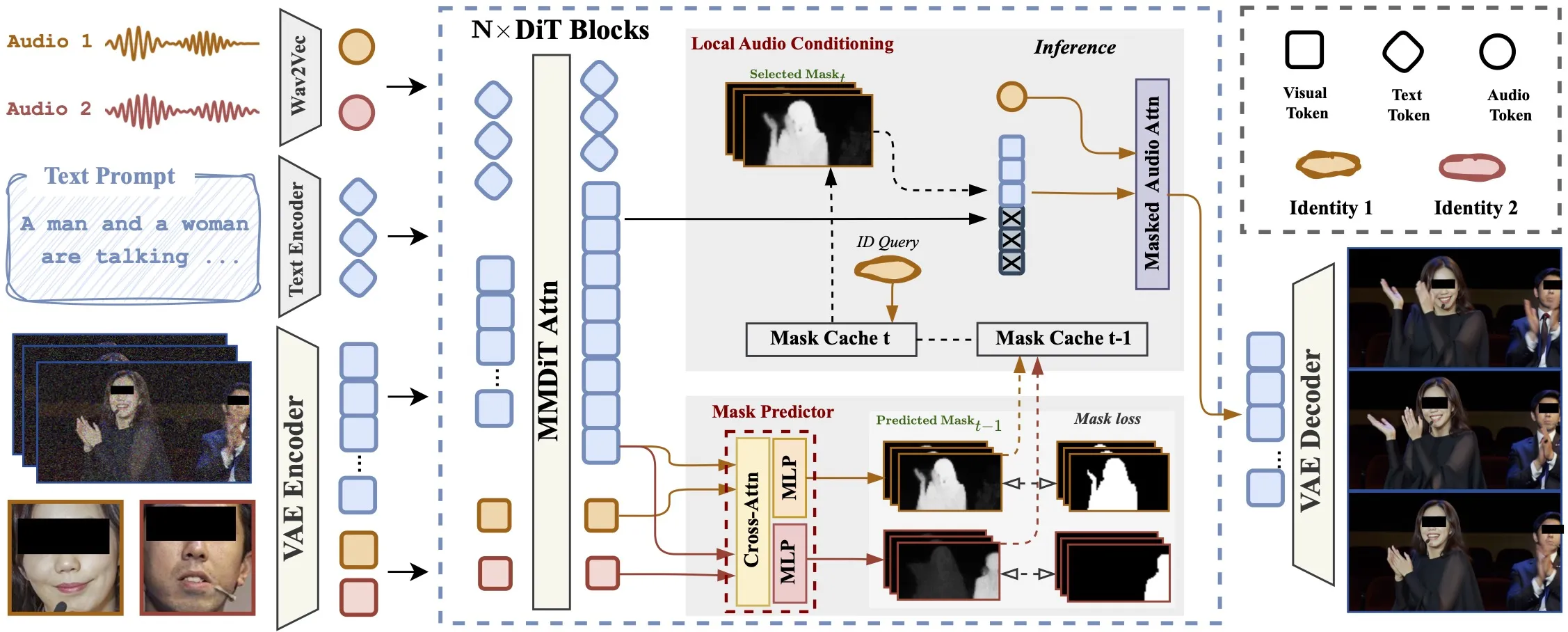
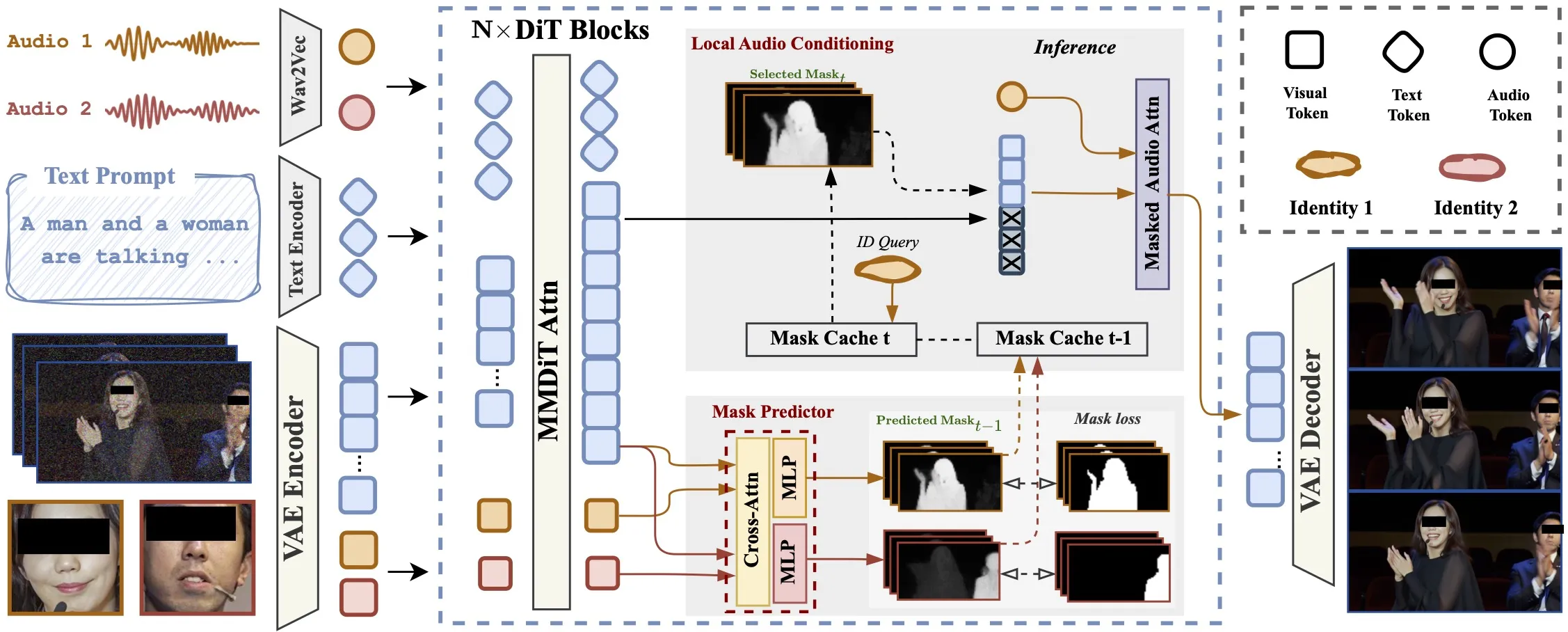
The model predicts a layout mask for each subject inside the network. These masks show which area belongs to which person across space and time.
It updates these masks step by step during denoising. Each step helps the next step place the right audio cues into the right face region.
Text guides the scene and actions, while the audio cross-attention ties speech to the speaker’s mouth. The result is speech that fits the right person through the whole clip.
For a link to tracking-style research from related teams, you may like this: DanceTrack overview.
InterActHuman: The Future of Multi-Concept Human Animation and Audio-Sync Technology Use Cases
- Video chat scenes: Create two or more speakers talking to each other with clean audio routing.
- Presenter videos: A single person explains a topic with strong lip sync from a clean audio track.
- Human–object stories: A person talks and interacts with an item (like a cup or a toy) guided by the prompt.
- Mixed domains: Try cartoons, animals, or stylized faces for fun clips, with or without audio.
- Content prototyping: Draft dialog scenes for scripts, learning, or social posts.
Installation & Setup (Getting Started)
Below are the exact steps and commands shared in the repo’s usage guide. Follow them in order.
Clone the repo:
git clone https://github.com/Omni-Avatar/OmniAvatar
cd OmniAvatar
Install dependencies:
pip install torch==2.4.0 torchvision==0.19.0 torchaudio==2.4.0 --index-url https://download.pytorch.org/whl/cu124
pip install -r requirements.txt
# Optional to install flash_attn to accelerate attention computation
pip install flash_attn
Model Download (Hugging Face):
mkdir pretrained_models
pip install "huggingface_hub[cli]"
huggingface-cli download Wan-AI/Wan2.1-T2V-14B --local-dir ./pretrained_models/Wan2.1-T2V-14B
huggingface-cli download facebook/wav2vec2-base-960h --local-dir ./pretrained_models/wav2vec2-base-960h
huggingface-cli download OmniAvatar/OmniAvatar-14B --local-dir ./pretrained_models/OmniAvatar-14B
File structure (Samples for 14B):
OmniAvatar
├── pretrained_models
│ ├── Wan2.1-T2V-14B
│ │ ├── ...
│ ├── OmniAvatar-14B
│ │ ├── config.json
│ │ └── pytorch_model.pt
│ └── wav2vec2-base-960h
│ ├── ...
Run Inference:
# 480p only for now
# 14B
torchrun --standalone --nproc_per_node=1 scripts/inference.py --config configs/inference.yaml --input_file examples/infer_samples.txt

# 1.3B
torchrun --standalone --nproc_per_node=1 scripts/inference.py --config configs/inference_1.3B.yaml --input_file examples/infer_samples.txt
Memory-saving example (FSDP and more):
torchrun --standalone --nproc_per_node=8 scripts/inference.py --config configs/inference.yaml --input_file examples/infer_samples.txt --hp=sp_size=8,max_tokens=30000,guidance_scale=4.5,overlap_frame=13,num_steps=25,use_fsdp=True,tea_cache_l1_thresh=0.14,num_persistent_param_in_dit=7000000000
Tips that matter:
- Input format in
examples/infer_samples.txtis[prompt]@@[img_path]@@[audio_path]. Keep both text and audio CFG in the 4–6 range to start. If lip sync needs more strength, raise audio CFG. - You can set audio_scale=3 so guidance_scale only affects text prompts. This makes audio control more direct.
- For speed, try num_steps in [20–50]. More steps often raise quality. For multi-GPU, set sp_size to the number of GPUs.
- TeaCache can help speed: try tea_cache_l1_thresh=0.14 (0.05–0.15 works). To lower memory, set use_fsdp=True and num_persistent_param_in_dit as shown.
- Prompt style helps. Try: [describe first frame] – [describe person actions] – [describe background, optional].
Quick start checklist:
- Install Python deps and GPU torch, then optional flash_attn. 2) Download Wan2.1-T2V-14B, wav2vec2-base-960h, and OmniAvatar-14B to pretrained_models. 3) Prepare
examples/infer_samples.txtin the exact[prompt]@@[img_path]@@[audio_path]format. 4) Run a 14B or 1.3B command. 5) Tune guidance scales, steps, and overlap_frame for your needs.
The Technology Behind It (Short and Simple)
- Diffusion transformer: The core model builds videos over many small steps. Each step removes noise and sharpens details.
- In-network mask predictor: The model learns which pixels belong to which subject at each time. This lets audio flow only to the right face.
- Audio cross-attention: The audio clip is joined with the video features inside the transformer, so mouth motion follows speech.
- Iterative layout: Masks are updated step by step so later steps get better placement for each person.
Performance & Showcases
Showcase 1 — Heading: Dialogue Videos | Label: Previous Next 1 2 3. This sample highlights multi-person speech with routing set by the input order.
Showcase 2 — Heading: Dialogue Videos | Label: Previous Next 1 2 3. The clip shows how a reference image and audio pair shape one speaker’s mouth motion.
Showcase 3 — Heading: Dialogue Videos | Label: Previous Next 1 2 3. Here the focus stays on dialog timing as audio segments switch between speakers.
Showcase 4 — Heading: Dialogue Videos | Label: Previous Next 1 2 3. You can see stable identity looks while the audio drives the speech track.
Showcase 5 — Heading: Dialogue Videos | Label: Previous Next 1 2 3. This shows a new segment in the same style, with the same format of control.
Showcase 6 — Heading: Dialogue Videos | Label: Previous Next 1 2 3. The sequence underlines the same dialog setup across multiple samples.
Building Your Own Dataset (Helpful Notes)
The repo includes tools in the preprocess folder: a caption analyzer and a grounding-sam pipeline. These help turn raw clips into paired items for training or study.
You can study the mask_predictor code path in OmniAvatar/models/wan_video_dit.py. It is shared to help readers understand how local masks can be predicted.
Troubleshooting and Tips
- If lip sync is weak, raise audio guidance (audio_scale or audio CFG). Keep prompt guidance steady.
- Try overlap_frame=13 for stronger long clips. If errors grow, lower it to 1.
- For GPU limits, turn on use_fsdp and set num_persistent_param_in_dit as in the sample command.
Image source: InterActHuman: The Future of Multi-Concept Human Animation and Audio-Sync Technology