ByteMorph: Mastering Non-Rigid Motions in AI Image Editing
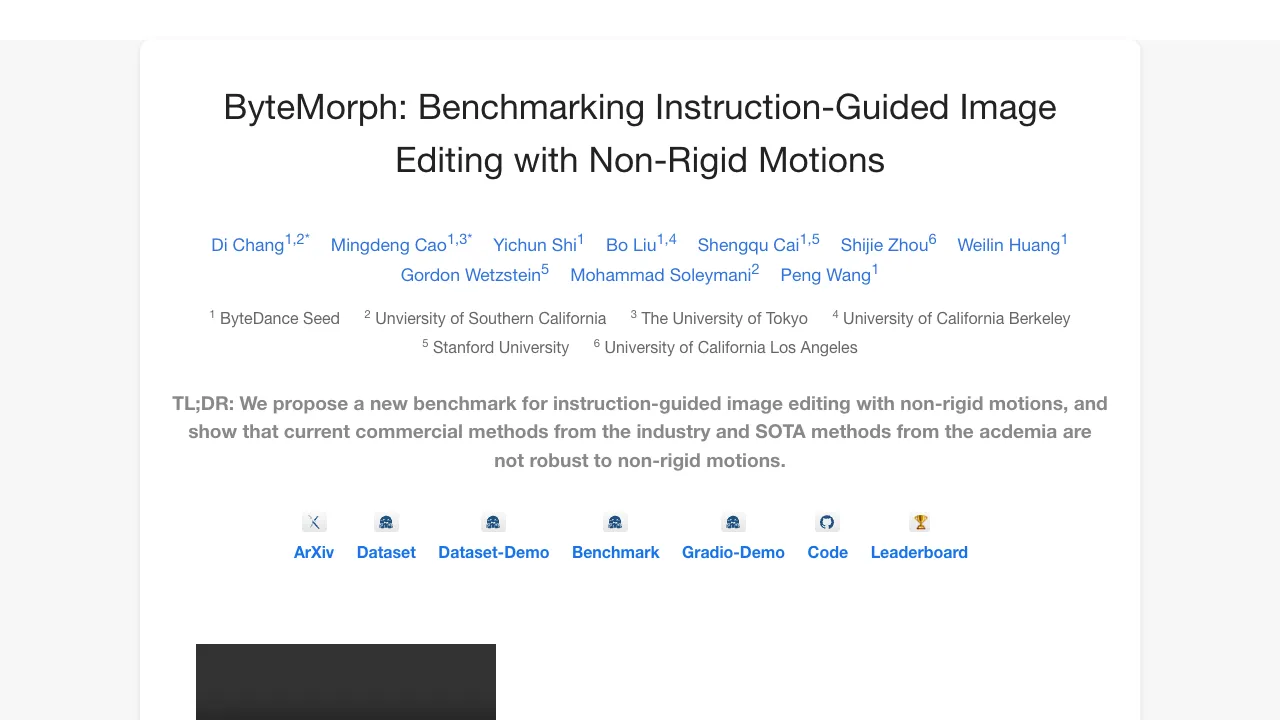
What is ByteMorph: Non‑Rigid Motions in AI Image Editing
ByteMorph is a research project that edits images by following plain text instructions that include movement. Think of tasks like “turn the camera to the left,” “bend the person’s arm,” or “make the toy twist.” These are called non‑rigid motions because shapes and views change in flexible ways.
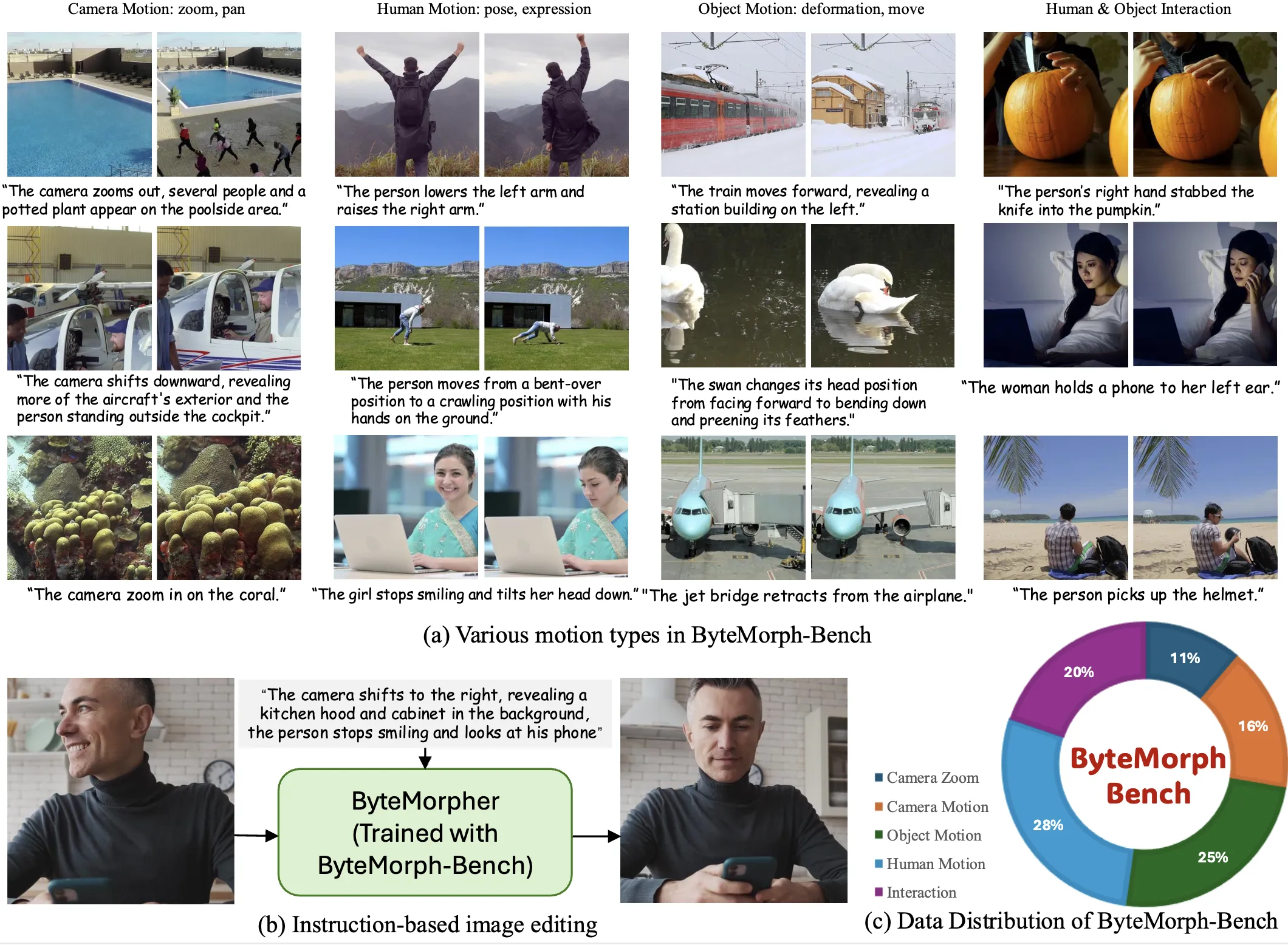
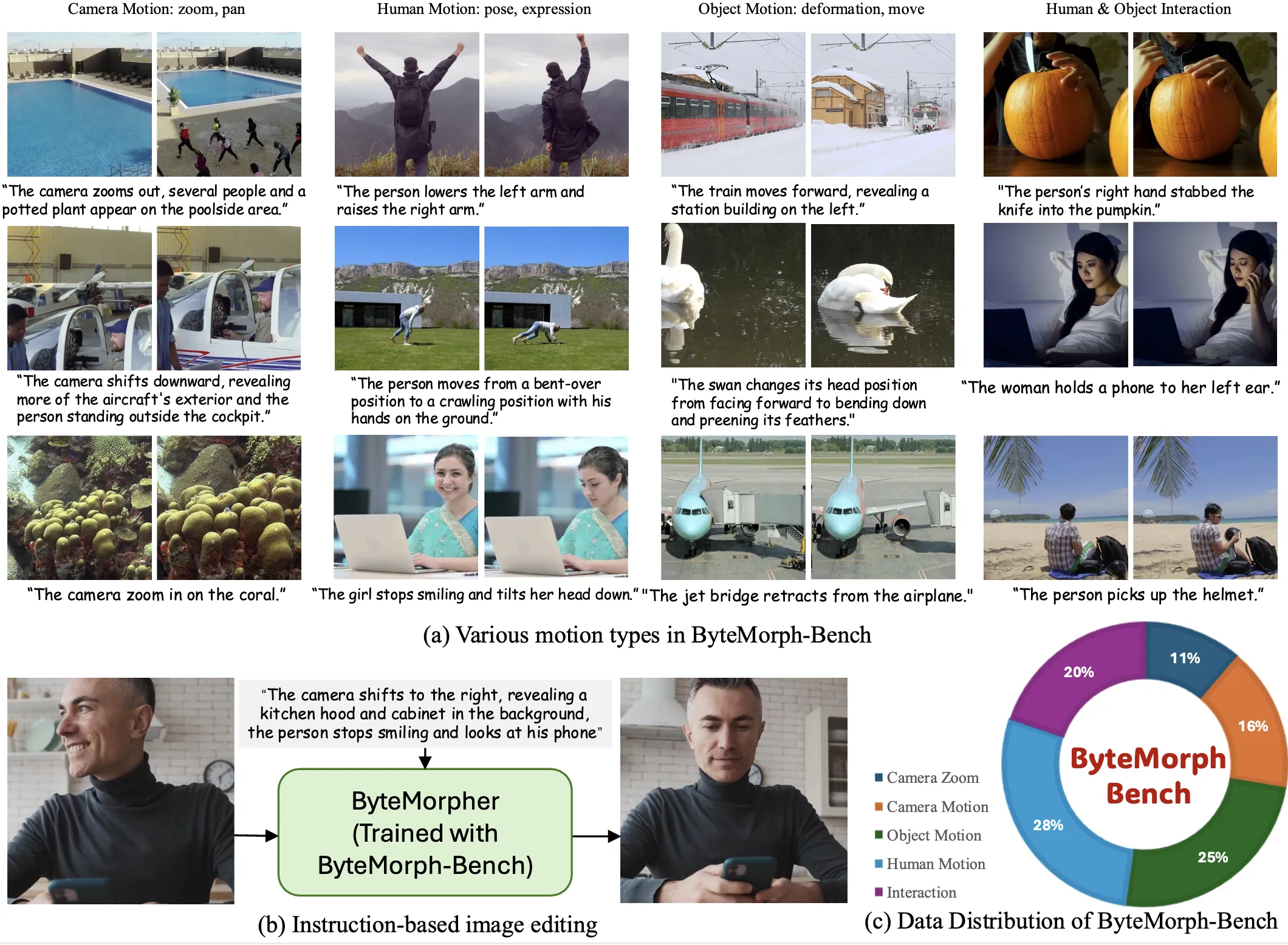
The project offers three things in one place: a very large training set (ByteMorph‑6M), a public test set (ByteMorph‑Bench), and a strong baseline model called ByteMorpher. The team also shares demos, code, and a leaderboard on the project page so anyone can check results side by side.
ByteMorph: Non‑Rigid Motions in AI Image Editing Overview
Here is a quick summary of the project at a glance.
| Item | Details |
|---|---|
| Type | Dataset + Benchmark + Baseline Model |
| Goal | Edit a source image based on a text instruction that includes motion (viewpoint shifts, object deformation, human moves, and interactions) |
| What’s Inside | ByteMorph‑6M training set (6M+ high‑res image editing pairs), ByteMorph‑Bench for testing, ByteMorpher baseline |
| Edit Categories | Camera Zoom, Camera Move, Object Motion, Human Motion, Interaction |
| How Data Was Built | Motion captions from a vision‑language model, video generation (Seaweed), layered compositing, automatic captions for pairs |
| Baseline Model | ByteMorpher (built on Diffusion Transformer, DiT), fine‑tuned for instruction‑guided edits with motion |
| Evaluation | CLIP‑based scores, a VLM score, and human studies (instruction following and identity keeping) |
| Try & Explore | Project page includes ArXiv, Dataset, Demo, Code, Leaderboard |
If you are exploring ByteDance tools as a whole, you may also like our short overview of Seedance Ai for related context on creative AI workflows.
ByteMorph: Non‑Rigid Motions in AI Image Editing Key Features
- Instruction‑guided editing that handles flexible movement, not just static or rigid changes.
- A huge training set (ByteMorph‑6M) with over six million high‑resolution editing pairs.
- A public benchmark (ByteMorph‑Bench) to test and compare models in five motion categories.
- ByteMorpher, a solid baseline built on DiT and fine‑tuned for motion‑centric edits.
- Data pipeline that uses motion captions, video generation (Seaweed), layered compositing, and auto‑captions for robust pairs.
- Clear evaluation with CLIP‑based metrics, a VLM score, and human ratings for following the instruction and keeping identity.
For teams comparing creative AI toolchains, see our quick take on Goku Ai and how it fits next to image and video editing tools.
ByteMorph: Non‑Rigid Motions in AI Image Editing Use Cases
- Product shots: ask the camera to move closer, turn a bit, or tilt to show a new view.
- Sports and dance: bend arms, turn heads, or shift stances to explain moves frame by frame.
- Nature and objects: twist, stretch, or curve shapes to show physical changes.
- People and pets: pose edits and small actions, while trying to keep identity.
- Storytelling: move the “camera” or adjust actions to fit a scene in comics or slides.
How It Works
The team starts by picking a real frame from a video. A vision‑language model writes a short “motion caption” that says how to move or change the scene.
Then a video generator named Seaweed makes a short clip that follows that motion. Neighboring frames in this clip become an editing pair: the first is the “before,” the next is the “after.”
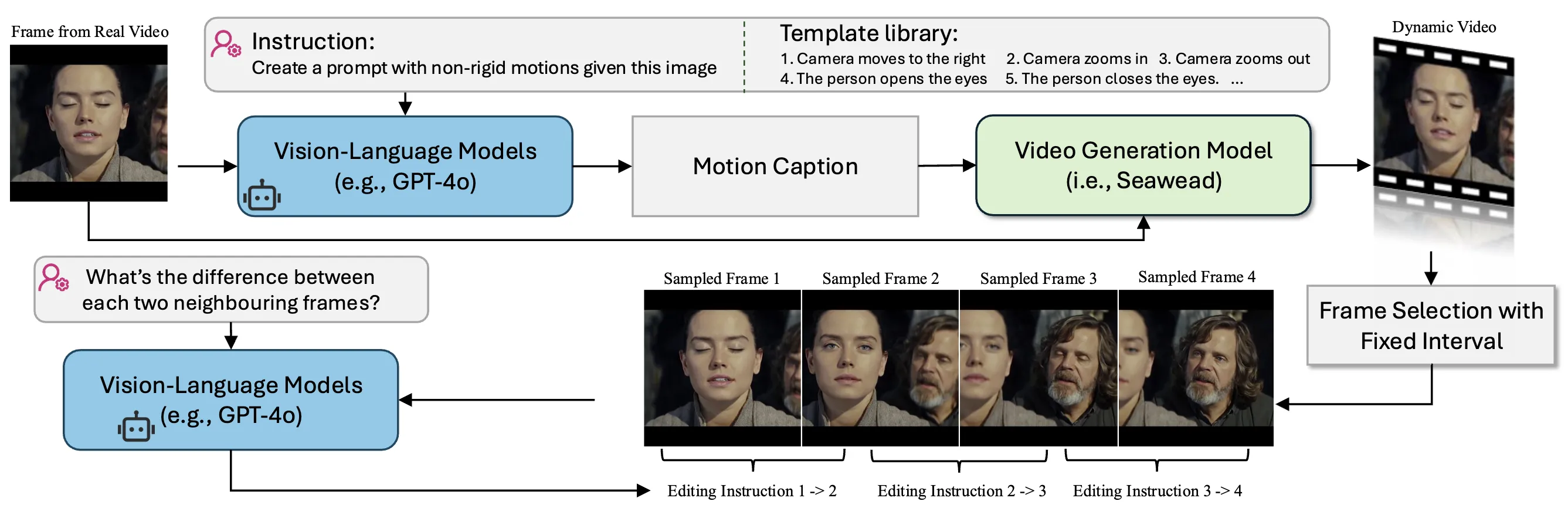
For each pair, the same vision‑language model creates a simple instruction that explains what changed (“zoom in on the person’s face,” “turn the car to the right”). This gives clean, paired data for training and testing.
The Technology Behind It
ByteMorpher is the baseline model built on a Diffusion Transformer (DiT). It is fine‑tuned on the new dataset to follow text instructions that include motion, not just color or style changes.
The team tested many well‑known AI editors, from both research and industry. They scored results using CLIP‑based numbers, a VLM score, and human studies. Tests cover Camera Zoom, Camera Move, Object Motion, Human Motion, and Interaction.
For teams building UI around editing flows, our brief note on Ui Tars Ai may help you connect model actions with clean user steps.
Performance & Showcases
Across the five edit types, ByteMorph shows strong motion edits and solid instruction following. The benchmark reports CLIP similarity and difference numbers for both text and images, plus a VLM score and human ratings.
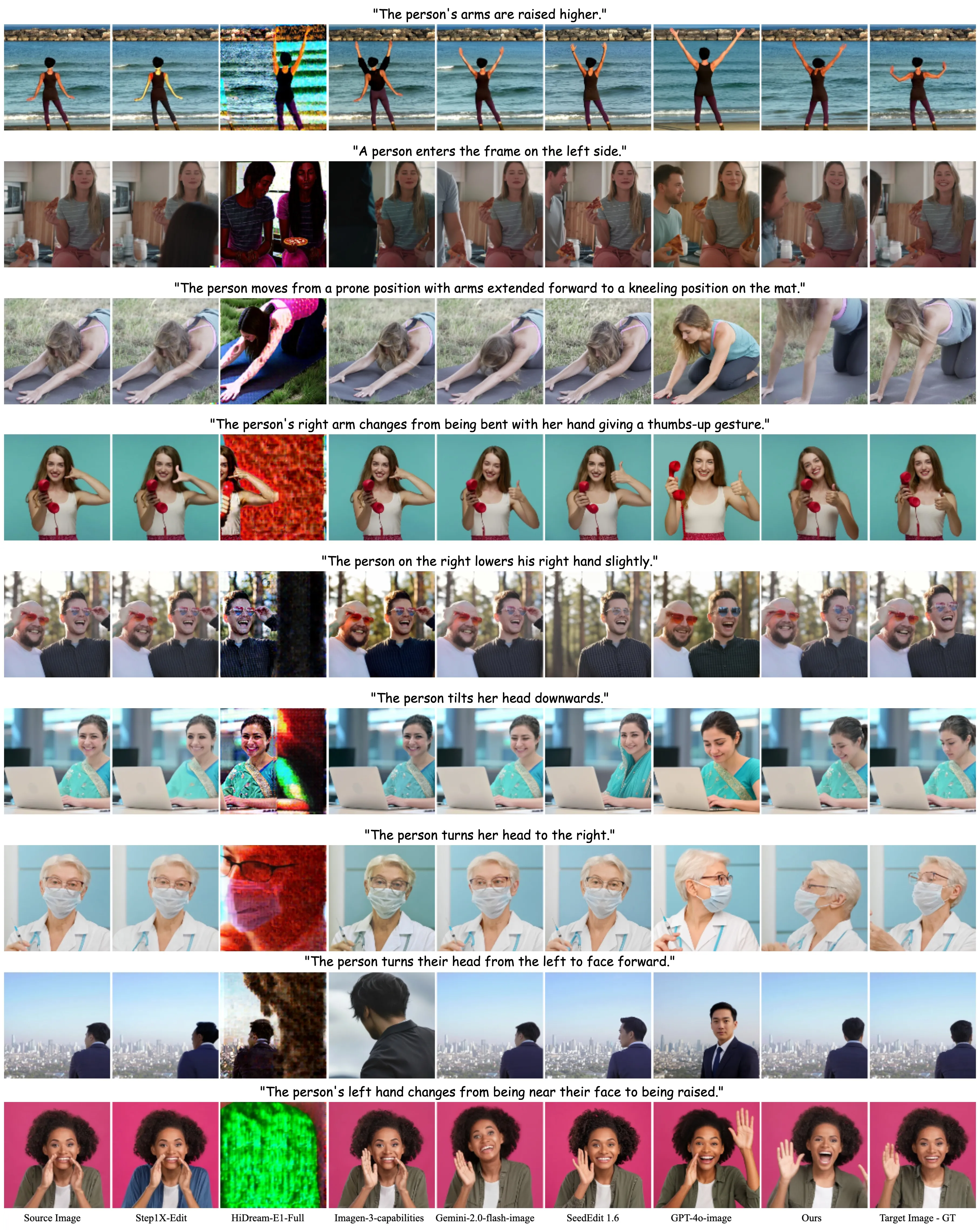
Showcase 1 — Di Chang1,2* Mingdeng Cao1,3* Yichun Shi1 Bo Liu1,4 Shengqu Cai1,5 Shijie Zhou6 Weilin Huang1 Gordon Wetzstein5 Mohammad Soleymani2 Peng Wang1 This showcase credits: Di Chang1,2* Mingdeng Cao1,3* Yichun Shi1 Bo Liu1,4 Shengqu Cai1,5 Shijie Zhou6 Weilin Huang1 Gordon Wetzstein5 Mohammad Soleymani2 Peng Wang1. It highlights the project authors and their groups.
Getting Started (No‑Code and Code Paths)
- Try the live Gradio demo on the project page to see edits from text prompts. You can explore camera moves, object deformations, and human motions.
- Browse the dataset demo to understand how instructions and pairs are structured.
- Check the code and the leaderboard on the project page to compare methods and see where ByteMorpher stands.
Note: The project page links to ArXiv, Dataset, Demo, Code, and Leaderboard. Follow those links for the latest instructions and updates from the authors.
Tips for Best Results
- Write clear, short instructions, like “zoom in on the dog” or “turn the chair to the left.”
- Keep one change at a time. For example, first “tilt the camera,” then “bend the arm.”
- If identity matters, add a short description of the subject to help keep the same look.
- Test both camera moves and subject moves to see which path fits your scene.
Extra Insights: What Changed After Fine‑Tuning
The team fine‑tuned other public models on the new training set. They saw better instruction following and better motion edits after training on ByteMorph‑6M.
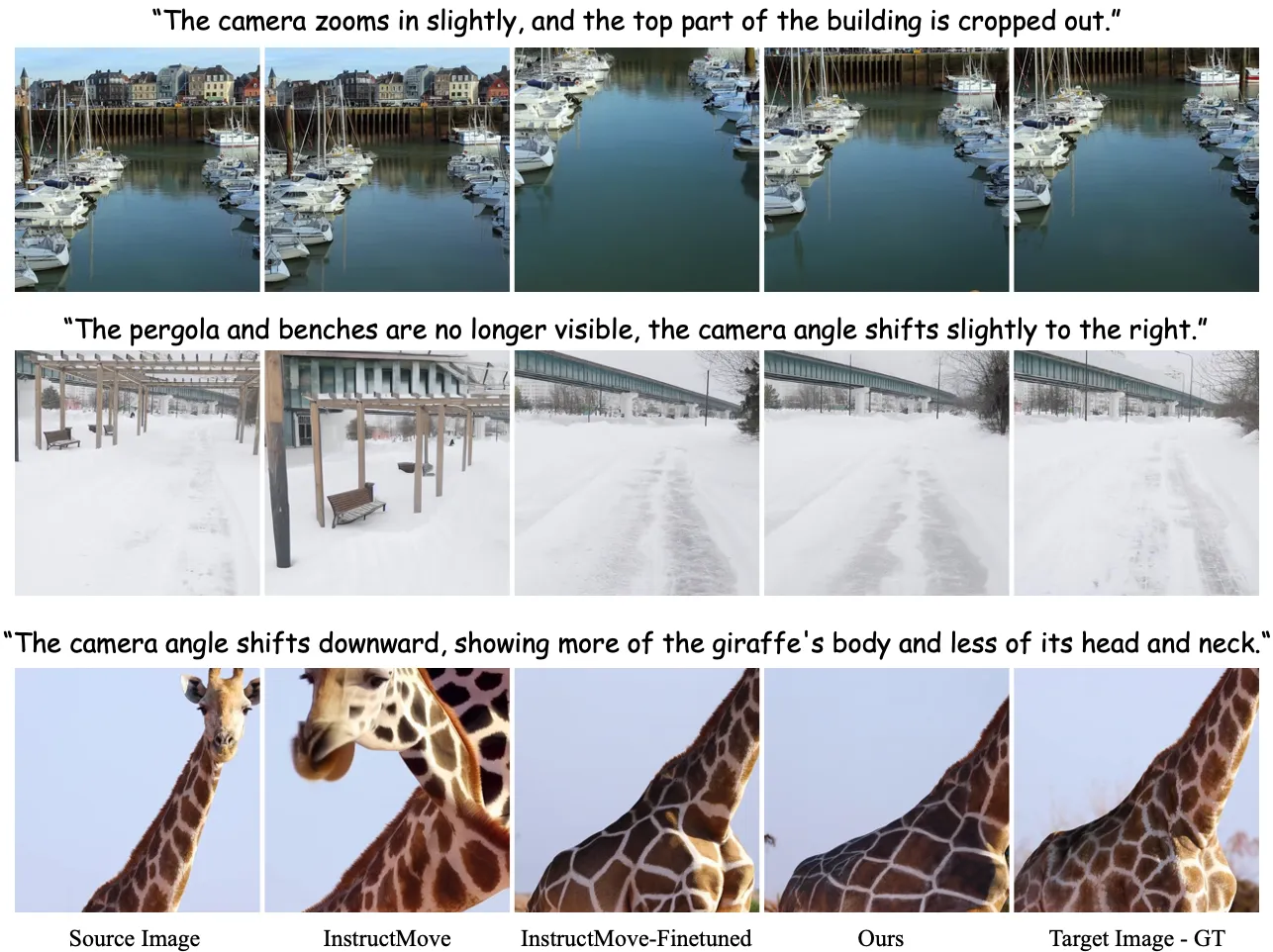
This suggests the dataset size and the motion‑aware instructions help models learn non‑rigid moves more clearly.
FAQ
What is a “non‑rigid” motion in this project?
It means flexible movement or shape change. This includes bending arms, twisting objects, or changing the camera view.
What is ByteMorph‑6M?
It is a training set with more than six million paired images. Each pair comes with a simple instruction that explains the motion change.
What is ByteMorph‑Bench?
It is a public test set used to judge how well a method edits images based on motion instructions. It has five edit categories and shared metrics.
What is ByteMorpher?
It is the baseline model released with the project. It is built on a Diffusion Transformer and trained for instruction‑guided motion edits.
How do I try it without installing anything?
Use the live demo linked on the project page. You can type a short instruction and see how the output image changes.
How do I compare my model to theirs?
Run your method on ByteMorph‑Bench and compute the listed scores. Then check the leaderboard on the project page to see how it ranks.
Image source: ByteMorph: ing Non-Rigid Motions in AI Image Editing